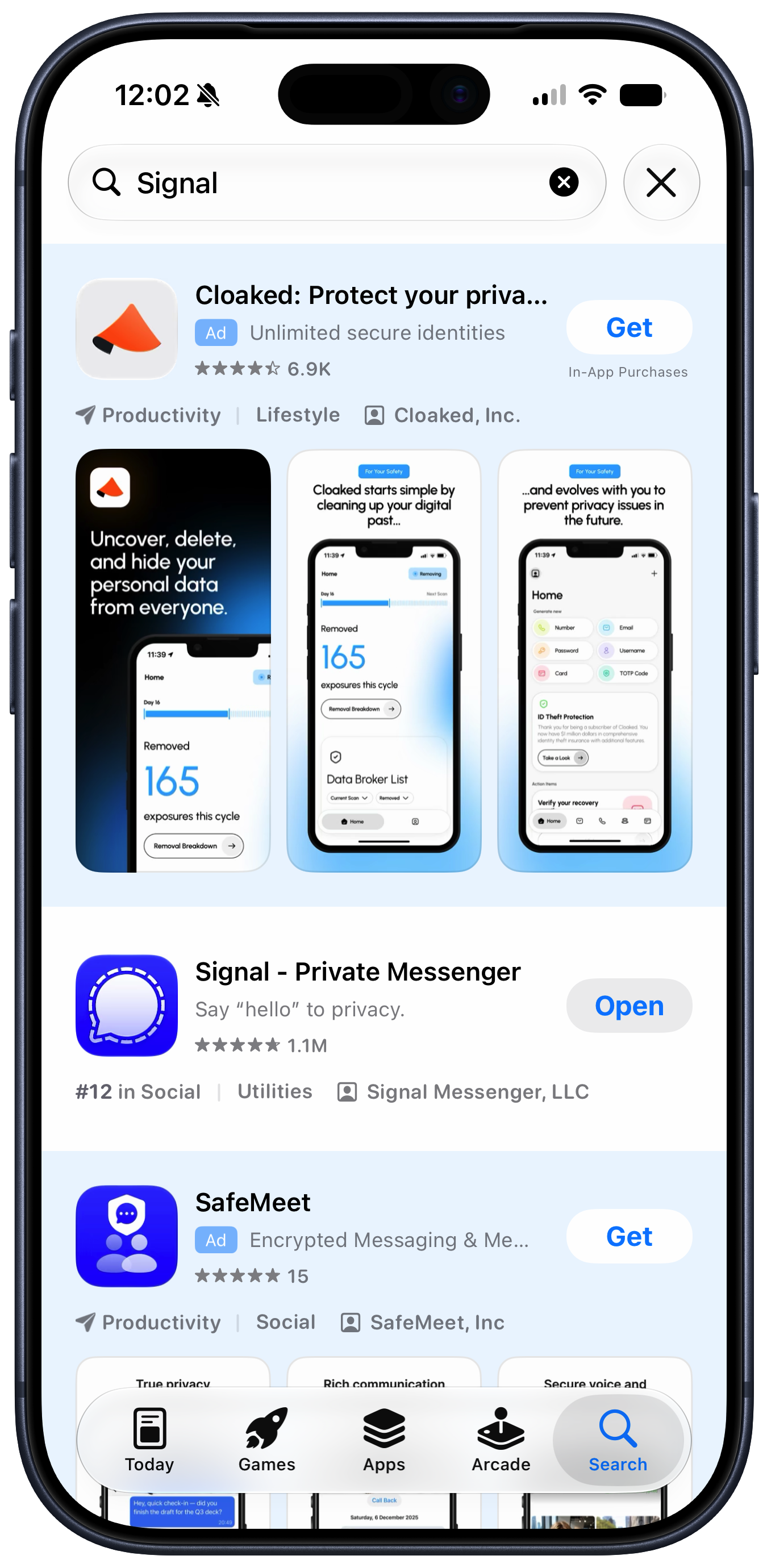
Advertising Cognitive Dissonance
This to me is proof that Apple leadership is suffering from cognitive dissonance over their slide into advertising. They’re conflating cause and effect. The Apple brand stands for high-quality superior user experiences because the devices and software Apple makes traditionally deliver high-quality superior user experiences. The work Apple ships is what makes the brand what it is. But now they’re stricken with the mindset that it’s the Apple brand that makes something a high-quality superior experience.
[…]
If you refuse to admit that the ads make these services worse, you also can’t admit that there’s a reason to offer an ad-free experience. So the thinking is something like “Apple always focuses on the user experience, and never deliberately makes the user experience worse. Therefore, if an Apple service shows ads, those ads are high quality and don’t detract from the quality of the product or the experience of using it. Therefore, there’s no reason to offer users a paid ad-free tier, because there’s no reason to want to avoid Apple’s ads.”
What a brand stands for can change over time. It’s eventually determined by the products, not the mantras.
- “It just works.”
- “A thousand no’s for every yes.”
- “What happens on your iPhone, stays on your iPhone.”
- “Music runs deep in Apple’s DNA.”
- “Design is how it works.”
Manton Reece (2010):
I feel bad admitting it, because some of my friends are betting on iAd revenue to feed their family, but I’m just not on board with Apple running an advertising network. I don’t want to see ads in my apps, and I don’t want Apple to ever lose even a little of what it means to be a product-driven company.
Previously:
- Apple Financial Statements: Products vs. Services
- App Store Personalized Recommendations and Keylogging
- Ads in Apple Maps
- Apple News Scam Ads
- More App Store Ad Spots
- Alan Dye Leaving Apple for Meta
- Apps for YouTube℠™®•!
- Giving Up on Siri and HomePod
- A Picture Is Worth a Thousand Permissions Requests
- Warren Buffett’s Paper Wizard
Update (2026-07-28): John Gruber (Mastodon):
The whole thing is funny because at a fundamental level we all just know in our bones that Apple never even considered putting “Intel Inside” stickers on Macs.
[…]
Apple still treats its hardware with that level of respect. With reverence. iPhones don’t even say “iPhone” on the hardware. No model or serial numbers. No small print. Just an Apple logo on the back.
[…]
Putting themselves in customers’ shoes today, how many ads do Apple’s executives want stuck in the results when they search for an app in the App Store? We know the honest answer. But the answer evidenced by the actual App Store is “Two really big ones, including one in the first spot.”
At least you could peel off the stickers.
While Apple can spin adding ads to Apple Maps as a revolutionary new way for businesses to be discovered, it’s telling that its initial announcement was hidden inside a press release about an entirely different product, and introduced as “Enhanced Discoverability in Apple Maps.” Those choices show that this isn’t something Apple is actually proud of—and that the people in charge of communicating and explaining Apple’s decisions to the world are at odds with those who are making the decisions about expanding revenue.
[…]
To this day, you’re confronted with an ad for Creator Studio every time you create a new document in those apps, and their default toolbars contain buttons that won’t work unless you subscribe to the bundle. As a result, Apple has essentially turned its free productivity suite—software that was designed to enhance the inherent value of Apple’s products—into a freemium package with upsell to a creative professional subscription bundle that’s irrelevant (and a terrible value!) for most of its existing users.
[…]
There are many more examples. Using notifications to promote subscriptions and badging the Settings app to push AppleCare plans are among the ways Apple has chosen to intervene in the user experience to drive revenue. I’m actually not opposed to the idea that Apple should communicate opportunities for its customers to get more out of their devices—but it should be careful not to cross the line into actively annoying those customers. If someone doesn’t want to see what you offer, you need to accept that and go away—not keep needling them. Apple often falls on the wrong side of that line.
[…]
It makes me wonder if the people making these decisions at Apple have lost track of the Apple brand and what it stands for.
What Snell’s column makes clear is that the incremental revenue Apple is gaining from putting shitty ads in its software comes at a price. They’re withdrawals from Apple’s brand equity. And I would argue that the value they’re detracting from the brand far out-values the dollar amount they’d padding to Apple’s bottom line.
[…]
If your competitors’ stores all smell like dogshit, don’t aim to have the store that smells the least like shit. Aim to have a store that smells pristine. “Our stores only carry a vague whiff of dogshit” is not insanely great.
Hotelling’s Law, like I was saying.
This is not an “update”. This is an advertisement.
Update (2026-07-29): John Gruber:
The people haven’t changed, but Apple has. Strong leaders inevitably shape the personality — the spirit — of organizations over time. Apple in 2011 was peak Steve Jobs Apple. Apple in 2026 is peak Tim Cook Apple. But it was Cook who popularized the “you’re not the customer, you’re the product” argument against “free with ads” online services. But that was in 2014.
“Slippery slope” is a perfect term. But I wanted to add something here. In my experience, in the realm of UI, there is no middle notch. I’ve seen it time and time again… the moment you open the door to One, Infinity starts exerting its pull[…]
Previously:
Update (2026-08-03): Jon Snader:
I HATE, HATE, HATE having ads pop up when I’m trying to do something else. It’s bad enough on Web sites where at least they have the excuse of having to make money some how but it rises to intolerable when they put them up on a device I’ve already paid for.
The annoyance is reason enough to dislike Apple’s ads but for me the worst thing is that they’re corrupting and inevitably lead to the user being replaced by the advertiser as the customer.
Update (2026-08-05): John Gruber:
Only search engines that agree to pay Apple for the traffic are in the list, and there’s no option for users to add custom ones.
It says a lot about modern Apple that I can’t find an unsubscribe link in this marketing email.
Apple News ads have been going down the toilet for years, but it didn’t used to be literal.
Update (2026-10-06): Mario Guzmán:
Around 2002, 2003, Steve Jobs wanted apps to be more “User Centric” than “Computer Centric.” That is to say, the apps should focus on what the user expects rather than an app designed around the technology and base its design around how the technology/computer works.
Seems like these days, we’re in a “marketing/designer-centric” mode. Design is what Designers & Marketing want for themselves. Flat. Basic. Soulless. Ads. Because “less is more” or something like that.
I mean… see for yourself[…]
Previously:
Update (2026-10-14): Mario Guzmán (Hacker News):
Oh we’re putting ads in inspector sidebars now? This is in Keynote.