Howard Oakley:
Spotlight doesn’t currently appear able to search Time Machine backups reliably, at least not in Sequoia or Tahoe, although this may not be universal.
[…]
If I now step back through my backups to reach one that I know contains that file, I can restore it. But if I type anything into the search field, nothing is found. If I change the scope of the search to that backup, the window title changes but its contents remain blank, and there isn’t even a busy spinner to indicate a search is in progress.
[…]
As I can’t disable Spotlight indexing on that volume without macOS telling me that it’s required to be indexed by Spotlight, neither can I force that volume to be reindexed.
[…]
My conclusion is that using Spotlight to search Time Machine backups no longer works, and the instructions given by Apple are also broken.
That has been my experience, too. As I see it, there are four separate problems:
- I want to be able to search all my backup snapshots, because I don’t know which one might contain the file I want to restore. Time Machine only lets you search one at a time.
- Searching an individual snapshot doesn’t actually work.
- Spotlight indexing is invasive, using lots of CPU time, and with spinning hard drives causes wear and tear and creates lots of noise. If search doesn’t work anyway, I’d like to turn it off, but macOS won’t let me.
- If the problem is with the index, there’s no way to reset it without deleting your backup.
Howard Oakley:
Unfortunately, all those saved versions in the version database fall outside the scope of Spotlight indexing, and Spotlight search can’t look inside any of the old versions saved in a volume’s version database. Surprisingly, the version browser doesn’t offer any search facilities either, as that’s presumably another feature intended for a future that never came.
[…]
One way around this is to save each document version as a separate file, allow Spotlight to extract their contents and add those to its indexes for that volume, then to search those files. This is quick and simple using my free utility Versatility.
Previously:
Backup Bug Mac Mac OS X Versions macOS 15 Sequoia macOS Tahoe 26 Spotlight Time Machine Versatility
Tim Hardwick:
Apple’s challenge against the EU’s designation of its App Stores and iOS platform as “gatekeepers” was dismissed by Europe’s top court on Wednesday, reports Reuters.
[…]
The company also disputed the classification of iMessage as a number-independent interpersonal communications service, or NIICS, which would subject the app to EU telecoms rules. But the General Court said Apple’s actions regarding the iMessage service are inadmissible.
William Gallagher:
Back in 2023, Apple acknowledged that it qualified under the then-new definition of being what the EU called a gatekeeper service. But key to that is the size of the operation, and since 2024, Apple has been claiming it runs five smaller App Stores rather than one large one.
[…]
“Irrespective of the devices in question,” ruled the judges, “those stores have the same purpose, namely to connect app developers with end users in order to facilitate the distribution of software applications.”
Steve Dent:
Apple disagreed with the decision but didn’t say yet if it would appeal. “We firmly believe the DMA’s mandate goes beyond what is lawful and proportionate, threatening to erode decades of privacy and security protections we’ve built and leaving our users vulnerable to new risks,” an Apple spokesperson said in a statement to multiple outlets. “We will continue advocating for the innovation and privacy our European customers deserve.”
Apple still has two cases pending with EU courts. The first is a challenge to the EU Commission’s decision last year forcing Apple to open iOS to third-party developers, and the second is an appeal against the €500 million fine imposed in April last year for anti-steering violations.
Previously:
Antitrust App Store Apple Digital Markets Act (DMA) European Union iMessage iOS iOS 26 iPadOS iPadOS 26 Lawsuit Legal
Tomas Kafka:
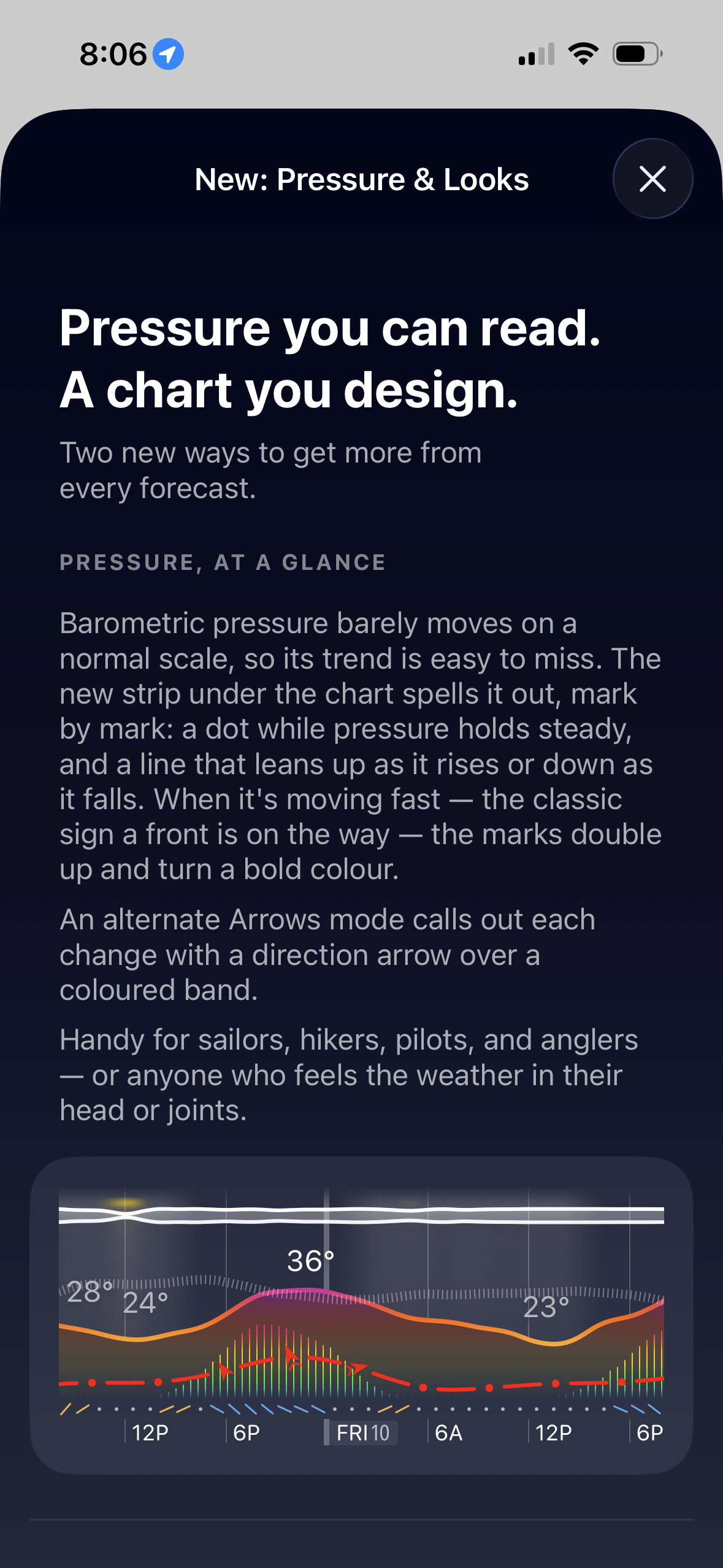
Pressure is now much easier to read. A new Pro trend strip under the chart shows whether pressure is holding steady, rising, or falling. Fast changes stand out with stronger marks and colour, so you can spot a front moving in sooner - useful for hiking, sailing, flying, fishing, or weather-sensitive heads and joints.
You can now also design the chart more freely with the new theme editor. Mix palette, style, sky detail, and accent colour, or start from a preset, to make Weathergraph fit your style.
This is an example of what it looks like:
Previously:
iOS iOS 26 iOS App Weather Weathergraph


