Archive for May 2026
Friday, May 29, 2026
Jeff Johnson:
My Safari extension StopTheMadness Pro has a feature to protect private windows. In other words, StopTheMadness Pro stops websites from detecting private windows in Safari. I won’t explain how my feature works, but in this blog post I’ll explain how websites detect private windows.
Jeff Johnson:
I’m sorry to say that at this time I don’t plan to make any additions or enhancements to YouTube-specific features in StopTheMadness Pro.
[…]
The downsides of adding YouTube-specific features to StopTheMadness have outweighed the upsides. YouTube is an endless time sink. Even though StopTheMadness is not a YouTube-specific extension, I’ve spent more time working on YouTube than on every other website in the world combined. Seriously. And YouTube doesn’t remain static; Google continues to change YouTube, sometimes breaking my features, requiring even more work.
I generally use Downie for YouTube videos, and it requires an insane number of updates to keep working.
Jeff Johnson:
Although DuckDuckGo doesn’t allow you to specify the number of results per page, it does have a setting to enable infinite scroll, which is more convenient than Google’s strict division of results into pages of 10 links. The problem is that I prefer to use private windows for the majority of my web browsing, especially searches, which means that any settings would disappear when the window is closed. DuckDuckGo claims to support URL parameters for settings, but in my testing, the parameters don’t actually seem to work reliably.
As you might expect, my solution to the problem is my web browser extension StopTheMadness Pro.
Jeff Johnson:
This update brings a great new feature: autoclick buttons! Specify a button on a website to be clicked automatically. For example, agree to terms and conditions, reject cookies, or close a popup.
I’ll have to report back on how well this works across various sites, but it sounds great and was successful in my initial testing:
In selection mode, manually click the button that you want to be automatically clicked.
[…]
StopTheMadness Pro uses CSS selectors to autoclick buttons. In order to click a single, specific button, and not mistakenly click the wrong buttons, StopTheMadness Pro searches for a unique way to identify the button on the page. If a unique identifier cannot be found, then the autoclick feature can’t be used with the button.
By default, StopTheMadness Pro attempts to find the button on the web page for 10 seconds after the page loads, and then it stops looking.
Previously:
Downie DuckDuckGo Mac Mac App macOS Tahoe 26 Privacy Safari Extensions StopTheMadness Web YouTube
RetinaDesk:
How many external monitors can your Mac actually drive? Pick your exact Apple Silicon Mac — we’ll show the maximum external display count, per-port resolution and refresh caps, valid configurations, and the gotchas that burn people.
The site’s maintainer, Parish Khan, writes:
After your March 2024 post on the M3 MacBook Pro getting two-display support via software update, Apple quietly amended the 14-inch M3 base spec only with macOS 14.6 in July — no follow-up announcement. The tool flags it clamshell-only since that’s still the catch.
Two other things worth knowing: the M1 Ultra Mac Studio is listed at 5 displays not 8 (that count starts at M2 Ultra), and 8K 60Hz is HDMI-only on every Mac, including the Thunderbolt 5 machines.
Howard Oakley:
Selecting external Retina-resolution displays for use with Apple silicon Macs is extremely complicated. Even when you read Apple’s tech specs it’s often not clear exactly which combinations will work together.
Previously:
Update (2026-06-01): Adam Engst:
Each display gets at least a week of daily driver testing on current Apple silicon hardware, with a consistent focus on text rendering, color profiles and consistency, brightness and backlight bleeding, single-cable behavior, and long-term eye comfort. Included stands, speakers, and webcams also come under scrutiny. The result is a detailed review with pros, cons, who the display is best for, and detailed specifications. Khan then combines all that information into three buying guides:
Display Documentation Hardware Mac macOS Tahoe 26 Retina
Applause Group:
Bartender Pro includes everything in Bartender 6, plus Top Shelf and future Pro tools as they’re released.
[…]
[Top Shelf is a] powerful new way to interact with your MacBook’s notch — bringing common utilities into what used to be wasted space.
The Pro features require a new $15/year subscription.
Dan Moren:
Top Shelf is part Dynamic Island, part clipboard manager, part file utility. Frankly, much of it also feels like the kind of feature Apple should building itself, because my experience over the last year or two with the notch in the MacBook displays continually makes me annoyed at just how user-unfriendly it is.
To trigger Top Shelf, you bring the cursor up to the notch; the interface expands outward from there, just like the Dynamic Island on the iPhone. By default, the first screen contains a pair of customizable widgets for common features like Calendar, Weather, and Music.
[…]
Files allows you to temporarily store, yes, files that you might want to move between apps. Drag and drop a file in there and then you can drag it back out of Top Shelf into another app. That pane also has an AirDrop section; drop a file there, and it will trigger the system’s AirDrop feature, with the file already pre-populated.
The Files feature sounds like Yoink.
See also: MacRumors and Mac Power Users Talk.
Ben Lovejoy:
However, there are also some truly remarkable [Apple] oversights which are somehow allowed to persist from macOS generation to macOS generation. […] menu items can end up being hidden behind the MacBook Pro notch, with Apple seemingly unaware or unconcerned about this. I typically only have four or five third-party menu bar items on screen at any given point (albeit including a wider timezone clock one), and yet it is still very common for one of them to end up invisible.
Previously:
App Subscriptions Bartender Mac Mac App macOS Tahoe 26 Menu Bar Yoink
Thursday, May 28, 2026
Sean Heber:
I made a function in Tapestry 23x faster today by sorting an array using its indices instead of using its data directly. Like this:
let unsorted = items
var indices = Array(unsorted.indices)
indices.sort { a, b in unsorted[a].thing > unsorted[b].thing }
items = indices.map { unsorted[$0] }
Versus presumably something like:
items.sort { a, b in a.thing > b.thing }
With Objective-C, at least pre-ARC, this was simple. The array owns the objects, and they do not get retained and released when passed to your comparator, or within it. Unless you do something silly, like removing objects from the array during sorting, it will be safe and have no memory management overhead.
With Swift, I find the situation rather confusing, and I was not able to find any documentation that lays out exactly what happens. Various searches and AI prompts turned up all sorts of conflicting information. Gemini, in particular, had some explanations that sounded reasonable but that I began to doubt because the sources that it linked to did not actually say what it claimed. I’ve tried to figure this out, but it may well be that some of my conclusions are wrong.
There are several things going on:
Swift will insert retains and releases for the closure parameters. I can see this in the disassembly and by setting breakpoints. I think this is only because they’re accessed within the closure. They don’t need to be retained by the caller because the closure is non-escaping.
If the optimizer is enabled, Swift can sometimes remove that retain counting. I’m not sure exactly when this happens. In my tests, where everything is defined in the same module, it worked for both classes and structs, but I get the impression that sometimes the optimizer is not able to remove the ARC traffic. This is a longstanding frustration with Swift, that the behavior under optimization can be wildly different and that it’s not obvious when you’re changing something in the code that defeats a crucial optimization.
There can also be ARC traffic from the non-comparator aspects of the sorting. Values need to be moved and sometimes copied into temporary buffers, since Swift uses a complex sorting algorithm that does merging as well as swapping. Some of this seems to be done at a low level to avoid ARC, but at least for structs I don’t think it can be totally avoided.
Swift also has exclusivity checks, which can detect (at runtime) if you’re modifying the array from inside the closure. So safety is somewhat decoupled from memory management.
Heber was sorting large structs and saw overhead related to properties that were not accessed in the closure. I’m not sure whether this was due to #1 or #3 or both. In any case, switching to indices adds (linear) overhead from creating two additional array buffers, but it reduces other types of ARC overhead because only integers are passed as parameters and moved around during sorting.
Is there a way—other than using indices—to guarantee the minimum ARC traffic? Swift now supports explicitly marking parameters as borrowing. That seems like conceptually the right idea. It directly expresses that the elements are owned by the array and so don’t need to be retained at other levels. But I don’t think it helps here. For #1, I think the parameters are already essentially borrowed, and it doesn’t address the overhead from #3. Also, the caller (sort) is not typed as taking a closure with borrowed parameters. Changing the closure wouldn’t change its behavior.
I also wondered whether it would help to use one of the other built-in sorting methods. With Comparable, you can avoid passing in a closure. But if the closure isn’t capturing anything, the signature seems identical to that of < in other respects. Still, maybe there are cases where the compiler would be able to see through more for certain Comparable types?
KeyPathComparator also seems promising in that more of the work happens internally. Maybe this could be optimized as the language evolves to do things that are not possible with normal functions/closures. But, so far, I think it’s mostly just syntactic sugar. In my tests, it still retained and released a lot with optimizations disabled.
Lastly, there’s the option of the Schwartzian transform. This can reduce the computational overhead during each comparison, e.g. if thing is a computed property. It needs extra space for a temporary array, but if you’re already making one for the indices trick, you can use the same one, just wider to store pairs.
Unfortunately, I don’t have a very satisfying conclusion except that I would be skeptical about trying to reason from first principles how the complete system will behave. I think you need to profile to see what’s actually happening. Even that’s easier said than done because the sorting algorithm switches between different modes based upon the size and character of the data.
Previously:
Algorithm Automatic Reference Counting (ARC) Memory Management Optimization Programming Swift Programming Language Tapestry
Wednesday, May 27, 2026
Tyler Hall (Mastodon):
The first version, from November 2020, was called AntiPhoto. The name was a mood. I had tens of thousands of photos and videos scattered across drives and old phone backups, and Apple Photos wanted me to live inside its library, on its terms. I didn’t want a walled garden. I wanted something that could point at a messy folder and just make sense of it.
[…]
For every dreamy sketch there were months of deeply unglamorous hitting my head against the wall, none of which makes a good screenshot. The single hardest problem was often just scrolling. A photo library isn’t 200 items, it’s 200,000+, and they all have different aspect ratios, and you want a buttery justified grid that never stutters. I have a screen recording I named “100k Spinning Scroll” from April 2022 — the day a library of 101,706 items finally scrolled without choking — and I remember it feeling like a bigger win than any feature. But even today, Iris has performance hiccups — especially around complex searches and truly massive libraries. But if I waited to solve every bug, I’d never ship.
[…]
I set out to build an anti-Photos utility — a search engine for a hard drive. What I actually ended up with is a memory keeper. Open a photo today and Iris tells you the date, surfaces “16 items on this day,” drops a pin on the map, and lists the people in the frame with their ages quietly calculated from their birthdays.
It’s now available:
Somewhere along the way, “your library” turned into “an account someone else owns.” That’s not the future we want. Iris reads from the folders or Apple Photos library you already have, builds a fast and intelligent library on your Mac, and leaves the originals exactly where you put them. No cloud. No accounts. Your memories are yours.
$14, no subscription, either direct or from the Mac App Store.
Previously:
Update (2026-05-29): Tyler Hall:
ATP 561 [talked] about how to handle photos with “don’t care” dates. Stuff like “1960s” that can’t be pinned to a specific date/time. […] I’m not sure if what Iris does is the best approach, but you can assign a decade, year, or month (or any combination of those) and it’ll bucket it into an “approximate” section where it makes sense.
Nick Heer:
But that is not the coolest part. No, that is that it lets you explore your tens- or hundreds-of-thousands of photos in a way that treats each of them as little memory boxes. So often, it is not just a picture of your kid, or your dog, or your dinner; it is a time you would like to remember. There are a bunch of things in each file that can bring you back to that moment. Photos does a poor job of that; Iris, on the other hand, is made for exactly that, something Hall takes seriously.
Iris Mac Mac App macOS Tahoe 26 Photography
Ben Sandofsky:
Mark III is now available in the App Store. This post highlights the major new features, starting with Looks, which produce gorgeous photos straight-out-of-camera.
[…]
Inspired by “Less, but better,” we partnered with the renowned Hollywood colorist Cullen Kelly to develop a succinct set of gorgeous, physically accurate processes exclusive to Halide. Each look was engineered with a specific intent. We verified every look thousands of times on real-world reference photos.
[…]
As Mark III became better and better, I actually missed its results when I reached for a standalone camera. I figured a lot of people might feel the same. So we’re excited to announce that Halide now lets you import RAW files from standalone cameras to apply the same magic that defines Halide.
I like the idea of looks, and the Apple vs. Halide Rembrandt comparison is striking, but I don’t like the workflow of making these decisions from my phone.
Previously:
Update (2026-06-08): John Gruber:
What I want is to just point and shoot and be able to instantly share images with the look I want already applied. I’m picky but I’m also really lazy, and don’t want to do any editing in post on most of the shots I keep. But I do want to be able to edit in post if I want to, including changing the look losslessly. This mixture of point-and-shoot ease and pro-level control didn’t use to be possible. Now, though, it is, with apps like Not Boring Camera, Analogue, and, now, Halide Mark III.
Halide High Dynamic Range (HDR) iOS iOS 26 iOS App Photography Raw Image Format
John Gruber:
!Camera’s use of LUTs for filter-like effects opens the app to a wide world of non-proprietary looks. The best source I’ve found for new LUTs to import is the Panasonic LUMIX Lab app — Panasonic’s built-in LUTs are boring, but the app has a whole community of user-submitted LUTs and I’ve found several of them that are lovely. !Camera’s custom “SuperRAW” format, is, in my opinion, key to the appeal of the app:
No more flat lifeless photos, no AI processing, no weird
artifacts. Our SuperRaw™ photo processing has been crafted to
showcase more film-like tones and preserve a photo’s beautiful
natural grain.
Previously:
!Camera iOS iOS 26 iOS App
Allison Johnson (2025):
Adobe’s Project Indigo is a camera app built by camera nerds for camera nerds. It’s the work of Florian Kainz and Marc Levoy, the latter of whom is also known as one of the pioneers of computational photography with his work on early Pixel phones. Indigo’s basic promise is a sensible approach to image processing while taking full advantage of computational techniques. It also invites you into the normally opaque processes that happen when you push the shutter button on your phone camera — just the thing for a camera nerd like me.
If you hate the overly aggressive HDR look, or you’re tired of your iPhone sharpening the ever-living crap out of your photos, Project Indigo might be for you. It’s available in beta on iOS, though it is not — and I stress this — for the faint of heart. It’s slow, it’s prone to heating up my iPhone, and it drains the battery. But it’s the most thoughtfully designed camera experience I’ve ever used on a phone, and it gave me a renewed sense of curiosity about the camera I use every day.
Joe Rosensteel:
I appreciate what Adobe is doing with Project Indigo. It’s a free iOS camera app, but it is heavily disclaimed as being experimental with unique features you can’t find in other apps. But Adobe also says they’re targeting “casual” photographers, which seems misguided.
[…]
You can’t adjust the tone mapping like you can with Photographic Styles. You’re supposed to take it into Lightroom and treat it like the RAW output of a DSLR or mirrorless camera.
The default result tends to be much more naturalistic than the Camera app.
John Gruber:
I’m deeply intrigued by Indigo, and I have a few friends who’ve shown me some extraordinary photographs taken with the app. If they hadn’t told me, I’d have wagered their photos were taken with dedicated large-sensor digital cameras, not phones.
Previously:
iOS iOS 26 iOS App Photography Project Indigo
Jeremy Gray (2025):
Unpro Camera promises “that unprocessed look” that has become popular lately and is in the same vein as Halide’s Process Zero option.
[…]
Unpro not only aims to produce a more retro-looking image, free from modern smartphone processing techniques, but the app also channels old-school vibes through its design and user interface. Unpro sports a skeuomorphic design, meaning that it digitally recreates real-world objects. In this case, the app has a shiny-looking virtual shutter release, a faux leather texture like a camera’s grip, and pseudo-illuminated icons for things like AF/AE locking and zoom mode. It is worth noting the buttons in the UI don’t move around — they’re always in the same location — which the developer says makes it easier to learn how to use.
Uncorrelated Contents:
Unlike most camera apps, Unpro features a carefully-crafted photo processing pipeline that produces excellent JPEG renditions of RAW and ProRAW photos without the need for manual editing.
[…]
Another feature that, as far as I know, is unique to Unpro: the ability to capture a RAW and ProRAW (or RAW + a deprocessed photo) in rapid succession.
Previously:
iOS iOS 26 iOS App Photography Raw Image Format Unpro Camera
Monday, May 25, 2026
Tyler Hall:
Rejected after six days waiting for review, and four minutes after launching the app for the first time.
The app uses one or more entitlements which do not appear to have matching functionality within the app.
com.apple.security.network.server
I guess they never opened the Settings window during all the time they spent reviewing the app?
Tyler Hall:
App Review rejected Iris for a second time, this time for two reasons.
They again claimed the app uses the com.apple.security.network.server entitlement without matching functionality - even though I responded to the first rejection with an annotated screenshot and detailed explanation showing the server feature in the app.
They asked for more information about how Iris uses face recognition data - asking me to quote from my privacy policy - despite both the privacy policy and the app itself explaining that no data (including face data) ever leaves your Mac and all processing happens entirely on-device.
Ironically, their rejection included a screenshot of Iris’s Settings window—showing the Privacy tab that explains exactly this.
Pasi Salenius:
My MAS app used to go through in under an hour, now takes close to a week.
And there’s a big difference between waiting a week to be approved vs. waiting a week just to begin the process of arguing over specious violations.
Jeff Johnson:
I’ve always found it odd that Apple appears to be bragging about these statistics, yet if you do the math, the statistics turn out to be somewhat embarrassing. Based on the 2024 numbers, over 130K app submissions every week reviewed by nearly (in other words, fewer than) 500 “dedicated experts” (a characterization I would question) means 260 reviews per week on average by each reviewer. If we assume, extremely generously, that 500 reviewers work 40 hours every week with no meetings, no training, no breaks, and no vacations, that leaves less than 10 minutes of review time on average for each submission.
[…]
You might ask why Apple, the most profitable corporation in history, with a 77% gross margin in “services” revenue, that could obviously afford to hire more app reviewers, doesn’t also hire better reviewers, more qualified, actual experts in app development and the market? The answer to my rhetorical question is that app reviewer is an unpleasant job, mostly mindless rule-following, repetitive, facing constant deadlines, reminiscent of assembly-line work. It’s a virtual assembly line.
[…]
It isn’t intended to be true curation, and thus, by no surprise, it isn’t true curation. From Apple’s perspective, adding more reviewers would just add to their costs without adding to their profits, which is the point of the App Store, and reviewers were never particularly good at stopping scams, so the investment in more inescapably low-skill reviewers wouldn’t necessarily bring substantial returns. I’m sure that Apple wants to avoid the embarrassment of scams in the store, but Apple can’t do that without fundamentally changing the nature of the App Store and software distribution on iOS, so they live with the embarrassment and rely on Apple apologists to hand-wave away the problem as “a few bad apples.”
Previously:
Update (2026-05-26): Richard Buckle:
This perfectly encapsulates why I no longer develop for Apple platforms.
Matt Sephton:
I also got this rejection for my app Localmost…which is a local web server manager!
Matt Sephton:
one of my apps was submitted and approved, but the first update I pushed was rejected because they wanted “test account details” to which i replied “the app does not have an account system” and then it was approved. it’s just so amateur hour. AND they still haven’t got me on the 15% track, the email said “sorry we’re busy right now so there are delays”
Pierre:
Our app resembles a marketplace, so we are always worried of reviewers being overzealous. We had to deal with a few rejections in the early versions. Also, we publish some apps with the branding and name of some big companies (think intellectual property red flags). What seems to work (maybe it is pure chance ?!) is that we provide a nice QA anticipating possible critiques in the Notes section next to the login/password.
Junjie:
I had the (unfortunate) opportunity of submitting 3 updates to MAS for @due in 4 days and want to provide another data point[…] Even before this week, my experience has been similarly speedy. But of course, the trouble with the App Store is that you never know when you’re on the unlucky side of things.
App Review App Store Rejection Iris Mac Mac App Mac App Store macOS Tahoe 26
OpenAI (Hacker News):
This proof is an important milestone for the math and AI communities. It marks the first time that a prominent open problem, central to a subfield of mathematics, has been solved autonomously by AI. It also demonstrates the depth of reasoning these systems now support.
[…]
The proof is available here. The companion paper by leading external mathematicians is available here. You can find an abridged version of the model’s chain of thought here .
Update (2026-08-17): Timothy Gowers:
I would like to find a coherent explanation of the conjunction of the following facts.
- The most notable mathematical results proved by LLMs have tended to be ones that we would classify as examples or counterexamples, where counterexamples are, broadly speaking, existence statements that disprove statements that we expected to be true.
- Many statements can be formulated as existence statements when we would usually think of them as universal statements, and vice versa, so what we consider to be an example depends on the mathematical context of a statement as well as its logical form.
- LLMs are pretty good at proving universal statements as well: it’s just that the strongest statements they have proved that we would think of as theorems have mainly not been at the level of the strongest statements that we would think of as counterexamples.
Artificial Intelligence Math OpenAI
Jeff Johnson:
Several of these apps have a link to a privacy policy web page that’s hosted on a generic free site such as sites.google.com, docs.google.com, github.io, wixsite.com, or vercel.app, which is always a bad sign. A couple of the apps use URL shorteners for the privacy policy link: bit.ly and shorturl.at. Why is that even allowed?!? And some of the privacy policy links are broken, returning HTTP 404 Not Found. Does Apple App Store review even look at the privacy policies?
[…]
I don’t know whether this surfeit of YouTube apps was the product of multiple developers acting independently or one developer hiding behind multiple Apple accounts, an App Store scam that I’ve seen before. I’ve never heard of any of these developers, and I doubt that you have either, not even AdBlocker LLC, the developer of App for YouTube ℠, who is not to be confused with Adblock Inc, the developer of AdBlock, who is to be confused with Eyeo GmbH, the developer of Adblock Plus, who acquired Adblock Inc in 2021. Got that? In any case, many duplicate app names with random symbols at the end is clearly a perverse experience for App Store users, and Apple’s so-called curation is primarily to blame. Moreover, almost all of these apps have pricey subscriptions, another App Store red flag that I’ve discussed before.
Previously:
App Review App Store Scams Mac Mac App Mac App Store Trademark YouTube
Sarah Perez (Hacker News):
The era of the “ten blue links” is officially over.
At its Google I/O conference on Tuesday, Google unveiled an AI-powered overhaul of Search centered around a reimagined “intelligent search box” — what the company describes as the biggest change to this entry point to the web since the search box debuted more than 25 years ago.
Instead of returning a simple list of links, Google Search will drop users into AI-powered interactive experiences at times. Google is also introducing tools that can dispatch “information agents” to gather information on a user’s behalf, along with tools that let users build personalized mini apps tailored to their needs.
[…]
While Google says that AI Mode is not the default experience, Search’s user interface encourages users to ask follow-up questions instead of scrolling down to the links to other pages.
John Gruber:
Odd, to me, to paint this only in terms of user convenience (ostensible user convenience at that), and not in terms of this being a de facto attack on Zillow and the rest of the web.
Nilay Patel (2024):
There’s a theory I’ve had for a long time that I’ve been calling “Google Zero” — my name for that moment when Google Search simply stops sending traffic outside of its search engine to third-party websites.
Amanda Silberling (Hacker News):
On Google’s video announcing the Search updates, one commenter wrote, “this is the best advertisement for letting people know it’s time to get a different search engine.”
[…]
If you’re curious about alternative search engines, you’re in the right place. Here are some places to start (or, embrace chaos and see where Open Web Engine takes you).
Previously:
Update (2026-05-27): Jess Kinghorn (Hacker News):
DuckDuckGo has been one major winner of this Google Search abandonment. Just for a start, visits to its AI-free search page noai.duckduckgo.com between May 20 to May 25 are said to have increased by 22.7% on average week-on-week, with the figures peaking May 24 at 27.7%.
The DuckDuckGo mobile app saw installs spike in the US by 18.1% on average compared to the previous week. TechCrunch reported this growth was sustained over six days, peaking at 30.5% on May 25.
Artificial Intelligence Google Gemini/Bard Google Search Web
Friday, May 22, 2026
Marcus Mendes:
Apple today filed a request with the Supreme Court in an attempt to reverse key lower court rulings over the App Store injunction in its long-running legal battle with Epic Games.
[…]
In its petition, Apple is asking the Supreme Court to review two questions.
The first is whether Apple should have been held in contempt for charging a commission on purchases made outside the App Store.
The second is about the scope of the injunction.
Sarah Perez:
“Epic never brought a class action and never attempted to show that enjoining Apple’s conduct against all other developers — like Microsoft or Spotify, who have nothing to do with Epic — was somehow necessary to provide relief to Epic,” reads Apple’s new petition, which asks the U.S. Supreme Court to review the lower court ruling.
In the same document, Apple also argues against the Ninth Circuit’s civil contempt order over Apple’s compliance with the injunction. The court had ruled that Apple must give developers the right to include links in their apps — links that could direct users to alternative payment options outside of Apple’s own system — if they chose to do so. Apple did permit this as required, but charged fees on those outside purchases, leading to the contempt order.
John Gruber:
Apple’s argument here is that only the letter of the law matters, and the letter of the injunction did not say anything about charging commissions on external payments, and thus they can’t be held in contempt for violating something that was never spelled out explicitly.
Wesley Hilliard:
If Apple wins the “in spirit” portion of its arguments, Apple gets to carry on with its previous 12% and 27% commission rates for external linking. It would also mean proceedings in the lower courts would return to appeals stages.
Juli Clover:
Epic Games and Apple agreed to an expedited schedule and Apple’s petition will be considered on June 25. Apple expects a decision on whether the Supreme Court will hear the case by the time the justices recess for the summer in late June or early July.
Previously:
Update (2026-06-11): Hartley Charlton:
Epic filed a 35-page opposition on June 4, 2026, urging the Supreme Court to reject Apple’s appeal. Apple’s response takes aim at two central arguments Epic made in that filing.
On the question of anti-steering, Apple says Epic is mischaracterizing the scope of the injunction against it. According to Apple, the order only restricted specific anti-steering practices and did not address App Store commissions, making Epic’s framing an attempt to rewrite the ruling rather than an accurate description of it.
The second dispute involves a 2025 Supreme Court precedent, “Trump v. CASA, Inc.” Epic says Apple is wrongly claiming an exemption from it. Apple responds that the earlier ruling explicitly states CASA “has no bearing” on antitrust cases, which this is, making Epic’s argument moot.
Update (2026-09-17): Juli Clover:
Apple today filed its opening merits brief with the Supreme Court as it prepares to fight the contempt ruling that forced it to change its App Store rules. Apple is asking the Supreme Court to reverse or vacate the contempt order, which would return the App Store to its pre–2025 rules.
Antitrust App Store Apple Epic Games External iOS Payments Fortnite iOS iOS 26 Lawsuit Legal
John Gruber:
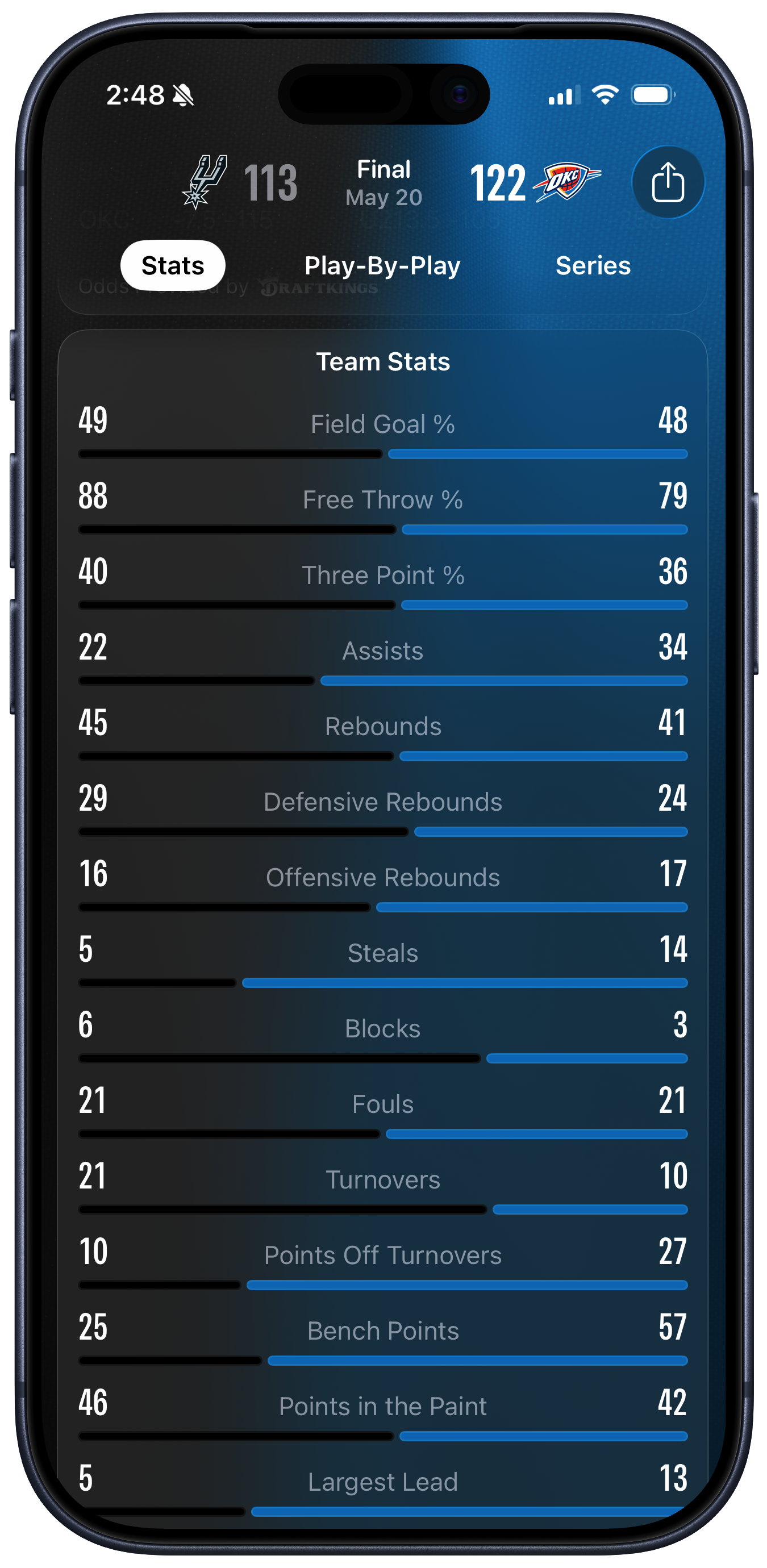
I’ve got some gripes about certain specific aspects of Apple Sports. Like, where does one even start to explain how much is wrong with their zero-sum visualization of team stats? Has anyone ever even seen a presentation like that before?
It has to be seen to be believed. What on earth were they thinking?
Still kind of curious that Apple Sports remains iPhone-only — not even an iPad version — but in a way I find that charming too. Maybe Apple is tight on money?
Kieran Healy:
John is right to call the picture a “Zero Sum” representation. The design strongly suggests to the viewer that, within each row, we’re looking at each team’s share of a total. Each pair of black and blue lines seem to be vying for control of their whole row, with the longest line being the “winner” in each case.
[…]
Literally none of the measures in the Basketball data above are zero-sum in this way. Both teams could shoot 100% from the free throw line, or zero percent. But because the first three measures shown are percentages, this reinforces the zero-sum impression given by the lines. It certainly did that in my case. But then, starting with Assists, the remaining rows are just absolute numbers. When I started looking at the absolute numbers, I got confused a second time by the length of the lines. “Oh so it’s not a share, it’s the value” I thought—but no, they do correspond in terms of relative proportions to the teams share within each row. But they’re not really shares they’re just magnitudes. But they have to be shown in a fixed space and we want to make them relatively comparable somehow so … Argh.
Apple’s software design right now seems to love uniformity. Throw a bunch of disparate statistics—or system settings—in a big list. It looks superficially clean and is easy to code. It seems like there’s a chart that’s illuminating the results, but it’s actually worse than a traditional text-only box score. The numbers that you most want to compare are placed maximally far apart. It’s like reading a table of contents with dual-colored dot leaders, but of course in a table of contents you aren’t meant to be reading all the page numbers.
Our fundamental problem is that we just have two cases (the teams) and fifteen different measures, or variables. Each variable, except for the three percentages, is in effect on its own scale. There’s no direct way to make comparisons across them.
John Gruber:
The problem is further complicated by the fact that Apple Sports shows the same screen for all sports, just with different sport-specific stats. I think the solution is to just present these numbers in a table. Yes, tables are boring. But they’re not confusing. What Apple Sports is doing, in an attempt not to be boring, is confusing.
Previously:
Apple Sports Design iOS iOS 26
MathWorks (Hacker News, Reddit):
Cleve was chief mathematician and cofounder of MathWorks and the author of the first version of MATLAB.
In his early years, he was a professor of math and computer science for almost 20 years at the University of Michigan, Stanford University, and the University of New Mexico. During this time he was known for being one of the authors of LINPACK and EISPACK, two foundational Fortran libraries for numerical computing. One popular paper of his is “Nineteen Dubious Ways to Compute the Exponential of a Matrix.”
He is coauthor of three traditional textbooks on numerical methods and author of two online books, Numerical Computing with MATLAB and Experiments with MATLAB.
Wikipedia:
Before joining MathWorks full-time in 1989, he also worked for Intel Hypercube, where he coined the term “embarrassingly parallel”, and Ardent Computer Corporation.
Education Fortran Mac Mac App Math MATLAB Programming Rest in Peace
Thursday, May 21, 2026
Geoffrey Cain (Amazon):
Drawing on previously unpublished materials and new interviews with the key players, Geoffrey Cain reveals the untold story of Steve Jobs’s “lost decade”—the formative years that shaped the icon we thought we knew.
With unprecedented access to unbroadcast footage of Jobs in NeXT meetings, private company documents, and interviews with his closest colleagues, Cain offers the definitive account of how failure transformed a brash wunderkind into a true business genius.
John Gruber:
And via Cain’s post on LinkedIn announcing the book, the foreword is by NeXT cofounder Dan’l Lewin.
Joe Cieplinski:
Back in 2013, I suggested the story of Steve Jobs would best be told as a 5-act opera, with the most crucial part of the story being Act III.
Steve Hayman:
Jobs left Apple in 1985, founded NeXT, hired me, bought Pixar, and came back to Apple in 1996
at its historic low point, when Apple was near-death, and orchestrated the turnaround we’ve all heard about.
I’ve bought most of the Steve Jobs books, and seen the movies, but they all seem to treat the NeXT years as an afterthought rather than a transformational time.
Sure, the NeXT hardware didn’t sell well but the software set the stage for everything Apple makes today.
Geoffrey Cain:
Today is launch day for Steve Jobs in Exile. I spent almost four years digging into Steve’s stretch in the wilderness -- 1985 to 1997, after Apple pushed him out and before it brought him back.
I expected the record to be complete. What more could there be on the most written-about entrepreneur alive? I was wrong. An archivist at Carnegie Mellon told me I was the first person in about fifteen years to open the NeXT archive. People had been holding letters, tapes, memos, recordings in their closets for decades, waiting to show someone. More than a hundred of them sat down with me.
He did a Reddit AMA.
Jason Snell:
It’s a surprising and sometimes gruesome (in a businessy way) story that does not show off the famous man at the center of the story as much as depict all the ways he failed in what turned out to be preparation for his career-defining role as Apple CEO. (I also got to interview Cain about the book this week on Upgrade.)
[…]
The computer that NeXT ended up building didn’t satisfy the requirements of those original higher-ed buyers who were the target market. Jobs had followed his bliss, and his good taste, in interesting directions. NeXT made an interesting product. But the product failed at being a successful product, just as NeXT kept failing at business.
And it just keeps happening, as the book details. Early investor and Jobs believer H. Ross Perot (yes, the former independent presidential candidate!) had ties in the government that would’ve allowed NeXT to sell computers to America’s intelligence agencies, primarily for spy-satellite image analysis. Jobs refused the lifeline, saying he didn’t want to do business with the government.
A deal with IBM had the potential for NeXT’s operating system to take the ecological niche of Microsoft Windows before it had been firmly established on the world’s PCs. Jobs decided he was uncomfortable working with IBM.
See also: Becoming Steve Jobs.
Previously:
Update (2026-05-29): Steve Hayman:
The book has tons of great stories and behind the scenes info; I certainly recognized a lot of the names, but many of the tales were new to me.
Update (2026-06-08): Marcin Wichary:
I do not see this as a book of new immense insight, technical depth, or design details, but that doesn’t mean it doesn’t go beyond surface level. What I appreciated most was Cain not shying away from pointing at some of Steve Jobs’s mistakes: hiring wrong people he happened to like, almost driving the company to the ground through obstinance, inability to focus on things he considered uninteresting, and a profound dose of duplicity coming into the NeXT/Apple merger.
Other things that stood out: focus on people around Jobs, spotlight on Jobs’s disappointing moral flexibility around working with government (or befriending Larry Ellison, for that matter), and a really fun pizza ordering story that serves as a prelude to the Starbucks call during the iPhone 2007 keynote.
Update (2026-09-24): Jeff Johnson:
Some people claim that Jobs put the computer users first, sacrificed everyone and everything for their sake, but after reading Steve Jobs in Exile, I find that hard to believe. Jobs clearly put himself first and built things that he considered cool. Any satisfaction of the users was merely coincidental, a result of shared characteristics between Jobs and the users. Jobs did have quite a bit in common with ordinary users, because he was not an engineer, nor was he an MBA like the majority of corporate executives (such as Tim Cook!). He was just a technology enthusiast and thought like a technology enthusiast. Nonetheless, countless choices were self-indulgent, with no benefit for the users. For example, Jobs obsessed over the Freemont, California factory that he commissioned to build the NeXT computer, spending huge amounts of money for a startup, imagining (delusionally) that NeXT customers—intended to be universities!—would want a buying “experience” like Ferrari customers.
[…]
In 2026, should history thank Steve Jobs for getting the background green exactly right in a 1988 product demo that none of us ever saw and that was scheduled by Jobs before the product was even ready? If I were in Steve’s place, I would have let the employees sleep[…]
Book Business Central Intelligence Agency (CIA) Education History IBM National Security Agency (NSA) NeXT Steve Jobs
César Pinto Castillo:
CloudKit is one of the best-kept secrets in the Apple platform stack. For years it has quietly powered sync, storage, and sharing for our apps — for free, with zero servers to run, and with end-to-end encryption we didn’t have to design ourselves. And yet, we’re moving off it.
[…]
When a user’s data won’t sync, we have no view into what happened on Apple’s side. We’ve spent years bolting telemetry onto NSPersistentCloudKitContainer.eventChangedNotification just to find out why a save failed — and even with that, we’re guessing from client-side error codes. There are no server logs we can pull, no admin view into the user’s zone.
[…]
CloudKit is supposed to “just work” across Apple platforms. In practice every target has been its own debugging project: macOS only synced on app restart for a while, Apple Watch silently stopped syncing because a user hadn’t accepted a new iCloud ToS — a failure mode we couldn’t even surface to them — and one of our entitlement bugs was reported to us by Apple. AppleTV sync is still flaky in user reports today.
[…]
iCloud signed-out, iCloud full, family-sharing edge cases — CloudKit hands all of this to the client. We’ve built distinct account-state UI for iOS, macOS, watchOS, tvOS, and visionOS, with localizations for each. “Warn the user when their iCloud is full” has been an open ticket of ours since 2025 because we can’t reliably detect it.
Via Fatbobman:
[For] small teams, CloudKit offers an almost unbelievable combination of features[…] But as their product evolved, CloudKit’s limitations became increasingly apparent[…] and most importantly, the inability to truly expand toward the Web and cross-platform ecosystems. Eventually, César’s team migrated to a Supabase/Postgres-based synchronization architecture.
Previously:
Update (2026-06-04): Fatbobman:
Many developers, after integrating CloudKit synchronization with Core Data or SwiftData, encounter a confusing phenomenon: The app synchronizes perfectly across multiple devices, yet when querying Records in the Apple Developer CloudKit Console, it shows “No Records Found” or a completely blank list.
[…]
To resolve this, you need to manually add indexes in the CloudKit Dashboard.
Patrick McConnell:
Sometimes you will mess up the magic. Perhaps you add a record or field to a Model class then remove it. The Schema may become confused and your app may have errors or crash. You can go into the CloudKit console and reset the environment at any point and the current Production Schema will be copied into the Development environment. If you are seeing odd issues with your app revolving around SwiftData or CloudKit feel free to nuke that environment and start over. The next time you run the app in Xcode/Simulator the Schema will be updated to match your actual code. Tip number one is nuke the Development environment and nuke often. Don’t spend hours trying to figure out some strange CloudKit error only to find out at the end that you got your Schema all mixed up.
[…]
In my case what appears to happen is the migration goes fine, the app launches and works as expected with all my new features and shiny new model updates. Until you fully close the app and relaunch. Then SwiftData acts like it’s never seen this data before and is very offended. Boom. FatalError.
Update (2026-06-11): Greg Pierce:
Drafts sync still has workarounds for issues that probably haven’t been in CloudKit since iOS 8, but I’m scared to rip them out. Those early days were rough.
But, I don’t have servers and user data to worry about, so I don’t complain too much.
CloudKit Core Data iOS iOS 26 Mac macOS Tahoe 26 PostgreSQL Programming SwiftData tvOS tvOS 26 visionOS visionOS 26 watchOS watchOS 26
Madeline Batt:
The lawsuit targeted generative AI company Perplexity, along with Meta and Google, alleging they disclosed transcripts of users’ conversations with chatbots for targeted advertising. The case highlighted a burgeoning monetization strategy for the AI industry to solve generative AI’s profitability problem with a function the technology has proven especially adept at: collecting intimate information about users. Coming a few months after announcements from Meta and OpenAI that they would use data from AI products to target ads, the action and its voluntary dismissal leave the viability of legal challenges to ad-based monetization strategies unresolved.
Maggie Harrison Dupré:
A new class action lawsuit accuses OpenAI of sharing data including user chat queries and personal identifying information like emails and user IDs with the tech giants — and targeted advertising behemoths — Meta and Google, without obtaining proper user consent.
Filed yesterday in California, the lawsuit claims that OpenAI’s data-sharing with Google and Meta violates the California Invasion of Privacy Act, known as CIPA, as well as the Electronic Communications Privacy Act. It points specifically to OpenAI’s integrations with Meta Pixel and Google Analytics, which are data-tracking and collection tools that facilitate targeted advertisements.
Via Nick Heer:
Interestingly, the Office of the Privacy Commissioner of Canada recently concluded an investigation of OpenAI’s training on personal information and whether it can produce that information reliably. It seems to me like questions about third-party ad targeting were out of scope. This is notable, however:
OpenAI represented that ‘untraining’ or ‘reverse-training’ LLMs, so that they no longer use or generate specific personal information for which a deletion request has been submitted, is not currently feasible.
[…]
It is not even clear OpenAI, for example, ensures data in its collection remains in compliance with opt-out requests when training new models.
Previously:
Advertising Artificial Intelligence Business Google Analytics Lawsuit Legal OpenAI Perplexity Privacy Web Web Crawlers
Multimodal Solutions:
Install, update, and clean up your brew packages from a quiet Mac‑native app. 14,000+ formulae and casks — no terminal required.
[…]
Browse and search through thousands of Homebrew packages with an intuitive visual interface. No more memorizing package names.
[…]
Install or remove any package with a single click.
[…]
See all outdated packages at a glance. Update individually, in bulk, or select specific ones to upgrade together.
[…]
See how much space each package uses. Clean up old versions, cache, and unused dependencies to reclaim disk space.
[…]
Taphouse cross‑references every package you’ve installed against published CVEs. Severity, fix versions, source links — and a one‑click upgrade for the ones that matter.
There’s an impressive set of features that seem to be very easy to use. It’s much better than the command-line or Electron, but it’s a SwiftUI app and various things look and feel a little off. There’s no File menu. The Settings window and sheets are scrollable but can’t be resized.
The core functionality is free. Paying €9.99 unlocks a long list of Pro features: bulk operations, favorites, tags, history, a menu bar icon, background updates, import/export, and managing apps that were directly downloaded, purchased from the Mac App Store, and that update via Sparkle.
See also: Cork (fewer features), Applite (focused on apps), Homebrew Formulae (web list of apps).
Previously:
Update (2026-05-22): The developer fixed some of the issues in a quick 1.5.1.8 update.
See also: Mac Power Users.
Developer Tool Homebrew Mac Mac App Mac App Store macOS Tahoe 26 Open-source Software Programming Security SwiftUI Taphouse
Wednesday, May 20, 2026
Manton Reece:
I submitted Inkwell for iOS to Apple for review on April 21st. It has gone through numerous rejections, code changes, resubmissions, clarifications, one phone call, and one appeal to the review board, which I’m still waiting to hear back on.
[…]
The app didn’t have a way to report objectionable content or block users. This rejection was bizarre to me since it’s an RSS reader where people choose to follow users.
[…]
The app doesn’t use in-app purchase so that Apple can take a percentage of Micro.blog revenue. I streamlined the app by removing creation features such as posting and highlighting, removed sign-up and external links, and even removed the app from all storefronts except the US, where there are different rules thanks to Epic vs. Apple. I believe it should now qualify under either 3.1.3(a) “reader apps” or 3.1.3(f) “stand-alone companion apps”.
[…]
Apple’s [Jaguar-era] Inkwell branding was short-lived, and the trademark is now listed as “dead” by the US Patent & Trademark Office. Yet the name still appears on Apple’s trademark page. This is what the reviewer found and objected to, even though other Inkwell apps have been approved without issue.
John Brayton:
Dealing with the App Store is the worst part of developing for Apple platforms.
Apple:
As powerful AI development tools drive a surge in app submissions, Apple’s App Review process has seamlessly scaled to handle the volume and to help ensure every new app and app update meets the App Store’s high standards for privacy, security, and quality.
Tyler Hall:
Apple keeps emailing me about WWDC when all I want them to do is email me about reviewing my Mac app.
Previously:
Update (2026-05-22): Jason Anthony Guy:
Apple loves its big numbers, and its execs will happily hawk them when it’s to their benefit. But what about the flip side? How about reporting the number of legitimate developers rejected for inane reasons? Should those rejections really be promoted as part of some great achievement? Apple’s proud of the “306,000 new developers” it’s welcomed to the platform, but how many saw their apps deplatformed? Apple brags about how many fraudulent apps get blocked; what about the egregious approvals?
Come to think of it, is Apple really patting itself on the back for finally taking down apps everyone but Apple knew were fraudulent from the jump? Is Apple counting those as both approvals and rejections? My mind boggles.
Radu Dutzan (via Nick Heer):
@doppi for Mac has been stuck there for two weeks. First of all, it takes them at least five full calendar days to review a Mac app. Deplorable.
But not just that, they’ve rejected the app twice, and for the dumbest shit. The second time, they cited one of the same reasons I had already explained, making me feel like it’s worthless to spend any effort trying to treat the process as rational.
Manton Reece:
After a full month of Apple rejections, the iOS version of Inkwell has been approved.
[…]
I care a lot about the names of things. In the App Store, Micro.blog is called simply… “Micro.blog”. No gimmicky taglines appended to the name. So it was a little painful that as a last resort, I’ve decided to temporarily rename the Inkwell app to “Ink•well for Micro.blog”. Yes, with a bullet character in the middle of the word.
I tried a few other renames before that, keeping Inkwell spelled correctly but shuffling it around with other words. “Ink•well” is the only name that Apple approved.
[…]
To more narrowly make the case for Inkwell approval under review guidelines section 3.1.3, I’ve also removed two features from the app[…] These are important parts of Inkwell that exist on Android, macOS, and the web.
App Store App Store Rejection Inkwell iOS iOS 26 iOS App Mac OS X 10.2 Jaguar Sign In with Apple Trademark
Talal Haj Bakry and Tommy Mysk (Mastodon):
Until macOS 26.4, Archive Utility had nearly unrestricted filesystem access. Combined with a drag-and-drop sandbox quirk, this let an attacker bypass App Sandbox data containers, Transparency, Consent, and Control (TCC) protections, and hijack third-party apps — all without special permissions or elevated privileges.
[…]
Here’s one interesting aspect of the macOS app sandbox: dragging and dropping a file or folder onto an application grants it unrestricted access to the dropped item. This is by design. Without it, apps couldn’t access files dragged from protected locations like ~/Desktop or ~/Documents, and drag and drop wouldn’t work in sandboxed apps at all.
[…]
Knowing about the drag-and-drop loophole, an attacker can try to convince a user to drag and drop Archive Utility’s preferences file into Terminal, which lets them rewrite Archive Utility’s output folder. From there, copying a file out of an app data container is a two-step move: compress the target file inside a protected area, then extract the archive into a folder the attacker controls.
[…]
Code signing should have prevented this kind of tampering with the application bundle, but for some reason macOS didn’t complain. We would like to investigate this further.
Previously:
Bug Code Signing Exploit Mac macOS Tahoe 26 Sandboxing Security Transparency Consent and Control (TCC)
Ron Elemans:
Despite all that, we have done our best to embrace and implement the concepts of the Liquid Glass design in Core Data Lab 3.0, although with a few tweaks here and there to improve the contrast in especially dialogs.
[…]
Identifying rows in data often depends on attributes with names like ‘identifier’, ‘title’ or ’name’, which not seldom requires scrolling or adjusting the column configuration to make them visible. With ‘Favorite attributes’ you can configure default attribute names that are automatically placed in front or on top of other attributes.
[…]
With the new ‘Favorite content’ setting, you can determine which attribute is shown first, and which other attributes must be shown on top of the said dropdown list.
[…]
You can add multiple diagrams to a project, and it’s easy to center each diagram around a few entities by excluding unrelated entities. The design is heavily inspired by the ‘graph style’ editor of the data model designer tool in Xcode 13 and older[…]
Also, you can now see relationships when opening an object in a separate window, and searching now supports the Matches and Like operations. It’s a free update.
Previously:
Core Data Core Data Lab Database Developer Tool Liquid Glass Mac Mac App macOS Tahoe 26 SwiftData
Manuel Grabowski:
No actual concept of versioning or upgrades for shared shortcuts. Sharing shortcuts happens via weird iCloud URLs rather than being an actual aspect of the system. So to update a shortcut, do you just add it again? No indication of what that will do before you press the button. Will it error out? Will it create a duplicate? Will it update/replace the existing one?
[…]
Of course this Playmobil-ass UI doesn’t show anything that would be remotely useful for serious people. Imagine wanting to sort your shortcuts by date or see the last modification date, like some rocket scientist.
Needless to say, there’s no version control or diffing, either. There’s so much stuff that apps can get for free if they use the file system instead of opaque storage. Bypassing it in the name of simplicity makes some things easier but blocks a long tail of possibilities—as well as basic stuff like sorting, if the app doesn’t provide it.
Previously:
Update (2026-05-25): Mike Rockwell:
Apple Shortcuts is such a mess that I’ve actually implemented my own backup system for my shortcuts. That way, if anything goes wrong — and it has several times in the past — I have a weekly backup that I can restore from.
Backup iCloud iOS iOS 26 Mac macOS Tahoe 26 Shortcuts Version Control
Juli Clover (Slashdot):
Apple is fighting an antitrust penalty law in India that could require it to pay massive fines in its ongoing antitrust dispute with Tinder owner Match, reports Reuters.
Last year, India passed a law that allows the Competition Commission of India (CCI) to use global turnover when calculating penalties imposed on companies for abusing market dominance. Apple can be fined up to 10 percent, which would result in a penalty of around $38 billion. Apple said that using global turnover would result in a fine that’s “manifestly arbitrary, unconstitutional, grossly disproportionate, and unjust.”
Jackson Chen:
Apple’s refusal to provide financial data to an Indian regulatory agency as part of an antitrust case will culminate in a final hearing on May 21, as first reported by Reuters.
Hartley Charlton:
The Delhi High Court ruling keeps a probe by the Competition Commission of India (CCI) alive, which found in 2024 that Apple had abused its dominant position in the iPhone apps market. The CCI wants Apple’s financial data to calculate potential penalties, but Apple has refused to hand it over so far.
Previously:
Update (2026-06-03): Hartley Charlton:
Apple has agreed to hand over financial data to India’s competition regulator, in a move that could bring a years-long antitrust case significantly closer to a penalty decision.
Update (2026-06-30): Hartley Charlton:
Apple has accused Indian antitrust investigators of “copy-pasting” claims from its rivals and failing to conduct their own analysis, arguing the regulator’s findings against it should be thrown out.
Antitrust App Store Apple India iOS iOS 26 Lawsuit Legal Match Group
Tuesday, May 19, 2026
Hartley Charlton (Hacker News):
Apple today announced a suite of accessibility updates that use Apple Intelligence to expand capabilities across VoiceOver, Magnifier, Voice Control, and Accessibility Reader, with additional new features for generated subtitles and wheelchair control via Apple Vision Pro.
Shelly Brisbin:
With updates to live recognition, VoiceOver users can press the iPhone action button to quickly ask a question about what’s in the camera viewfinder and get a detailed response. Users can also ask follow-up questions in their own words to get more visual information. These question features resemble what’s available to users of the Be My Eyes app’s Be My AI feature, but it’s unclear whether Apple’s offerings will go further.
[…]
Voice Control is set to get an Apple Intelligence boost, giving users the ability to describe an element onscreen they want to act on, instead of using a numbered grid, or remembering an item’s label. The natural language support should also allow Voice Control users to navigate apps or elements that aren’t labeled for the feature.
Previously:
Accessibility Apple Intelligence iOS iOS 27 Mac macOS 27 Golden Gate Magnifier visionOS visionOS 27 Voice Control VoiceOver
Adam Engst:
Apple doesn’t provide a user-editable list where you can add special words, but there is a back-door way to train Dictation—on all your Apple devices—to work more the way you prefer: through the Contacts app.
[…]
Regardless of the number of words in the name or phrase, I put them all in the First Name field, with the hear-no-evil monkey 🙉 emoji in the Last Name field. That way, these spurious contacts sort to the very bottom of Contacts and don’t clutter the display. I also add them to a Proper Noun-Contacts list (mentally removing the “u” amuses me).
[…]
Dictation picks up some of these entries quickly, such that you don’t have to do anything more. However, in other cases, it requires more training.
[…]
Inserting a zero-width space in the middle of the word did indeed prevent Dictation from recognizing it. Unfortunately, the zero-width space also gets in the way of searching on the full name, so it’s best to put it as far back in the word as possible.
Contacts Dictation iOS iOS 26 Mac macOS Tahoe 26 Unicode
Flexibits:
So, grab a slice of virtual cake and join us on a trip down memory lane as we look back at how far Fantastical (and Flexibits) has come!
Still one of my favorite apps, though I don’t use most of the advanced features.
Previously:
Anniversary Fantastical History iOS iOS 26 iOS App Mac Mac App macOS Tahoe 26
Hartley Charlton:
Fortnite is back on the App Store in every country except Australia, Epic Games announced today, as the company declared it is entering the “final battle” of its long-running legal dispute with Apple.
Epic said the decision to push Fortnite back onto iOS globally was prompted by Apple’s own words to the U.S. Supreme Court, in which Apple acknowledged that “regulators around the world are watching this case to determine what commission rate Apple may charge on covered purchases in huge markets outside the United States.” Epic CEO Tim Sweeney framed the move as a strategic provocation, writing on X that the return marks “the beginning of the end of the Apple Tax worldwide.”
[…]
Epic said it won its court case there and that an Australian court found many of Apple’s developer terms to be unlawful, but Apple continues to enforce those terms regardless. Epic said it cannot return “under an illegal payment arrangement” and is waiting for a court order to compel Apple to comply.
Previously:
Antitrust App Store External iOS Payments Fortnite iOS iOS 26 iOS App Legal
Paul Hudson (Mastodon, Twitter):
It’s called Kickstart, and it has only one job: to help indie developers make more money on the App Store.
Instead of juggling spreadsheets, launch docs, analytics dashboards, review tools, and half-finished marketing plans, Kickstart gives you one focused workspace for launch, growth, and iteration.
[…]
Kickstart helps turn all those disconnected responsibilities into clear, manageable next steps. So, instead of wondering what to focus on next, Kickstart gives you practical day-by-day tasks that help move your app forward, and then helps you complete those tasks right inside the app.
Previously:
App Store Business Developer Tool iTunes Connect Kickstart Mac Mac App macOS Tahoe 26 Marketing Programming Simulator TestFlight Video
Monday, May 18, 2026
Todd Bookman (via Roman Loyola):
Then, according to Carter, the cards are carefully placed back in their original packaging, and are returned to the store’s shelves, where an unsuspecting customer will hopefully purchase them and add money to the card.
[…]
The scale of the scheme is mind-boggling: Apple, working with police, determined that the company shipped 46,364 products to a single warehouse in Windham, New Hampshire during a 10-week window last summer, with a total value of $47 million. That works out to an average of $600,000 a day in Apple products to a single location. A separate facility in Amherst received another $35 million in iPhones over the same period.
[…]
Chinese nationals are working and, in some cases, living inside these rented warehouses. There, workers receive the new Apple products from UPS or FedEx, sometimes thousands a day. They unbox the products, then consolidate all of the electronics into larger, anonymous brown boxes.
[…]
Once the electronics are repackaged into unmarked boxes, the warehouse workers go to UPS or FedEx to ship them to their next destination. Often, that’s to an international exporter based in Florida. From there, it’s on to China, Dubai, or South America, where the iPhones and other devices are resold for profit.
I don’t think I’ve seen anything yet about electronic gift cards not being safe.
Previously:
Update (2026-05-20): Adam Engst:
My recommendation stands: avoid physical gift cards entirely, and if you must use one, redeem it at an Apple Store for physical merchandise rather than adding the balance to your Apple Account.
Update (2026-05-22): Jason Anthony Guy:
I’m infuriated by the apparent institutional failure exposed by the purchases of Apple products[…] Shipping 46,000 products to a single location didn’t raise any suspicions inside Apple? Is there a legitimate business out there that’s buying $47 million of Apple products over a ten-week period, at retail prices, without anyone at Apple even raising an eyebrow? At that volume, I would at least expect a business manager to reach out to establish a relationship. How did this not raise flags?
[…]
I’m sure Apple has data showing the average number of gift cards used in any transaction, the value of those purchases, whether they’re from new or repeat customers, where the products are shipped, and a vast multitude of additional datapoints that could have flagged these purchases. I really hope that, in the year since this scheme was revealed, Apple has implemented meaningful measures that will help prevent another deadly scam.
Update (2026-09-03): William Gallagher:
According to ABC News Australia, the scam works first by Apple and other gift cards being stolen from supermarket shelves. The codes from those cards are then taken and the cards put back on the shelves.
Then when a customer buys the card and it is therefore activated with, say, $100 on it, the scammers spend the money. In New South Wales, the Coles supermarket chain spent a year building a case against one 32-year-old man, who was convicted of the fraud.
Apple Apple ID Business Law Enforcement Payments Shopping
John Voorhees:
Late yesterday, Anthropic announced messaging support for Claude Code, allowing users to connect to a Claude Code session running on a Mac from a mobile device using Telegram and Discord bots. I spent a few hours playing with it last night, and despite being released as a research preview, the messaging integration is already very capable, but a little fiddly to set up.
Tim Hardwick:
Anthropic are out with yet another update to Claude AI: the company’s Claude Code and Cowork tools can now remotely control your Mac on your behalf.
[…]
The capability pairs with Dispatch (released last week) which lets you assign Claude tasks from your iPhone and return to finished work on your desktop. In the YouTube video embedded below, Anthropic’s demo shows a user asking Claude to export a pitch deck as a PDF and attach it to a meeting invite, all while the user is away from their Mac.
[…]
The new feature is essentially Anthropic’s version of OpenClaw, the open-source AI agent that went viral earlier this year.
John Gruber:
The Claude Mac client itself remains a lazy Electron clunker. If Claude Code is so good I don’t get why they don’t prove it by using it to make an even halfway decent native Mac app.
Tim Hardwick:
Anthropic has released a redesigned Claude Code experience for its Claude desktop app, bringing in a new sidebar for managing multiple sessions, a drag-and-drop layout for arranging the workspace, and more.
[…]
Anthropic has also dropped more of the developer workflow into the app itself. There’s now an integrated terminal for running tests and builds, an in-app file editor for spot edits, a rebuilt diff viewer aimed at large changesets, and an expanded preview pane that handles HTML files and PDFs alongside local app servers. Each pane is also drag-and-drop friendly, so the layout can be arranged to suit.
[…]
In related news, Anthropic also announced Routines – a new way to set up Claude Code automations that run without an active session. A routine bundles a prompt, a repo, and any relevant connectors into a single configuration that can run on a schedule, fire from an API call, or trigger off a GitHub event such as a new pull request.
Wade Tregaskis:
I strongly suspect Claude’s Mac app is written by Claude.
That’s not a compliment.
[…]
There’s its general everyday bugginess – it frequently resets the scroll position of conversations to some arbitrary point miles back in time, for example. Or just abruptly removes focus from the text field while you’re in the middle of typing (doesn’t move it anywhere else, just defocuses). It smells, in a nutshell.
But the “vibe coding” stench really wafts in when you consider that [cynically] their most important user flow – the upsell – doesn’t even work.
Previously:
Update (2026-07-06): Drew Breunig:
On the surface, this ability should render Electron’s benefits obsolete! Rather than write one web app and ship it to each platform, we should write one spec and test suite and use coding agents to ship native code to each platform. If this ability is real and adopted, users get snappy, performant, native apps from small, focused teams serving a broad market.
But we’re still leaning on Electron. Even Anthropic, one of the leaders in AI coding tools, who keeps publishing flashy agentic coding achievements, still uses Electron in the Claude desktop app. And it’s slow, buggy, and bloated app.
[…]
For one thing, coding agents are really good at the first 90% of dev. But that last bit – nailing down all the edge cases and continuing support once it meets the real world – remains hard, tedious, and requires plenty of agent hand-holding.
Via John Gruber (Mastodon):
The struggle with the last 10 percent is unrelated to AI coding. It’s the nature of all software engineering.
[…]
So it’s not that Claude somehow prefers Electron, but that “some of the engineers” at Anthropic do.
Some is doing some heavy lifting there, given that “some of the engineers” includes Felix Rieseberg, currently Anthropic’s engineering lead for Claude Cowork and Claude Code Desktop, and previously engineering lead for the Claude apps for MacOS and Windows. Rieseberg didn’t merely “work on Electron back in the day”. He is one of the principal people responsible for creating Electron, and remains today one of three members of the Electron project’s Administrative Working Group that “oversees the entire governance and project”. He literally wrote the book on Electron.
Previously:
Update (2026-07-27): Ben Lovejoy:
Security researchers demonstrated that Claude Cowork could escape the sandbox intended to control the access it gets to your Mac. The exploit, dubbed ShareRoot, could allow an attacker to read and write files stored anywhere on your Mac, as well as access login credentials for online services.
Around half a million Mac users had co-work sessions exposed, and some still remain vulnerable to the exploit today …
Artificial Intelligence Claude Discord Electron Mac Mac App macOS Tahoe 26 Telegram
Khanh:
Early this week, we had a meeting at Apple Park in Cupertino. While there, we also shared with Apple our latest vulnerability research report: the first public macOS kernel memory corruption exploit on M5 silicon, surviving MIE. It was laser printed, in honor of our hacker friends.
[…]
The exploit is a data-only kernel local privilege escalation chain targeting macOS 26.4.1 (25E253). It starts from an unprivileged local user, uses only normal system calls, and ends with a root shell. The implementation path involves two vulnerabilities and several techniques, targeting bare-metal M5 hardware with kernel MIE enabled.
[…]
We didn’t build the chain alone. Mythos Preview helped identify the bugs and assisted throughout exploit development.
Previously:
Update (2026-05-26): ironPeak (via Patrick Wardle):
MIE is a real improvement. EMTE stops most pointer corruption, the RO zone keeps the crown jewels behind a hardware gate, and the Secure Page Table Monitor enforces that only one function can open it. All of that did its job. And it didn’t catch this one.
The bug was in the one place MIE can’t protect: the argument validation of the trusted writer itself. An integer overflow in _zalloc_ro_mut’s stack-area filter let attacker bytes spill across slot boundaries inside the RO zone. The bytes landed on a ucred. The cr_uid flipped to zero. Root shell. The pointer was never bad, the page table was never wrong, the tag was always correct.
See also: Hacker News.
Apple M5 Artificial Intelligence Bug Claude Exploit Kernel Mac macOS Tahoe 26 Mythos Programming Security
Bobby Holley:
Since February, the Firefox team has been working around the clock using frontier AI models to find and fix latent security vulnerabilities in the browser. We wrote previously about our collaboration with Anthropic to scan Firefox with Opus 4.6, which led to fixes for 22 security-sensitive bugs in Firefox 148.
As part of our continued collaboration with Anthropic, we had the opportunity to apply an early version of Claude Mythos Preview to Firefox. This week’s release of Firefox 150 includes fixes for 271 vulnerabilities identified during this initial evaluation.
[…]
Our work isn’t finished, but we’ve turned the corner and can glimpse a future much better than just keeping up. Defenders finally have a chance to win, decisively.
[…]
Encouragingly, we also haven’t seen any bugs that couldn’t have been found by an elite human researcher. Some commentators predict that future AI models will unearth entirely new forms of vulnerabilities that defy our current comprehension, but we don’t think so.
Mozilla (Hacker News):
In this post, we’ll go into more detail about how we approached this work, what we found, and advice for other projects on making good use of emerging capabilities to harden themselves against attack.
Dan Goodin:
The engineers said their earlier brushes with AI-assisted vulnerability detection were fraught with “unwanted slop.”
[…]
Mozilla’s work with Mythos was different, Mozilla Distinguished Engineer Brian Grinstead said in an interview. The biggest differentiating factor was the use of an agent harness, a piece of code that wraps around an LLM to guide it through a series of specific tasks. For such a harness to be useful, it requires significant resources to customize it to the project-specific semantics, tooling, and processes it will be used for.
Previously:
Artificial Intelligence Bug Claude Firefox Mac Mac App macOS Tahoe 26 Mythos Security
Friday, May 15, 2026
Zac Hall (MacRumors):
The update also adds these changes:
- Refreshed look with Liquid Glass.
- List filtering by Unwatched, Bookmarked, and Downloaded, and preferred topics.
- Improved reliability of image capture during enrollment.
- Bug fixes and various other enhancements.
Steve Troughton-Smith:
[It] has been ported from Catalyst-based to AppKit-based (it is a SwiftUI app in either case). Expect a whole new set of idiosyncrasies along with whatever new improvements/bugs it introduces.
(You can now fullscreen videos properly, for example)
I went to launch the old app so that I could compare it before downloading the new one and realized that I had deleted it because that was the only way to prevent WWDC session links from opening in the app instead of in Safari. So I don’t have a good feel for what’s changed aside from the list filtering mentioned above and the better support for full screen videos.
The current universal links behavior is that if I click a link within Safari it stays in Safari and shows a banner for opening the link in the Developer app. That’s an improvement. If I click a link outside of Safari, it opens the Developer app. There’s no command in the app to open the current session in your browser, though you can use Edit ‣ Copy Link and then paste it.
Previously:
Update (2026-06-04): I’ve deleted the Developer app again. I can’t stand how just having it installed makes NetNewsWire open links from Apple’s developer news site in the app instead of in my browser.
Apple Developer App Catalyst (Marzipan) Cocoa iOS iOS 26 Liquid Glass Mac macOS Tahoe 26 SwiftUI Universal Links
OmniFocus 4.8:
OmniFocus 4.8 introduces a visually refreshed interface, adopting beautiful Liquid Glass design elements and a modernized look and feel when run on macOS Tahoe 26, iOS 26, or iPadOS 26. This release also includes support for a range of new OS features - support for consulting Apple’s new on-device Foundation Models via Omni Automation plug-ins, OmniFocus Shortcuts actions in Spotlight on macOS 26, iOS 26 CarPlay widgets, watchOS 26 Control Center Controls, and more!
[…]
New Navigation Bar collapses on scroll, providing more space to view your tasks on iOS 26. When expanded, the Navigation Bar contains the redesigned Perspectives Bar and buttons for Quick Open, Search, Smart Add, and Quick Entry. Collapsed, the Navigation Bar displays a minimal set of buttons (including a button showing the current perspective icon, which you can tap to expand the Navigation Bar).
Here’s what that looks like. I guess it’s the kind of design that Apple wants to encourage with Liquid Glass, but I find it annoying how the controls always seem to be moving around and showing either too much or too little.
Starting in version 4, OmniFocus for iOS showed the perspectives bar on the bottom and then had a single + button floating over the bottom-right. You could tap, double-tap, or drag it to create new actions. The new design is an improvement in that there are now dedicated buttons for creating new actions at the current location (Smart Add) or in the inbox (Quick Entry). I nearly always want it in the inbox, so I no longer have to double-tap every time!
But the expanded form of the navigation bar now includes the Quick Open button (previously available with the perspectives) and the Search button (previously available by pulling down the list). I don’t think these items need such prominence, and now they take up enough extra space that, rather than the + buttons floating over the edge of the actions, the bar now obscures the full width of the action (with fuzzy text showing through).
The lower part of the navigation bar shows the perspectives. With Liquid Glass, the bubbles for each “tab” are wider, so I can only see four perspectives at once instead of five. There’s also extra dead space below the bottom of the navigation bar, where a little bit of blurred text shows through. Overall, it feels like it takes up more space than before, while showing less.
The animating design is meant to help by auto-collapsing the larger navigation bar to a form that’s even more compact than before. Here, everything except the two + buttons gets hidden in a menu. It seemed like a promising idea, but after months of use I find it worse than the old design and probably worse than just showing the huge bar all the time (which is not an option, even if you enable Reduce Motion). The interface just feels busy, with the navigation bar animating in and out as I scroll and change perspectives. I never quite have muscle memory for where the buttons will be. And one of my most common actions—switching back and forth between perspectives—now often takes extra taps because I have to go into the menu. It’s not even fully predictable: generally, the bar goes into compact mode when you scroll down a long list, but sometimes OmniFocus continues showing the expanded bar, anyway.
Forecast and Perspective Items widgets are now available in CarPlay on iOS 26.
This is surprisingly really useful because it lets me put arbitrary text on my car’s screen. In theory, you can do this with Apple Notes, but its font size is so large that there’s barely room for any text. OmniFocus lets me pick a much smaller font to see more. You can create multiple widgets. I always have one showing my flagged actions, and I have another car-specific perspective for information that I want to have available there.
On devices running macOS Tahoe 26, iOS 26, iPadOS 26, or visionOS 26 with hardware support for Apple Intelligence, OmniFocus plug-ins can now consult Apple’s new on-device Foundation Models.
As I discussed in my post about OmniOutliner 6, I think this is really cool but haven’t found it to be useful yet. I do think there’s potential here because things are set up so that the AI can leverage OmniFocus’s rich data model. You could ask it to pull dates out of text and then set date properties on your actions. Tags and notes attached to actions can be used for either input or output. Time estimates and project names are also potential fodder. This would need to be done, not purely by prompting but by writing JavaScript using a glue layer that Omni provides. There are some sample plug-ins.
Some other nice changes in recent versions:
Control Center — Quick Entry, Quick Open and Open Perspective controls are now available in the Control gallery on macOS 26.
[…]
AppleScript’s “evaluate javascript” now resolves Promise results from asynchronous functions.
[…]
Setting values for new repetition rules is now fully supported by AppleScript.
I’ve been using OmniFocus since 1.0, and it’s normally been trouble-free, but the last year or so has been frustrating. I haven’t had any data loss, but the little bugs have worn on me. The good news is that some of the worst ones are finally fixed:
Syncing would stop working unless I force-quit the iOS app.
There were various problems with the iOS share sheet.
There were major performance problems with search and quick entry.
The bad news is that some really annoying ones are still in play:
Tabbing in the Mac app often stops working, so that the cursor moves to the search field in the toolbar instead of to the next column.
Tags in the main view of the Mac app spontaneously collapse themselves, hiding all the actions they contain.
After the Mac app syncs in the background, sometimes it moves the window to a different space. This bug was seemingly fixed for a while but then came back.
The iOS app sometimes shows an out-of-date list of flagged actions. The count in the perspectives bar will be correct, but the action list itself will be missing deferred actions that recently became available. (Recent release notes suggest that this and the tabbing bug are fixed, but I still see both of them regularly, though the flagged one is perhaps less frequent than in previous versions.)
Syncing the watch app is unreliable enough that I’ve uninstalled that version of the app. It would never sync on its own in the background, and the count shown in the complication would always be wrong. Even syncing in the foreground would fail more often than not. I don’t know whether this is the fault of the app or watchOS, but it just doesn’t work. If I added an action on the watch I couldn’t count on ever seeing it on other devices. Also, the uncompleted watch syncs would degrade the performance of the Mac and iOS apps. It works much better to skip the watch app and just input from the watch using Reminders.
My overall take is that OmniFocus is still a great app, and I don’t know what I’d do without it. I just wish it would get back to being friction-free.
See also: Reddit and Wired.
Previously:
Update (2026-05-29): Jesse Squires:
Sadly, @OmniFocus is nearly unusable with Liquid Glass.
Everything is bouncing around everywhere. Perspectives are a mess compared to the old design. Extra taps for everything. 😩
Update (2026-06-16): OmniFocus 4.8.12:
Metadata is now correctly displayed for newly selected item after deletion of previously selected item.
I’m not sure yet whether it’s fully fixed, but this definitely addresses the most common occurrences of the tabbing bug that I mentioned.
Update (2026-07-13): Unfortunately, the tabbing bug is not fully fixed.
AppleScript Artificial Intelligence Bug CarPlay Design Foundation Models Framework iOS iOS 26 iOS Widgets JavaScript Liquid Glass Mac Mac App macOS Tahoe 26 OmniFocus Syncing watchOS watchOS 26 watchOS App
Thursday, May 14, 2026
Federico Zanetello:
@State is one of the many SwiftUI’s pillars that, once understood, we take for granted and use pretty much everywhere without a second thought. But what is @State? What’s happening behind the scenes?
Nikita Vasilev:
The answer is that @State does not store its value in the struct. The struct holds only a thin token - a reference to a node in an external, long-lived graph maintained by the SwiftUI runtime.
[…]
State in the Attribute Graph is owned by the view that declares it. Lifetime of the graph node is tied to the lifetime of that view’s identity in the hierarchy.
Rens Breur:
As is generally known, SwiftUI hands off some of its work to a private framework called AttributeGraph. In this article we will explore how SwiftUI uses that framework to efficiently update only those parts of an app necessary and to efficiently get the data out of your view graph it needs for rendering your app.
Chris Eidhof:
In this talk, we’ll look at the system that underpins SwiftUI: the attribute graph.
Previously:
Update (2026-05-15): Mindaugas Rudokas:
For an official “documentation” source, this WWDC video has a segment with pretty good illustrated explanation on how AttributeGraph and update cycle of SwiftUI works (starts at 20:47).
iOS iOS 26 Mac macOS Tahoe 26 Programming Swift Programming Language SwiftUI
Anders Borum:
After my experiments with APFS cloning, I made a Quick Action shortcut for Finder that’s much faster than Duplicate or “cp -c -R”, both of which clone files individually instead of the whole tree in one go.
The regular file copying APIs also give you folders full of file clones rather than a directory clone. His shortcut runs a Python script:
The clone is made with the macOS clonefile(2) syscall, invoked
directly through ctypes. clonefile asks APFS to create a new inode
that shares the source’s data extents — no bytes are copied up
front, the new tree just points at the same disk blocks. The two
trees diverge lazily: only blocks that are later modified in one
side get their own physical storage (copy-on-write).
However, it’s not clear to me what the benefit is. Aside from somehow being faster, it sounds like you end up with the same structure. The clonefile(2) man page says:
If src names a directory, the directory hierarchy is cloned as if each item was cloned individually. However, the use of clonefile(2) to clone directory hierarchies is strongly discouraged. Use copyfile(3)
instead for copying directories.
I don’t think APFS really supports directory clones except at the snapshot level.
See also: Ask Different, Howard Oakely.
Previously:
Update (2026-05-15): Kevin Elliott (via Frizlab):
[You] can basically think of cloning a directory as doing two things:
-
Pushing the copy operation into kernel, avoiding the syscall overhead of directory iteration, creation, and individual clonefile calls.
-
Preventing all changes to the source hierarchy while the operation is in progress, making the process atomic.
That second point is what makes this potentially dangerous as, in the worst case, you could theoretically panic the kernel by stalling all activity on critical locations long enough that the kernel "gives up" and panics.
Apple File System (APFS) Mac macOS Tahoe 26 Python Shortcuts
Rafe Rosner-Uddin (Hacker News):
The Seattle-based group has started to widely deploy its in-house “MeshClaw” product in recent weeks, allowing employees to create AI agents that can connect to workplace software and carry out tasks on a user’s behalf, according to three people familiar with the matter.
Some employees said colleagues were using the software to automate additional, unnecessary AI activity to increase their consumption of tokens—units of data processed by models.
They said the move reflected pressure to adopt the technology after Amazon introduced targets for more than 80 percent of developers to use AI each week, and earlier this year began tracking AI token consumption on internal leader boards.
[…]
Amazon has told employees that the AI token statistics would not be used in performance evaluations. But several staff members said they believed managers were monitoring the data.
Goodhart’s law:
When a measure becomes a target, it ceases to be a good measure.
Previously:
Update (2026-05-15): See also: Jon Snader and Hacker News.
Update (2026-05-29): Dare Obasanjo:
Amazon comes to its senses and realizes tokenmaxxing is dumb. The company has shut down an internal leaderboard that tracked employees’ use of AI tools after workers tried to boost their scores with unnecessary activity that increased the company’s computing costs.
Amazon Artificial Intelligence Business Programming Working
Tim Hardwick:
The file in question is called “weights.bin,” which powers Google’s on-device Gemini Nano AI model – the engine behind Chrome features like scam detection, autofill suggestions, and the “Help Me Write” tool. Local models tend to be pretty big storage-wise, and this one is no different. The problem is that Google hasn’t clearly signposted the fact that it’s eating 4GB of your drive with training data.
The issue only recently came to light thanks to security researcher Alexander Hanff, who noticed that Chrome installs the model on any device meeting the minimum hardware requirements, only without prompting you whether you’d like it there in the first place.
I was opted into the On-device AI feature but for some reason did not have the file on my Mac.
Artificial Intelligence Google Chrome Mac Mac App macOS Tahoe 26 Storage
Wednesday, May 13, 2026
Ken Case:
Redesigning and rebuilding all of our toolbars, sidebars, and inspectors for Liquid Glass gave us a great opportunity to cross-pollinate features, making some familiar platform-exclusive features available across all platforms for the first time. And it was also easier than ever to build new features that work in consistent ways across those platforms.
For all platforms OmniOutliner 6 introduces smart Dynamic Themes, which automatically adapt to Light and Dark Mode, and a brand new cross-platform template picker.
On the Mac, OmniOutliner 6 additionally introduces the ability to open and work with concurrent multiple windows of the same document—something I find particularly useful when working with long outlines.
On the iPad and iPhone, OmniOutliner 6 adds support for creating and editing advanced Saved Filters, and a handy, new Style Attributes Inspector, plus additional style customization support for grid lines, row indentation and column-spanning Notes.
Multiple windows per document is probably my favorite new feature. I have some really big outlines that I don’t want to split up, because I like to be able to search everything at once. It had been unwieldy to flip back and forth to look at different parts of the document, so I had been duplicating the file in order to open another (view-only) copy in a separate window. Now I can just open another window—and it even supports more than two. This is also useful if I want to do a search without losing my current view.
Not being able to edit saved filters on iOS was a longstanding limitation. It didn’t affect me that much because I nearly always use OmniOutliner from my Mac. But I imagine this was a more serious problem for heavier iOS users because—at least for me—saved filters aren’t set-it-and-forget-it like smart playlists in Music. My filters often have embedded query text that I want to edit. It’s great that this can be done from iOS now, and it may be the best iOS implementation I’ve seen of this sort of complex interface. Version 6 also lets you duplicate saved filters, which is great when I want to create multiple complex filters that are the same except for one condition.
But, for me, the change is actually a regression because on the Mac the standard predicate editor interface has been replaced with the new cross-platform filter editor interface. On iOS, it’s impressive that editing complex filters is even possible, but on the Mac the new interface—based around nested sheets that lack default buttons—feels clunky. You also can no longer create new criteria at arbitrary locations; instead, they are always created at the bottom, and then you can drag them to the desired location.
I’m also unhappy with the layout of the window toolbar area. The filter field for regular searches has moved from the toolbar to a separate banner that shifts my content down and takes up more space (while wasting space in my now-empty toolbar). I used to put the i button in the toolbar for toggling the inspector pane. In previous versions, the inspector appeared below the toolbar, so I could click twice in the same place to show/hide the inspector. Now, the inspector goes all the way to the top of the window (even though there’s nothing actually in the top portion of it) so that every time I click the toolbar button it moves out from under the cursor. I think Apple is encouraging this sort of design, but I just don’t see the point. (Toggling the inspector via the keyboard also isn’t easy because I type the “I” key using my mouse hand.) On the plus side, you can now save some space at the bottom of the window by hiding the status bar.
But as I mentioned last year, one of the interesting problems we’ve been pondering is how best to link to documents in native apps. We’ve spent some time refining our solution to that problem, Omni Links, which are now shipping first in OmniOutliner 6. With Omni Links, we can link to content across all our devices, and we can share those links with other people and other apps.
Omni Links support everything we said document links needed to have. Omni Links work across all of Apple’s computing platforms and can be shared with a team. They leverage existing solutions for syncing and sharing documents, such as iCloud Drive or shared Git repositories. They are easy to create, easy to use, and easy to share.
[…]
With Omni Links, this makes collaboration easier than ever: you can select a row, copy an Omni Link, and share it with your team—and anyone with a Mac, iPad, iPhone, or Apple Vision Pro can open the link in the free viewer to see what you shared—no additional purchase required.
Omni Links are really cool and seem to have a good, flexible design. As in previous versions, you can make a link, not just to a file, but also to a particular outline row within it. Each row has a unique ID so that the link keeps pointing to the right place even if you move the row or add other rows around it. What’s new with Omni Links is that when you link to another file (rather than create an internal link within the same document) the links are more robust and sharable (either to other people or to your other devices). Each link consists of a connected folder name and a relative path. Having a floating base for the path solves the problem of each user/device having a different absolute path for iCloud Drive, Dropbox, Git, or wherever else you store your documents. You wouldn’t want to move or rename the file within the folder (as that would change the relative path), but you can change where the folder itself is stored (or even which service is used to sync it) without breaking any document links. You can just go to the Connected Folders window in OmniOutliner and tell it where that folder is now stored. The links are also scriptable via Omni Automation.
With OmniOutliner, these powerful Apple Intelligence language models are fully under your control. Like all language models, they’re not perfect oracles by any means—and they’re not fundamental to using OmniOutliner. But sample plug-ins leveraging Apple Intelligence are ready for immediate one-click installation, and plug-in authors can integrate these language models with OmniOutliner in all sorts of creative ways.
For those who choose to use them, these plug-ins can be nice time savers: automatically summarizing an article into an outline, or generating content such as a meeting agenda or a fictional story based on a simple prompt.
The integration between Omni Automation and Apple’s foundation models is really neat. Everything happens on-device, and it’s able to take input from the current outline selection, the clipboard, or a prompt that you enter, and return the results in a structured outline format. First, you need to install the AI Tools plug-in. Then you can install plug-ins Omni has written such as Outline the Clipboard or Step-List Generator or write your own (in JavaScript). Installation is easy: you can just click special links rather than having to download files and move them into place (though you can also do that if you prefer).
Currently, I see this as more a technology preview that shows potential than a feature I would use in actual work. The sample plug-ins seem useful in theory—e.g. helping you get unstuck by breaking down tasks—but do not provide features that I personally need. Apple doesn’t currently provide a user-level front end for its models. I can imagine a future where an OmniOutliner document becomes an interactive document—like a Mathematica notebook or a BBEdit AI Worksheet. This seems like an almost ideal interface for prompting an LLM because you’d get a local artifact with rich text, structure, and powerful search. Unfortunately, the results from Apple’s local model seem far behind the online competition. The answers aren’t as good and aren’t consistent; sometimes there will be a reasonable amount of detail with good formatting, but other times it will be very brief or make each line a new indented outline child, creating a pyramid of doom.
In testing, I constantly ran into errors. Both the input and output have to fit into 4,096 tokens or you get “insufficient maximum response token limit.” And lots of seemingly benign text triggered “content likely to be unsafe” errors. The local models are also really slow, often taking 30 seconds or more on an M1 Pro. There’s no progress indicator, so sometimes it isn’t clear whether it’s still thinking or the process has stopped with an error (shown in the separate Console window). Presumably, this will improve over time with better models and faster hardware.
OmniOutliner 6 release notes:
Theme colors can now automatically update when Dark Mode is turned on or off. Override the automatic color conversion when desired, to create your own light or dark appearance.
[…]
Image attachments can now be resized to better fit your content. Additionally, attachment support, previously a Pro-only feature, is now available in the Essentials edition of OmniOutliner.
[…]
New “Pasting from other apps” setting offers options for pasting styled text. Dedicated menu items are now available for “Paste and Merge Styles,” “Paste and Match Style,” and “Paste with Original Style” behaviors.
Styled text is great, but moving it between Mac apps has always been a source of friction. Paste and Match Style is usually what I use throughout macOS because it will discard unwanted formatting from the source, making the text harmonious with the destination. Paste and Merge Styles is a new Omni-specific feature that’s better in that it preserves essential styles such as bold and italic, while matching the font and color of the destination. When I wanted to preserve those, I used to have to do a regular (full) paste and then go into the Style Attributes in the inspector and click the × button for the attributes that I wanted to delete. Now this is handled automatically.
(Note: The Mac version of OmniOutliner does still support lots of different options for bold, strikethrough, and underlined text. You can still access these by clicking and holding on the buttons in the inspector, even though the little pop-down menu arrows indicating that this is possible have been removed.)
Paste and Match Style is still useful when you want to strip those basic styles, too, or get rid of links. Unfortunately, it does not get rid of links when copying and pasting from OmniFocus to OmniOutliner. I never want these links because I’m typically cutting OmniFocus actions to move them to OmniOutliner. By the time I paste the text, the targets of the links no longer exist. These dead links are pernicious because I can’t even get rid of them using the Remove Link command; that leaves black text with a blue underline, and the cursor still changes to the pointing finger even though there’s no more link to click. The solution I found is to use a script to only copy the plain text from OmniFocus. Omni also supplies a plug-in.
Ainsley Bourque Olson:
OmniOutliner 6.1, available today for all platforms, introduces a powerful collection of new Shortcuts actions—bringing the collection of actions available for automating OmniOutliner via shortcuts to 25!
OmniOutliner is a universal purchase that’s $24.99 for Essentials and $99.99 for Pro (50% off for upgrading) or $49.99/year.
See also: Bicycle For Your Mind, 9To5Mac, Mac Power Users Talk.
Previously:
Artificial Intelligence Dark Mode Foundation Models Framework iOS iOS 26 iOS App Liquid Glass Mac Mac App macOS Tahoe 26 OmniOutliner Outliner Pasteboard Shortcuts URL
Tuesday, May 12, 2026
Apple (xip, downloads):
Xcode 26.5 includes Swift 6.3 and SDKs for iOS 26.5, iPadOS 26.5, tvOS 26.5, macOS 26.5, and visionOS 26.5. Xcode 26.5 supports on-device debugging in iOS 15 and later, tvOS 15 and later, watchOS 8 and later, and visionOS. Xcode 26.5 requires a Mac running macOS Tahoe 26.2 or later.
[…]
Messages can now be queued in the coding assistant.
Agents can now ask clarifying questions to provide more accurate results.
[…]
Mac (Designed for iPad) apps with pointer authentication are now compatible with macOS Tahoe 26.5 and newer.
Previously:
Update (2026-05-18): Max Seelemann:
Aaaaaand another few hours that went into diagnosing, reporting and working around a new compiler bug (with Xcode 26.5 / Swift 6.3.2). 🥲
Swift 6.3.2 ships a compiler bug that can violate MainActor isolation.
Matt Massicotte:
This is a very serious problem, and while it is covered in the release notes, I’ve been telling people to avoid 26.5. It’s not really a usable release.
Max Seelemann:
It took me reading the release notes like 10 times to even understand what they were trying to say there. And then 5 more times that it overlaps with my own finding. Also the attribution to Upcoming Features is incorrect imo. It’s a really bad bug diagnosis and description.
Update (2026-05-19): Max Seelemann:
It’s a really simple, really basic use of the language, and it produces a crash.
[…]
I have zero inside knowledge about this, so maybe the issue was actually found even earlier. But it seems safe to assume it was known before the release.
[…]
OS releases set the pace and Xcode follows along. I doubt a bug in an Xcode version would ever be able to delay an OS release.
[…]
Maybe not a perfect solution, but a significant step forward would be to decouple Swift and Xcode versions.
Bug Mac macOS Tahoe 26 Programming Swift Assist Swift Concurrency Swift Programming Language Xcode
macOS 15.7.7 (security, full installer):
This update provides important security fixes and is recommended for all users.
macOS 14.8.7 (security, full installer):
This update provides important security fixes and is recommended for all users.
Howard Oakley.
I don’t know what happened to 15.7.6 or 14.8.6, but they seem to have been skipped.
Jesse Squires:
I updated to Sequoia 15.7.7 and now there’s this virtual “Update” drive stuck in Finder.
It won’t go away, even after multiple reboots.
Previously:
Update (2026-05-13): Jeff Johnson:
You can see on the Apple security releases support page that Safari 26.4 was released for Sequoia and Sonoma on March 24, the same day as macOS Tahoe 26.4. Inexplicably, however, Apple has still failed to release Safari 26.5 for Sequoia and Sonoma. If you look at the list of WebKit vulnerabilities in the security content of macOS Tahoe 26.5, those are now 0-day vulnerabilities in Safari 26.4 on Sequoia and Sonoma. Any malware author in the world can read the description of those vulnerabilities, compare the WebKit binaries on macOS 26.5 to the WebKit binaries on macOS 26.4, and reverse engineer the fixes, which would allow them to develop exploits for the vulnerabilities. The reason that software vendors standardly update all vulnerable software on the same day is to avoid this exact situation, when there’s a significant window of time for malware authors to develop attacks on vulnerable, unpatchable systems.
I’m not sure why there was a delay, but Safari 26.5 is now available for Sequoia and Sonoma. It does not show up in Software update for me, but I can get it through softwareupdate.
Previously:
Mac macOS 14 Sonoma macOS 15 Sequoia macOS Release Safari Security Software Update
Apple:
This document describes the security content of iOS 18.7.9 and iPadOS 18.7.9.
[…]
Available for: iPhone XS, iPhone XS Max, iPhone XR, iPad 7th generation
After a brief reprieve, Apple seems to have gone back to the policy of iOS 18.7.3, where you can only get iOS 18.7.9 if your phone is not capable of running iOS 26.
Previously:
iOS iOS 18 iOS Release iPadOS iPadOS 18 iPadOS Release Security
Monday, May 11, 2026
Juli Clover (release notes, security, enterprise, developer, full installer, IPSW):
macOS Tahoe 26.5 adds a Suggested Places section to the search interface in the Apple Maps app. It also lays the groundwork for ads in the Maps app, which are coming this summer.
The App Store is also getting a monthly subscription option that will let users pay a lower price on a monthly basis, but agree to pay for a subscription for a 12-month period.
I’ve heard that macOS 26.5 introduces problems with disabling System Integrity Protection; I’m not sure whether this was fixed before the final release.
See also Mr. Macintosh and Howard Oakley.
Previously:
Update (2026-05-12): Rich Trouton:
One of the features included with macOS Tahoe 26.5.0 is a new option in the Energy preferences in System Settings for automatically starting a Mac when power is connected to it, either following a power failure or when the Mac is plugged in to power.
Matt Gemmell:
With macOS 26.5, unmounted external thunderbolt drives are no longer automatically remounted whenever the screen is unlocked, bringing my 8 months of mild suffering to an end.
Update (2026-05-13): John Brayton:
I am seeing a bug in macOS 26.5 that affects keyboard shortcuts that have no modifiers and are attached to menu items.
Update (2026-05-18): PotentPeas:
The poll will remain open for 30 days.
[…]
As someone who values stability and “things working right” more than access to the latest new features, I’m holding off on upgrading to Tahoe until I believe that it will be a reasonably smooth experience.
With the initial Tahoe release, reading comments and posts from the community, I saw a lot of repeatedly noted issues.
[…]
I am interested in your take, after using macOS Tahoe 26.5 for a bit. Did they make any improvements that meaningfully fix or improve any issues you were experiencing with prior 26.X releases? Should a “regular” user upgrade yet? Is it “safe”? Or is it still not worth it, because of the bugs and UI jank?
Ricky Mondello:
macOS 26.5 fixes a weird bug that could sometimes happen in the Passwords app where ⌘F wouldn’t focus the search field.
Update (2026-05-25): Nik:
I just bought an M5 MacBook Air. I like the hardware but really dislike MacOS Tahoe. The user interface is unfinished, distracting and it wastes space. I think other people covered these issues in detail.
The thing is: I thought that I would be able to downgrade to Sequoia somehow, unfortunately I have not found a way to do so for an M5 machine.
Hence, I am on the verge of sending the machine back for a refund.
Apple Password Manager Keyboard Shortcuts Mac macOS Release macOS Tahoe 26 Power System Integrity Protection
Juli Clover (iOS/iPadOS release notes, security, no enterprise, developer):
iOS 26.5 introduces end-to-end encryption for RCS messages exchanged between iPhone and Android users. E2EE for RCS requires both participants in the conversation to have a carrier that supports the feature, and carriers will be rolling out support over time. Encrypted RCS messages have a small lock symbol, and match the end-to-end encryption protections of iMessage.
In the Maps app, there is a new “Suggested Places” section that displays recommendations based on location and recent searches. The Maps app is getting ads this summer, and the groundwork for ads is included in iOS 26.5 and iPadOS 26.5.
Apple added a new Pride Luminance wallpaper that matches the Pride Luminance Apple Watch face and Apple Watch band. The updates are largely the same on iPad.
Apple is calling encrypted RCS a beta:
Apple and Google have led a cross-industry effort to bring end-to-end encryption to Rich Communication Services (RCS), making the cross-platform messaging format that replaces traditional SMS more secure and private.
[…]
Encryption is on by default and will be automatically enabled over time for new and existing RCS conversations.
[…]
[iMessage] remains the best way to communicate between Apple devices.
See also: Wired.
Previously:
Update (2026-05-12): Juli Clover:
iOS 26.5 introduces several interoperability changes for third-party wearables, which means European iPhone users have access to new capabilities when using non-Apple accessories.
John Gruber (Mastodon):
I hope this leads to a future where all RCS messages are end-to-end encrypted, but I doubt it. Currently this E2EE RCS depends both on the carriers (of both parties) in a direct chat, and the software running on their devices. The carrier list is pretty broad, but as far as I can tell, it still doesn’t include Google’s own Google Fi.
But the indication for this is subtle. You have to read the small print metadata in each chat to see if it’s encrypted. The message text remains the same shade of green.
Juli Clover:
Encrypted messages are denoted with a small lock symbol.
Matt Birchler:
Support is excellent as well. Here in the US, all carriers that support RCS, also support encrypted RCS except for H20 Wireless and Total Wireless.
Previously:
Update (2026-05-13): John Gruber (Mastodon):
These new DMA compliance features are the result of requirements imposed in March last year — again, from investigations that began under Vestager, not Ribera.
[…]
The EU hasn’t rescinded any of their existing requirements under the DMA. But Ribera has clearly deescalated the EU’s approach to regulating American companies in general, and Apple specifically. No new requirements in over a year, no new investigations, and no inflammatory rhetoric. (Still no iPhone Mirroring in the EU, either, though, because they haven’t rescinded any already-imposed requirements.)
Antitrust Digital Markets Act (DMA) iOS iOS 26 iOS Release iPadOS iPadOS 26 iPadOS Release Messages.app Privacy Rich Communication Services (RCS) Security
Juli Clover (release notes, security, developer):
watchOS 26.5 adds a new Pride Luminance watch face. It also fixes a bug with dual SIM iPhones and an issue that could cause audio alerts to fail to play in the Workout app.
Previously:
watchOS watchOS 26 watchOS Release
Juli Clover (release notes, security, developer):
No new features were found in tvOS 26.5 during the beta testing period, so it likely focuses on bug fixes and performance improvements.
Previously:
tvOS tvOS 26 tvOS Release
Juli Clover (release notes, security, no enterprise, developer):
Apple’s release notes say that visionOS 26.5 includes bug fixes and security improvements.
Previously:
visionOS visionOS 26 visionOS Release
Juli Clover (release notes):
According to Apple’s release notes, HomePod Software 26.5 includes performance and stability improvements.
Previously:
audioOS audioOS 26 audioOS Release
Friday, May 8, 2026
Nate Anderson:
I’ve recently developed a daily habit—perhaps one I should cut back on—of visiting several subreddits to keep up on things like audio production and the Russian invasion of Ukraine. But I was surprised this weekend to suddenly find myself cut off; Reddit simply would not let me visit the site on my mobile phone.
Instead, a new overlay popped up, saying, “Get the app to keep using Reddit.”
There was no way to skip, bypass, or close the overlay. It did not provide any instructions or alternatives for continuing to use the mobile web version. What it did offer was a large button I could press to get the app. If I did so, the overlay told me, I would be able to “search better” and “personalize your feed”—two things I don’t care to do.
[…]
The block seemed curious, given that Reddit began as a website, and websites generally want traffic. […] But some services, including X and Instagram, aggressively push users toward apps—or at least toward being logged in to them.
So far this is just an experiment for “a small subset of frequent logged-out mobile users.”
Via Nick Heer:
It sucks that the open web is getting torn apart because commercial websites are incentivized to direct people to apps where large-scale scraping is a bigger challenge.
Previously:
Update (2026-05-11): See also: Hacker News and MacRumors.
Advertising iOS iOS 26 iOS App Reddit Universal Links Web
Ask.com:
As IAC continues to sharpen its focus, we have made the decision to discontinue our search business, which includes Ask.com. After 30 years of answering the world’s questions, Ask.com officially closed on May 1, 2026.
Mr. Macintosh:
Courtesy of the Internet archive, the image above is from the 1996 beta. This is what Ask Jeeves looked like after the public launch on June 1, 1997.
Ask Jeeves Search Sunset Web
Paulo Andrade (Mastodon):
Unlike my other apps, where I typically blend AppKit (or UIKit) with SwiftUI, Shopie is built entirely in SwiftUI. I wanted to keep it that way to maximize code reuse across iOS, iPadOS, and now macOS. This post explores how far SwiftUI can take you on the Mac in 2026, especially if your goal is to build an app that feels truly native to the platform.
[…]
In a proper Mac-assed app, opening a context menu should enable a focus ring around the item the menu applies to, even when that item isn’t selected. […] Reminders, Notes, and Stocks are all SwiftUI apps on macOS, yet each behaves differently. Reminders only gets this right because it’s using List, which inherits the behavior from NSTableView.
[…]
SwiftUI has already gone through three drag-and-drop eras. […] But the problem with all three is that you have no visibility into the drag session unless you are the drop target.
[…]
Once again, the issue isn’t that keyboard support is impossible in SwiftUI. It’s that the framework gives you just enough to cover the simple cases, then gets in your way the moment you try to match what Mac apps have done for decades.
David Deller:
Spent most of the day fighting with SwiftUI and getting nowhere. Hate it when this happens. The solution, as always, was to redo some parts in AppKit. I wish I had done this whole app in AppKit from the start.
SwiftUI never gave me this much trouble on iOS, but it’s so much worse on Mac. And context-switching between the two is a drag.
Patrick McConnell:
SwiftUI is littered with things that do 85% of what you need and then get ignored for years. It’s the iPadOS of frameworks.
Yes, we can use Cocoa frameworks (and I do) but why can’t SwiftUI approach the level of the Cocoa frameworks?
I think in many cases Cocoa is more effective simply because Apple hasn’t spent the effort to bring SwiftUI to the same level.
Helge Heß:
I think it’s because SwiftUI is not intended to be a Cocoa level framework. Similar in how Objective-C is not supposed to replace C. That would be Smalltalk, which shows how impractical (however nice) that would be.
My personal suggestion is to consider SwiftUI a form builder on steroids. It’s extraordinarily effective for things builtin.
Helge Heß:
I can’t tell what their long-term plan is, but IMO it’s extremely unlikely to be a fully SwiftUI based system. Except for tiny platforms like watchOS (the original target AFAIK). I suspect that SwiftUI for UIKit+ was never intended to be a competitor to Cocoa, but to ReactNative and the likes.
Colin Cornaby:
I had the unpleasant experience of trying to do something complicated with a scroll view in SwiftUI. You can’t get or manipulate the scroll offset directly? What?
Previously:
Update (2026-05-11): Max Seelemann:
Couldn’t have said it better.
Louie Mantia:
Every macOS developer comes to the same conclusion after trying to use SwiftUI to make a proper Mac app: it’s not ready (yet).
To be honest, I can’t understand why everyone keeps trying.
Regarding the scrolling limitation that Cornaby mentioned, Fatbobman writes:
This article will explore these latest scroll control APIs and review the development of all significant APIs related to scroll control since the inception of SwiftUI.
See also Phil Zakharchenko.
Michele:
As usual, it only works for the simple case, just try to add Section to your List and it breaks.
Phil Zakharchenko:
While trying out a few things around the SwiftUI document handling and lifecycle in a macOS application, I came across a pretty bad issue. Not only did it not do as the API promised, it actually messed with the menu in ways that would be unrecoverable to a SwiftUI lifecycle application.
Steve Troughton-Smith:
I maintain building SwiftUI instead of working on a true AppKit/UIKit replacement was a generational mistake — 7 years later we’re back where we started, unable to trust SwiftUI to build a platform around, still in need of a modern, more-powerful and dependable UI framework that spans all the way down, and up, Apple’s product line. SwiftUI, outside of watchOS, gained us absolutely nothing of value, and has eroded a lot of the software quality we once took for granted
(Could you have done [a more pared-back] SwiftUI and a next-gen framework, absolutely! SwiftUI should never have been load-bearing.)
Alex Rosenberg:
I’m mostly disappointed that none of the newer frameworks have the sophistication of NSTableView and all the column rearranging and whatnot.
Dominik Wagner:
I could not agree more. It is no coincidence that there has been almost no major new mac-assed mac app since this shift inside apple. I was there when it happened, and sadly could not stop it.
The saddest thing is that a lot of apple also agreed that this was the wrong way, but politics and pro swift timelines did just dismiss all of these. Much to the detriment to what, at least to me, made apple apple, besides all its flaws: a strive to great user interaction.
Marco Arment:
I really like SwiftUI.
It just still has a lot of missing or incomplete functionality, and Apple doesn’t seem to be in much of a rush to fill in the gaps.
I sometimes wonder how much better macOS could be today if they’d never tried to make the iPad into a Mac replacement, and had focused on maintaining and improving just one great PC-class OS.
Dennis Oberhoff:
SwiftUI Previews are pretty cool. I think the biggest problem that people struggle with it is that their dependency graph is missing when they pull it up.
It crashes and its very bad in telling you why.
Helge Heß:
I think a reason why todays Apple frameworks (and languages) have “issues” is that they are being build as frameworks by framework teams, not as part of apps to support the apps, such are supposed to follow.
This used to be different. AppKit was built to support creating great new apps very quickly for the NeXT, which needed apps from scratch, to be developed by NeXT themselves. Mail, Preview, Workspace, Chess, etc the minimum to get working.
Same for UIKit which wasn’t even originally meant for public consumption (which shows). It was created to quickly build good first party apps.
I’m not entirely sure, but I think this is different for SwiftUI (and many other Apple frameworks). Maybe it was the original intention for watchOS, but certainly not for UIKit+. It doesn’t seem it was “app first”. (even just for something seemingly simple/baseline, like building TextEdit or Finder)
I recall the SwiftUI team saying that during the design phase they wanted to make sure that it was capable of building Keynote. But it doesn’t look like they actually rebuilt Keynote using SwiftUI, the way Finder was rewritten from Carbon to Cocoa. My copy of Keynote for Mac has 373 nib files. So much of the story of modern APIs (not just SwiftUI) is the difference between what they can do on paper vs. in practice.
Update (2026-05-12): Keren R. Bell:
There’s a few elements to this app that I couldn’t add easily with SwiftUI, and after consulting the usual suspects, it seems I couldn’t. Take the menu bar, part of the Mac’s identity. Despite various articles promising customizability, you can’t actually tailor it to fit your app without nuking it and starting from scratch.
[…]
There’s a few other things. SwiftUI basically can not talk to the clipboard. […] To implement moving points on the canvas with Arrow keys, I couldn’t just assign the function a a keyboard shortcut. My current embarassing solution is invisible, 0x0 accessibility-hidden buttons behind the canvas, with a modifier-less Keyboard Shortcut attached to each.
Helge Heß:
People often complain about some SwiftUI bugs, lack of feature XYZ and such. But I think they often miss the structurally deep / conceptual issues. Like how many instance methods does View have? Something like 500+?
David Beck:
Agreed. Some of them apply to one specific view type, but are hard to find because they exist in this soup. Some apply to multiple types of views, but have slightly different effects. And sometimes, different views will have different modifiers to do the same thing.
It’s basically subverting the type system. Also, instead of literate APIs it relies on implicit stuff like this:
At this point, AppKit developers with their finger on the pulse may be familiar with setting subtitles on NSMenuItem using the subtitle property, which has been available since macOS 14.4.
[…]
The key insight is that we can use multiple Text views within a Button’s label to force SwiftUI to interpret the first Text view as a title, and the second one as a subtitle.
Update (2026-05-19): Natalia Panferova:
In this post we will explore the most modern APIs that SwiftUI provides for programmatic scrolling, covering how to configure the initial scroll position of a scroll view, how to drive it programmatically, and how to read the current position back. We will also cover some of the nuances that are easy to miss. It’s worth noting though, that all of these new APIs apply to ScrollView only, and ScrollViewReader remains the only native option for programmatic scrolling in lists.
Update (2026-05-21): Collin Donnell:
If you were building a new Mac app today, how would you structure it? My feeling is still AppKit skeleton/lifecycle with SwiftUI views mixed in as much as possible.
Update (2026-06-24): Paulo Andrade (Mastodon):
All this attention also resulted in an engineer from Apple reaching out with some notes. We exchanged a few emails, I filed a few radars, and now that WWDC 27 is behind us, this post serves as a small update to the issues I wrote about before.
Previously:
Keyboard Shortcuts Mac Mac App macOS Tahoe 26 Notes Programming Reminders Shopie Stocks Swift Programming Language SwiftUI
Juli Clover:
Rave, a cross-platform service that lets users watch movies and TV shows together, today filed a series of antitrust lawsuits against Apple after Apple removed the Rave app from the App Store in August 2025.
According to Rave, Apple cited “unspecified allegations of fraud and vague concerns about content moderation” when pulling the app. Rave alleges Apple targeted the service because Rave competed with SharePlay, and Apple wanted to corner the market on smartphone co-viewing. Rave claims that Apple also falsely labeled the Rave Mac app as malware, preventing Mac users from installing it.
Discussion on Reddit suggests that Rave had unmoderated public chatrooms, pornography, issues with scams, and CSAM material. The Rave app was also labeled as malware by Kaspersky, BitDefender, Windows, and Google, suggesting Apple may have had reason to protect users from the app beyond limiting competition.
They claim that the content moderation issues have been resolved.
Antitrust App Store App Store Rejection iOS iOS 26 iOS App Lawsuit Legal Mac Mac App macOS Tahoe 26 Malware Notarization Rave SharePlay
Thursday, May 7, 2026
Hex:
Sendy has been completely refreshed with a modern, more polished interface.
[…]
Reach your audience sooner with 2 times faster sending speeds.
[…]
Design beautiful emails faster than ever with the all-new drag & drop editor. No coding required. […] Get up and running faster with built-in templates.
[…]
Introducing a new File Manager to easily store, organize, and reuse all your uploaded images
[…]
A new Amazon SES Status indicator in the sidebar shows your current reputation (e.g. Healthy or Paused)
[…]
When editing a campaign or autoresponder, you can ask AI to review your email and suggest improvements based on what you’ve already written.
I continue to like Sendy but haven’t had the chance to install this update yet. It’s $69 for new licenses or $34 to upgrade.
Amazon SES Artificial Intelligence E-mail Mailing Lists Sendy Web
Greg Hurrell:
The other backup tool that has saved my hide in the past is SuperDuper!, but on this occasion I didn’t have access to my physical (SuperDuper!) backup, so restoring from the cloud (Arq) was my only option.
[…]
Arq used all the memory on the system, requiring me to start again[…] Restarting is a bit annoying, because I use Glacier storage for my backups, meaning that you can’t just start downloading the data from the cloud; instead, you request for it to be made available and then wait 5 hours before actually beginning the download. Downloading from Glacier also hurts the wallet a bit, to the tune of about a hundred bucks for all the retrieval costs associated with the repeated attempts.
[…]
There are a number of apps that you have to open or twiddle in order to get things working, even though Homebrew installs them[…]
Backup and restore have definitely gotten easier over the years, but whether on iOS or macOS restoring is never as smooth as you’d hope.
Previously:
Amazon Glacier Arq Backup Mac macOS Tahoe 26
Wednesday, May 6, 2026
Alen Todorov (via Hacker News, MacRumors):
After 14 years of waiting on developers to ship Wallet support, Apple is letting users do it themselves. Here is what Bloomberg is reporting, how the new flow works, and what it means for third-party tools like WalletWallet.
Bloomberg’s Mark Gurman reported on Monday that iOS 27 will add a “Create a Pass” feature to the Wallet app. Tap the “+” button you already use to add credit cards or pass emails, and Wallet will offer something it has never offered before on iPhone: a path to build your own pass.
You can scan a QR code on a paper ticket or membership card with the camera, or build a pass from scratch in a layout editor. The whole flow runs without an Apple Developer account, a Pass Type ID, or any certificate signing.
[…]
Apple shipped PassKit alongside iOS 6 back in 2012. The pitch was clean: businesses build .pkpass files, customers tap to add, everyone wins. In practice, the consistent adopters ended up being airlines, big-box retailers, ticketing platforms, and a handful of national chains. Most gyms, cafes, libraries, rec centers, and small loyalty programs never built one, because the path requires an Apple Developer account, signing certificates, and enough engineering work that “just print a paper card” almost always won the budget conversation.
This seems like it should have been a day one feature except that perhaps Apple worried that it would disincentivize developers from adopting PassKit. Instead, people created Photos albums with pictures of bar codes.
noio:
15 years ago, a friend of mine built an app to do this — “Pass Creator” — then Apple yanked the functionality.
kilian:
The wallet app UI is the peak of Apple’s ‘single 20y/o in sf’ design.
Anyone that has multiple card from the same bank (because, say, you have a personal account and a shared account with your partner) has to do the “pick between the two identical looking top 20px of cards” dance every time they use Wallet to pay for something. It is mind-boggling that the current UI persists.
I wish Wallet supported search while in Apple Pay mode and a way to add your own notes/comments to each card.
Previously:
Update (2026-06-09): Juli Clover:
The Wallet app in iOS 27 has a new “Create a Pass” option that’s designed to let you add passes for tickets, memberships, and more using Visual Intelligence. If you have a ticket for an event and there’s not a digital version available in the Wallet app already, you can create one using the physical pass.
Previously:
Update (2026-08-20): Glenn Fleishman:
If you have a device that supports Visual Intelligence and the pass has a barcode or QR code, tap Continue, and Wallet opens a camera sheet.
[…]
There’s a quirk in editing fields that baffled me for a while, but I teased out the answer in testing. Apple pre-populates field areas, marked with white rounded rectangles with subtle glowing edges. If you tap the Edit button (in the lower-right corner) and choose Add/Remove Fields, you cannot add new field areas. (See the figure for how I’ve labeled this.) What you can do is tap on an existing field within a field area to change it, or you can tap within a glowing rectangle (the field area) to add another field. This is not a great interface, and I expect it will mature.
[…]
If you’re not yet using the iOS 27 beta or want options that Apple isn’t offering, you could try one of these free tools. Be aware, however, that Wallet passes have to be signed, so any data you provide to these companies is sent to them in the clear. Both have details in their privacy policies about how they protect your data.
Apple Pay iOS iOS 27 iOS App QR Codes Strategy Tax Wallet WalletWallet
Juli Clover (Slashdot, Hacker News):
Apple will pay $250 million to settle a class action lawsuit accusing it of false advertising and unfair competition after the personalized Siri features it promoted when launching the iPhone 16 were delayed.
A smarter, Apple Intelligence version of Siri was shown off at WWDC 2024, and then promoted in ads and videos when the iPhone 16 launched in September 2024. After Apple delayed the Siri Apple Intelligence features in March 2025, Apple pulled its ads, but they had been running for several months at that point.
If you really did buy an $800+ iPhone because of advertised features that never shipped, getting back $25 doesn’t seem like much consolation. I’m not sure what would make sense, though. With a lot of products, you could just extend the return period, but returning an iPhone months or a year later is not very useful because you probably no longer have your old phone to switch back to.
Previously:
Update (2026-05-07): Manton Reece:
Right, because tech company class action lawsuits are now rarely about the customers. They’re about the lawyers skimming some of the money. The settlement doesn’t appear to outline the fee yet, but 25% for these things is common — and matches the Apple battery lawsuit a few years ago — which would be $62.5 million here.
Joe Rossignol:
According to the terms of the settlement, each person who files an eligible claim will receive a per-device payment of $25, but this amount could increase up to $95 if the total number of claims submitted is lower than anticipated.
[…]
Within the next few months, a settlement website should go live with an online claims form.
[…]
On an earnings call last month, Apple CEO Tim Cook said the personalized version of Siri will be released this year.
Update (2026-07-13): Joe Rossignol:
This week, the California court overseeing the case held a hearing regarding preliminary approval of the settlement, but the judge has not yet issued a ruling. It will likely be at least a few more months before eligible customers can begin submitting claims, with payouts unlikely to begin until late this year or early next year if the settlement is ultimately approved.
Update (2026-07-24): Joe Rossignol:
Apple’s settlement has now received preliminary approval from a judge, according to a July 17 court document.
Chance Miller:
Verita Global, the Settlement Administrator behind the case, will set up a website where you can submit claim information.
Update (2026-09-02): Joe Rossignol:
If the dates proposed by Apple’s lawyers are approved by the judge, eligible customers would begin to be notified about the settlement on Monday, September 21 this year, and claim submissions would likely begin around that date. The claims period would end on Monday, December 21, giving customers around 90 days to take action.
Update (2026-09-22): Joe Rossignol:
In May, Apple agreed to pay $250 million to settle a U.S. class action lawsuit over Siri AI’s delayed launch, and the settlement website is now live.
John Gruber:
After wasting time on a few tries, I tried ACH next, and the web form had pasting disabled on the fields for the routing and account numbers.
Apple Apple Intelligence iOS iOS 18 iPhone 16 Lawsuit Legal Siri
Nilay Patel (Hacker News):
It’s a way of thinking that basically created our modern world. Marc Andreessen, the literal embodiment of software brain, called it in 2011 when he wrote the piece “Why software is eating the world” as an op-ed in The Wall Street Journal. But software thinking has been turbocharged by AI in a way that I think helps explain the enormous gap between how excited the tech industry is about the technology and how regular people are growing to dislike it more and more over time.
[…]
The simplest definition I’ve come up with is that it’s when you see the whole world as a series of databases that can be controlled with the structured language of software code. Like I said, this is a powerful way of seeing things. So much of our lives run through databases, and a bunch of important companies have been built around maintaining those databases and providing access to them.
[…]
Any business process that looks like code talking to a database in a repetitive way is up for grabs. That’s why Anthropic has been so relentlessly focused on enterprise customers, and it’s why OpenAI is now pivoting to business use. There’s real value in introducing AI to business, because so much of modern business is already software: collecting data, analyzing it, and taking action on it over and over again in a loop. Businesses also control their data, and they can demand that all their databases work together.
In this way, software brain has ruled the business world for a long time. AI has just made it easier than ever for more people to make more software than ever before — for every kind of business to automate big chunks of itself with software. It’s everywhere: the absolute cutting edge of advertising and marketing is automation with AI. It’s not being a creative.
Via John Gruber:
It’s up for debate what exactly is off and what should be done about it, but the undeniable proof that something is profoundly off is the deep unpopularity surrounding everything related to AI. You can’t argue that the public always turns against groundbreaking technology. The last two epoch-defining shifts in technology were the smartphone in the 2000s, and the Internet/web in the 1990s. Neither of those moments generated this sort of mainstream popular backlash. I’d say in both of those cases, regular people were optimistically curious. The single most distinctive thing about “AI” today is the vociferous public opposition to it and deeply pessimistic expectations about what it’s going to do.
Maybe the closest analog is social media, where people love to talk about how bad it is and yet continue right on using it. In both cases, there’s the sense that abstinence is not really an option because you’ll be left behind, and meanwhile the technology is providing real utility.
Previously:
Artificial Intelligence Business Database Web
Tuesday, May 5, 2026
Adam Engst:
What I didn’t know until recently is that Apple provides a hidden—but documented, amazingly!—way to export your replacement pairs to a property list file. All you have to do is select the items to export (Command-A selects all) and drag them to the desktop. You can then edit that file in a text editor like BBEdit or TextEdit before reimporting it, which is merely a matter of dragging it back into the Text Replacements dialog. This export/import feature is useful in three ways:
- Backup: If you have an extensive set of text replacements, making a backup would be a sensible precaution.
- Sharing: Any Mac user can import your text replacements, so if you’ve built up a custom collection of scientific, medical, or technical replacements, you can share them with colleagues.
- Easier editing: Bulk changes might be easier to make outside Apple’s one-at-a-time interface.
[…]
I was all ready to give you an updated version of the TidBITS AutoCorrect Dictionary that could be imported into the Text Replacements dialog, but after hours of testing, I just couldn’t make it work reliably enough.
Previously:
Update (2026-05-11): Vítor:
The article mentions an invisible plist file, but in the past I’ve found the best way to export Text Replacements to be querying the ~/Library/KeyboardServices/TextReplacements.db SQLite database.
I’ve queried that effectively for years in an Alfred workflow because people asked for a way to export Text Replacements into Alfred Snippets.
Bug Mac macOS Tahoe 26
John Gruber:
I know that sounds like a joke but I really do think the biggest problem with the Touch Bar wasn’t that the first crack at it wasn’t good enough, but that they never took a second crack at it.
One could argue that the second crack was adding the physical Esc key. That took three years. It might have worked out better if the initial version had included Esc and perhaps the volume controls as real keys. Then the focus could have been more on what the Touch Bar could add in place of the keys that many people rarely use, rather than on how it messed up common actions.
I think better software could have helped a lot. First, it would sometimes hang and not respond. But, more importantly, I think it could have been a lot more useful. There’s this amazing, programmable screen, but there wasn’t really any way to empower the user to do stuff with it. You could only rearrange predetermined toolbar buttons. There also should have been a better way to balance global vs. app-specific items.
Hardware-wise, I think it needed some sort of haptics. And, even now, I’m disappointed with how Touch ID works on Macs. With iPhones, it was nearly perfect for me. Through several generations of Macs, it still often rejects my finger and feels like it’s slowing me down.
Alex Rosenberg:
I thought the Touch Bar was clever and had potential. I think it was immediately and permanently sullied by being paired with the butterfly keyboard and laptops that had too few ports. Being paired with those other problems but being the official identifying feature of those machines painted a target on it.
Steven Aquino:
What was ushered with a bang exited with but a whimper. My understanding over the years has been the software people inside Apple Park more or less fell out of love with the Touch Bar. I’ve never gotten a concrete explanation why, but the enthusiasm evidently was severely, irreparably curbed.
It’s a shame, because hardware was never the Touch Bar’s Achilles heel.
[…]
I hate to break it to the able-bodied masses, but not everyone is a touch typist.
[…]
Touch Bar Zoom is/was a masterpiece.
Previously:
Update (2026-05-06): Craig Grannell:
The problem for me is that it wasn’t everywhere. It’s always a long shot getting devs en masse to support new features. But to support a feature that only a relatively small number of Macs have and that pretty rapidly started to fall out of favour? That’s, er, an even longer shot.
Cory Birdsong:
The Elgato Stream Deck became a huge success at the same time the Touch Bar floundered, which tells me the problem was entirely in the software implementation. Fundamentally, the buttons on it should’ve been user-configured instead of dynamic based on the app. You can’t build muscle memory around keys that change every time you switch applications. I used BetterTouchTool to set mine up that way, and I liked it a lot better than the default implementation.
Update (2026-08-17): Marcin Wichary (Mastodon, Hacker News):
Any system dialog would show its buttons repeated in the Touch Bar. This felt puzzling to me, as those were already served well by both mouse interactions and keyboard (Esc/Enter).
[…]
There were many kinds of chevrons (at least three!), and the action didn’t fully match their arrows – some of the chevrons indeed made the controls expand in an expected direction, but some instead drilled deeper and took half of the bar, and others took over the whole thing. (On top of that, some controls had regular horizontal scrolling.)
[…]
On the other hand, the Customize Control Strip interaction here was an absolute highlight, providing a magical-feeling bridge between the world of the Touch Bar and the heavens above it – this was perhaps the best-designed part of the whole system[…]
[…]
Using the Touch Bar was being constantly aware of its small size: The previews were tiny, your fingers overlapped content all the time, and scrolling only happened in the horizontal plane. (And you had to keep your finger in a straight line instead of a slight arc – not a natural gesture.)
Jesper:
My view about it today remains: it’s not that it wasn’t a completely terrible concept. It’s that regardless of how good it was, it was a terrible idea for it to replace F keys.
[…]
Keys are stationary and you can build up muscle memory. The muscle memory for the Touch Bar is only as accurate as your mental image of what is being shown, and as Marcin shows, the Touch Bar is nothing if not multimodal. It will work well as long as nothing changes, or as long as you are always in sync, such that touching blindly will always trigger what you intended.
The lesson of history is that touch input does not require haptics to be successful, as long as the input is gestural (like in a trackpad), updates a visible indicator where you are looking (like in moving a mouse pointer with a trackpad), or you are unflinchingly focused on the surface you are inputting on (every capacitive multi-touch display since the original iPhone). The Touch Bar was none of these.
BetterTouchTool Haptics History Keyboard Keyboard Shortcuts Mac MacBook Pro macOS 10.12 Sierra Touch Bar
Monday, May 4, 2026
Goichi Hirakawa:
- Compatible with Mac with Apple Silicon [i.e. doesn’t require Rosetta].
- Updated the app icon.
- Improved compatibility with macOS Tahoe.
Previously:
E-mail Client GyazMail Mac Mac App macOS Tahoe 26 Rosetta
Jason Snell (complete commentary):
There weren’t too many radical changes in this year’s survey. Respondents are most positive about Apple’s hardware, with another strong score honoring its commitment to security and privacy. And optimism about the future of Apple in the enterprise skyrocketed, up half a point to tie for second-highest score in the survey.
[…]
Speaking of software surprises, half of the respondents felt that this year’s OS adoption pace was more or less the same as usual. Only 17% felt this was a slower year, up slightly from last year. What’s interesting is that there’s been a two-year trend in this category, with “quicker than usual” and “about the same” switching places. Perhaps the pace of change has just become the new normal.
[…]
Panelists were enthusiastic about some specific new [enterprise program] features, but there are still long-standing gaps that generate frustration. And what’s Apple Business, anyway?
[…]
Apple’s hardware may be riding high, but software is not going great. And yet the score went back up from last year’s low of 3.0. macOS Tahoe and Liquid Glass were the dominant sources of negativity. Complaints ranged from cosmetic inconsistency to serious breakage.
Previously:
Apple Software Quality AppleCare Artificial Intelligence iOS iOS 26 Liquid Glass Mac macOS Tahoe 26 Mobile Device Management (MDM)
Craig Mod (Hacker News):
The iPad should be radically (though obviously) touch-only. No keyboards. No pointers. No mice. No trackpads. Just your disgusting fingers flopping over the screen and mooshing into icons. It should not have any window’d modes. Each app should fill the whole screen and only the whole screen. […] iPadOS shouldn’t be anything like Windows or macOS or Linux, it shouldn’t be iOS made big, it should be only like iPadOS — a singular thing of finger-poking joy.
[…]
These kinds of workflow paper cuts are everywhere on the iPad. In terms of power, that original iPad Pro is still pretty much all the iPad you could ever want or need. I’m sure there are a few of you doing more with your iPads than the original Pro could deliver, but I’m not sure there’re many. Almost anything that doesn’t involve the Apple Pencil (Procreate being one of the true killer apps, the app that may have sold more iPads to creative professionals than anything else) could be done better on a MacBook. Even email feels better on a MacBook.
[…]
This sense of iPad “not working” has only grown in the past two years with the explosion of LLMs and tools like Claude Code. macOS is the place to run the things because macOS is malleable and its constituent parts fungible, it’s able to embody the role of tool by trusting the user to be an adult.
[…]
You’d think that Apple would have seen the launch of the M1 as a clear moment to maximally delineate between MacBooks and iPad. But no, Apple got weird. Some kind of internal velocity set in motion perhaps years ago by an errant project manager continued to push the company into fuzzy software spaces. For instead of making iPadOS more iPad-focused — a touch-only wonderland of touch-computing joy — they began to make it more like fake macOS. […] And each time we’d peek — a few times a year or so — our hearts fell a little in dismay to see how far they’d strayed, how utterly uninteresting it all was, how much it was trying to be “macOS lite” but somehow, mostly, worse. […] Slowly, then quickly, those of us on macOS felt squeezed in the opposite direction.
[…]
I just love the idea that the specificity of our tools should be radically clear.
Mahmoud Itani:
Later this year, the MacBook Pro is expected to undergo one of its most significant transformations ever with a touchscreen OLED display. At around the same time, the iPhone Fold will bring a tablet-sized screen to Apple’s handset for the first time.
[…]
However, while Apple’s laptops and tablets have been largely evolving along parallel lines, they’re now seemingly en route to an intersection. The looming strategy shift suggests that Apple is thinking differently behind the scenes. iPads and MacBooks are actively borrowing hardware and software features from each other, and, at this pace, they could realistically become a single product within a few generations.
Similar to how the iPhone rendered the iPod redundant, Apple’s upcoming touchscreen products appear to be starting to dig the iPad’s grave.
iPersuade:
Most authors who write articles like this simply don’t understand how iPads are actually used in a productive environment and what makes people who use them as their main machine really like them. I have both mac and my iPad pro and mostly I live on my iPad pro. What I need the iPad for would not be solved by a touchscreen mac. The MacBook Neo is not truly competition for the iPad because they’re different tools and anybody buying a Neo to replace their iPad wasn’t using the right tool to begin with. The less expensive iPad compared to a Mac made some people pick the wrong tool for cost reasons, so in that sense it looks like competition. And in that sense it looks like the Neo is the shiny new object dislodging the iPad. The question might be how many people who bought an iPad really wanted a mac and what does that do to the iPad market? That is an open question but not for the reasons pundits typically write about.
Cyberguycpt:
The Neo Taught Me I Never Needed an iPad
Don’t get me wrong, I still really enjoy my iPad and understand why it’s a great tool for so many people. However, for most of my daily activities, the NEO is all I need. I don’t play games or draw on it; I mainly use it for social media and watching videos. Occasionally, I need to do more computer-based tasks like typing emails, writing word documents, or creating Excel sheets, which are much easier with a keyboard. Up until now, an iPad was the only option for me because of its price. I wouldn’t spend $1000+ on a laptop for just a few tasks every now and then, but with my educational discount, the MacBook at $599 finally made sense. When I first got the NEO, I was a bit skeptical about how often I’d actually use it, but I’ve found myself using it more than the iPad.
Brandon McMullen:
I have been really thinking about the place of the iPad now that the new $599 MacBook Neo has been replaced. I have seen countless videos and articles saying some version of “Why would you even buy an iPad anymore? Just get the Neo”. I think that this sentiment is both right and also very wrong.
[…]
I predict, and I hope this bears out, that as time goes on, the iPad will be looked at as less of a laptop, and more of an iPad again. Let’s let the iPad just be an iPad again. Because iPads are awesome! They’re great for drawing, journaling, reading, shopping, entertainment, gaming, lounging around with, and the list goes on and on. An iPad is an awesome “tablet computer”, it doesn’t need to be an awesome laptop. The iPad as a third device, slotted in between the smartphone and the laptop, is where it excels.
[…]
I don’t believe for a second that the new MacBook Neo is going to kill the iPad. Rather, I think the MacBook Neo may kill the mainstream desire to make the iPad a laptop replacement.
Keren R. Bell:
I think the iPad is an amazing thing when its allowed to breathe its own air, and the MacBook Neo might just let it have that chance.
Riccardo Mori:
Apple never really took a definitive decision with the iPad, so they kept changing course and approach. They kept throwing stuff at it, at this iPad that kept becoming a jack of an increasing number of trades, while being a master at very few of them, comparatively. They built an increasingly higher tower of ‘stuff the iPad can potentially do’ over the inadequate foundation that iOS/iPadOS was and is. They thought that the problem was solvable by throwing faster and faster CPUs at it, while the actual work should have been done on the operating system front. There are still things a Newton MessagePad 2100 with a 162MHz ARM processor can do better than an M5 iPad Pro because NewtonOS is a better-designed OS for the device it runs on than iPadOS is on the iPad.
They also thought that remaining vague enough about the iPad’s core purpose was a good strategy, perhaps to buy time or to avoid taking a defining direction for the iPad that couldn’t be easily reversed. Apple’s way of remaining vague was perfectly epitomised by the phrase, We can’t wait to see what you’ll do with it. Like, here’s this obscenely powerful slab of glass and aluminium, do with it whatever you wish.
[…]
First Apple tried to make iOS and iPadOS more complex because the iPad needed to be a more sophisticated device than an iPhone, but apparently there’s a ceiling after which complicating iPadOS makes the whole system unintuitive, with increasing discoverability issues, and the insurmountable obstacle that is a touch interface — and a touch interface can only do so much.
So, when the complication of iPadOS didn’t go very far, the natural next step for Apple was simplifying Mac OS.
Matt Ronge:
The iPad’s external display support is underrated.
I connected my iPad to a Studio Display and ran Workbench. Now my headless Mac mini (back in Minneapolis) is running full-screen on a 27" display in Ohio.
Remote Mac on a Studio Display through an iPad. Pretty wild. 🤯
Alex Reframe (translated):
Apple really needs to put macOS on the iPad. Not a lite version, macOS adapted for the iPad.
Here I tested it with the screen mirroring from the Mac mini, the screen adapted and touch works. It’s absolutely amazing!
At most, being able to switch from iPadOS to a version with macOS capabilities depending on the user’s needs and what they’re looking for.
Mahmoud Itani:
Meanwhile, the redesigned MacBook Pro will likely offer a slimmer shell and OLED touchscreen, bringing its form factor closer to an iPad Pro. That’s not to mention that Apple code has revealed in the past that the company is testing 5G-enabled MacBooks, so the overhauled model could potentially pack an in-house cellular modem, too.
[…]
If the touchscreen Pro is successful, it’s almost certain to expand to the Air and the Neo, making it even harder to justify buying an entry-level iPad.
[…]
The same goes for the iPad mini, which is in danger of being eclipsed by the iPhone Fold. For one, iPadOS is increasingly gaining desktop-like features that make more sense on larger screens. And those who want a small book-like tablet will surely opt for an iPhone Fold instead, which is expected to cost roughly what you’d pay for a mini and an iPhone Pro.
Hartley Charlton:
Apple has reportedly abandoned plans for a foldable “iPad Ultra” following years of disappointing sales performance for the iPad Pro.
Jon Mundy (Hacker News):
The next step for Apple seems clear to me: make an iPad Neo and lock up the tablet market. Give us a brightly coloured £200/$200ish full-sized tablet, with Apple’s peerless handle on the whole software and hardware pipeline, and its impressive custom silicon operation.
Previously:
Update (2026-05-05): Steve Troughton-Smith:
The idea that we can rewind the clock to when developers cared enough to make high-quality unique iPad apps like Push Pop Press did is a complete fantasy. If you push the reset button on iPad today, developers aren’t remotely in the mood to rebuild the kind of unique, bespoke app ecosystem the device had before iOS 7 and the last big reset. If iPad were invented today, it would have a fate much more similar to Vision Pro than anybody wants to think about.
iOS 7 effectively wiped out iPad app development. For years after that release, developers were hands-full redesigning for flat design and then flexible layouts. Custom iPad app designs fell by the wayside, and eventually all the unique apps on the platform were replaced with scaled phone apps.
Update (2026-05-06): Warner Crocker:
I use an iPad as a tool in my work as a theatre practitioner. I’m on my feet with a script on my iPad, using an Apple Pencil to take notes. If I need to do keyboard work in the rehearsal room, I plop the iPad on a Magic Keyboard, do the keyboard related task, then pop the iPad off again and get back on my feet. When I’m back in my digs, I mostly work on a Mac. Apple’s ecosystem makes this all possible. When it works well.
[…]
The current lineup serves me well. Frankly, I can’t imagine any changes Apple could make that would alter how I work.
[…]
Craig Mod argues that “the specificity of our tools should be radically clear.” I buy the argument, but extending the discussion I’ll say it’s better to have more capability than less. Most users don’t touch anywhere near what even the most limited devices can offer.
[…]
Moving on, and with the “What’s a Computer?” miscues behind us, Apple’s current challenge and our headaches stem more from Apple trying to meld its operating systems into some sort of grand cohesive vision that feels the same across all of its devices. Admirable. But ultimately flawed in the same way that each different computing device Apple sells is as different as any two users who use that same device.
Artificial Intelligence iOS iPad iPadOS iPadOS 26 iPhone iPhone Fold Mac MacBook Neo macOS Tahoe 26
Friday, May 1, 2026
Apple (transcript, MacRumors, Hacker News):
The Company posted quarterly revenue of $111.2 billion, up 17 percent year over year. Diluted earnings per share was $2.01, up 22 percent year over year.
“Today Apple is proud to report our best March quarter ever, with revenue of $111.2 billion and double-digit growth across every geographic segment,” said Tim Cook, Apple’s CEO. “iPhone achieved a March quarter revenue record, fueled by such extraordinary demand for the iPhone 17 lineup. During the quarter, Services achieved yet another all-time record, and we were excited to introduce remarkable new products to our strongest lineup ever. That included the addition of the iPhone 17e and the M4-powered iPad Air, along with the launch of MacBook Neo, which is captivating customers all around the world.”
Jason Snell:
And now, to help you visualize what Apple just announced, here is our traditional barrage of charts and graphs[…]
Margins are now at 49.3%.
Jason Anthony Guy:
iPhone saw a quarterly revenue record, fueled by “extraordinary demand” for the iPhone 17 family, reaching $57 billion in revenue (up 22%), while Services hit yet another all-time record ($31 billion in revenue, up 16%). Mac revenue was up 6% (to $8.4 billion), iPad revenue was up 8% (to $6.9 billion), and Wearables, Home, and Accessories were up 5% (to $7.9 billion). Apple’s installed user base also reached a “new all-time high” of 2.5 billion active devices.
The company gave unexpectedly strong guidance for the June quarter, with expectations of 14–17% total revenue growth, in spite of uncertainty surrounding tariffs, wars, and RAMageddon.
Jason Snell:
Those holiday quarters are huge. They stand out on any chart you make. The other quarters, well, they’re the sag in the saddle. They’re important because you need 12 months to make a calendar, but they’ve never had the sizzle of the holiday quarter.
Which is why it’s so impressive that, for two successive “boring” quarters, Apple has generated more than $100 billion in revenue. In 2020, Apple’s “boring” quarters averaged $60.9 billion in revenue. That a company this large can still grow this much in five years is astounding.
[…]
The key concept here seems to be flexibility. It sure sounds to me like Apple wants the ability to, for example, stash a little extra cash away so that it’s capable of making big moves if it needs to. Maybe that’s capital expenditures involving AI stuff. Maybe it’s keeping enough cash ready to spring if there’s a company it feels like it can acquire, in whole or in part.
M.G. Siegler:
The dichotomy is so wild that it now gets written about every single quarter. But the dichotomy also keeps growing every single quarter as Big Tech keeps ramping CapEx and yes, Apple stays the same! I mean the chart above says it all by showing it all.
[…]
Last year, the numbers exploded. This year, they’ll explode even further. Amazon will hit $200B spent for the year. Google will be close behind at $190B. Microsoft should be around the same at $190B. Meta at $145B. Apple? Again, they hit $4.344B in CapEx in the first half of 2026 – which was down a bit year on year – so they should end in that $9B to $10B range, assuming some level of ramp.
[…]
Either Apple is right and the rest of Big Tech will have lit hundreds of billions – perhaps trillions when all is said and done – of dollars on fire, or Apple is going to be in big trouble.
[…]
What’s especially wild there is that Apple is most famously the company that doesn’t want to be beholden to anyone else if at all possible. It’s the “Tim Cook Doctrine” for chrissakes! Either they’ve forgotten that fear, which stems from the times Apple nearly died in their history when others refused to play ball with them, and have been lulled to complacency by years of iPhone dominance, or again, they just think this will be like web search. Not something they need to fully own.
Adam Engst:
Troublingly, Apple is pushing harder into advertising. In the Q&A with analysts, Parekh said the company had added more ad inventory to the App Store and would bring ads to Apple Maps in the US and Canada this summer. Apple spins the increase in ads as helping developers and local businesses, but even Apple’s pet 451 Research firm won’t be able to come up with double-digit numbers for customer satisfaction with ads.
Juli Clover (Hacker News):
Tim Cook said that the Mac mini and Mac Studio could be hard to get for months to come.
[…]
Shipping delays for the Mac mini and the Mac Studio have been increasing over the last few months, and the waits for some models stretch into months. Apple stopped selling the Mac Studio with 512GB RAM entirely, and it stopped accepting orders for some models with higher amounts of RAM. As of last week, the base Mac mini was listed as “Currently Unavailable” from Apple’s online store because it is out of stock.
Joe Rossignol:
Apple was very optimistic about the MacBook Neo before announcing it, but the company still “undercalled” the level of enthusiasm that the laptop would generate, according to Cook.
Previously:
Update (2026-05-04): Jeff Johnson:
There should be more discussion of the line from the statement of John Ternus during the Apple earnings call: “Tim is one of the greatest business leaders of all time.”
Update (2026-05-06): Craig Grannell:
Apple making money is a good thing if you enjoy using its products and want the company to not just survive but thrive. However, I’m less excited about how Apple increasingly makes that money: advertising. Apple used to poke fun at rivals peppering user experiences with ads, and yet today it’s doing exactly that, while still claiming to be better because it respects user privacy.
[…]
Apple needs to rediscover its philosophy of old before it becomes yet another tech company that blatantly prioritizes shareholders over the people who actually use its products.
Apple Apple Quarterly Results Apple Services Business iOS iPhone 17 iPhone 17 Pro iPhone 17 Pro Max iPhone Air Mac Mac mini Mac Studio MacBook Neo
Ryan Christoffel (Reddit):
Apple recently announced an AI partnership with Google. But reporting indicates the company initially pursued deals with other companies, including Anthropic.
Based on new comments from Bloomberg’s Mark Gurman, it’s easy to see why.
Gurman, speaking on TBPN, said the following:
Apple runs on Anthropic at this point. Anthropic is powering a lot of the stuff Apple is doing internally in terms of product development, a lot of their internal tools…They have custom versions of Claude running on their own servers internally.
Aaron (Hacker News):
Apple accidentally left Claude.md files in today’s Apple Support app update (v5.13)
That’s an odd way of phrasing it, because it makes it sound like the file is naturally in the app package and Apple forgot to delete it. But why was it being copied into the app in the first place? (It seems to be related to building the app, not to using AI for customer support.)
Aaron:
Apple has released an emergency update to the Apple Support app (v5.13.1) to remove the Claude.md files
Ziwen:
I have a friend in apple.
He has over 200 dollars credit on claude everyday to spend.
Previously:
Apple Artificial Intelligence Claude iOS iOS 26 Programming
Jess Weatherbed (Hacker News):
All empires eventually fall, and it seems the creative software industry has collectively decided that Adobe’s time has come.
[…]
Pricing in particular has given competitors an opening to attack. Some of the best alternatives aren’t just undercutting Adobe’s price — they’re available for free. People love free.
[…]
Perhaps coincidently, Canva also dropped its own bomb on Adobe’s After Effects this week. Canva has made the full version of Cavalry available for free instead of locking the motion graphics software behind its own user subscriptions, after the design platform acquired it back in February. If that sounds familiar, it’s because Canva did a similar thing last year with Affinity — a trio of apps it acquired that provide similar features to Adobe’s Illustrator, Photoshop, and InDesign software.
[…]
Other Adobe apps also took a hit this week thanks to the latest DaVinci Resolve 21 update. The free multipurpose post-production software — which is already considered a rival to Premiere Pro — now includes photo editing features like color-correction, masking tools, and import support for Apple Photos and Lightroom Catalog files.
Jaron Schneider (Hacker News):
No, you would no longer really “own” the software, but Adobe promised that, in exchange, going cloud-based meant that it would be more agile and better able to deliver updates and features to users. You also would, theoretically, save a lot of money by not having to purchase the physical Creative Suite disks.
[…]
I don’t think that has wholly changed in the last decade-plus, as I know there are still people at Adobe who feel the same way — I met them just two years ago when I visited with the PetaPixel Podcast team. But the difference is the corporation around those people has changed, and now those people are no longer encouraged to talk to the public the way they once were.
[…]
Adobe started to shift its focus to enticing those corporate customers to the detriment of its connection to the customers that gave it success to begin with. […] Adobe not so much forgot who its users were, but instead it actively decided they no longer mattered. It believed it had become so big, so mighty, and so important that it could move beyond them. What arrogance.
Nick Heer:
I think Adobe has actually shipped worse products as a result of this strategy — and, for once, I will avoid making it all about bugs, of which there are many. Adobe’s applications are more capable than they ever have been, but they are also often worse for professionals in actual use as a direct result of the company’s software-as-a-service model. Nearly every application contains upsells or supposedly helpful alerts that are actually ads for other Adobe services. These promotions are particularly aggressive in pushing artificial intelligence tools. Even software as relatively simple as Acrobat cannot help but promote its ability to summarize a two-page document, and then suggest you store it with Adobe’s cloud service instead of sending it as an attachment.
This stuff gets in the way of professionals trying to do their job. Adobe was pressured into adding a “Quiet Mode” in Photoshop to hide most of these things, but not all of them, and only in Photoshop. It only underscores how much Adobe views its software as something it gives people permission to use, instead of tools it makes to help people get their work done.
Eric Schwarz:
In that time, Adobe has added features, but the shift to Creative Cloud meant that the company has taken up rent-seeking and the general behavior seems to include unfixed bugs, bloat, and disrespecting its users.
[…]
I’d be willing to overlook a lot of this if the software continued to get better, but the software has strayed so far from even feeling like it belongs on a Mac. Even one of the common practices to resolve issues using the Creative Cloud Cleaner tool makes the whole thing feel like ’90s Microsoft at best and malware at worst.
Previously:
Adobe Business Canva Mac Mac App macOS Tahoe 26 Strategy Tax