Apple Creator Studio and the App Store
The transition from version 14.4 of Pages, Keynote, and Numbers to version 15.1 has been confusing, to say the least. In late January, Apple released version 14.5 of all three apps, with the App Store claiming “This update contains bug fixes and performance improvements” for all three. I wonder if even that is true, given that 14.5 doesn’t appear in the version history for any of them.
The actual change in 14.5 is a dialog that appears at launch, informing the user that 14.5 will no longer receive updates and directing them to download version 15 from the App Store.
When you click the Go to App Store link in each of these dialogs, you’re taken to the appropriate page to download version 15.1. (There’s no indication of what happened to 15.0.)
In the Finder the two apps look the same, except for the icon. But when you look at them in detail, there are two important differences. The new apps have a different name in the file system, which you can see in Terminal. The name in the file system is
/Applications/Keynote Creator Studio.app.[…]
This may seem cosmetic, but it will lead to broken dock items when the old version is removed. A user might be confused why Keynote is suddenly a question mark in the dock.
[…]
When you further inspect the application bundle by looking at the Info.plist or with a tool like Apparency, you will see that the bundle identifier of the new app is
com.apple.Keynotevs.com.apple.iWork.Keynotefor the old one.
Apple violating their own guidelines
This Creative Studio roll-out really has highlighted how lousy and inflexible the App Store back-end is. Double versions, app updates that tell you to download other app updates, and presumably why there’s only one bundle on offer… developers knew this already of course
As a third-party dev, I expect to have to deal with things like this. But I think it really says something that Apple themselves can’t make it work better for their own apps. (Or don’t care enough to?)
The new subscription-based iWork apps are a whole new Universal Purchase SKU on the Mac App Store, ditching the old Mac-only records. The old standalone apps still exist (for now), but if you search the store you’ll find two completely different versions each of Pages, Numbers and Keynote
What are we even doing. Ads in Apple’s apps… separate versions of subscription vs non-subscription…
Steve Jobs would be running around screaming at everyone in anger.
If you were still in doubt we had reached, and passed, the end of an era at Apple: here is the nail in the coffin.
I purchased Logic Pro and Final Cut Pro via my US App Store account years ago, but my Australian account is my main account. With Logic Pro 12, it looks like it’s no longer possible for me to use that setup. Final Cut Pro still works though.
But it’s another level when the same thing happens to Apple and its own apps.
[…]
I’m also struck by the fact that Apple has had to do the App Store trick of attaching subtitles to the names of every app it makes, because the design of the App Store has led to stuffing keywords into titles becoming somehow a best practice. So it’s not Final Cut Pro anymore, it’s “Final Cut Pro: Create Video.” And Numbers is “Numbers: Make Spreadsheets.”
Another reason for the subtitles: app title metadata can’t be the same as another SKU on ANY platform. If you release “Foo” on macOS, you can’t use “Foo” on iOS or a universal app.
(We had to deal with this in Triode by using a dash, endash, and emdash on different platforms.)
Previously:
Update (2026-02-19): Jesse Squires:
Interesting App Store experience:
- Try to install universal app on iOS.
- It’s iOS 26+ only. ☹️ Doesn’t work.
- Install on macOS. (It’s macOS 13+)
- Downloads automatically on iOS. 🤡
Presumably, this is because there is a “last compatible version” available for iOS 18. Combine that with app download sync.
Why couldn’t the App Store “just work”? 🙃
Update (2026-04-14): Ryan Christoffel:
Apple has just made a change to its iWork lineup on the Mac, removing the old versions of Pages, Keynote, and Numbers from the App Store and leaving just the newer builds that support Apple Creator Studio.
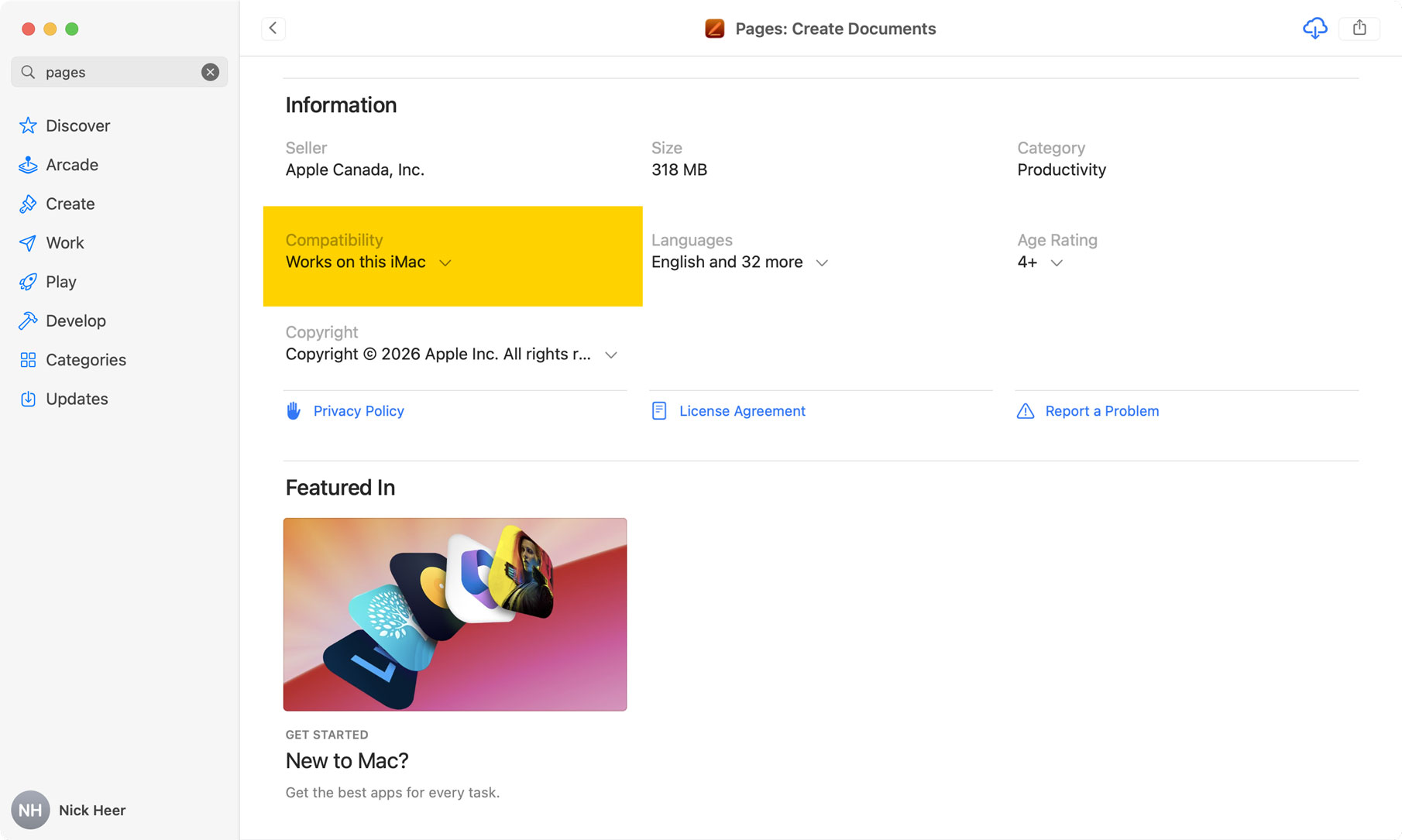
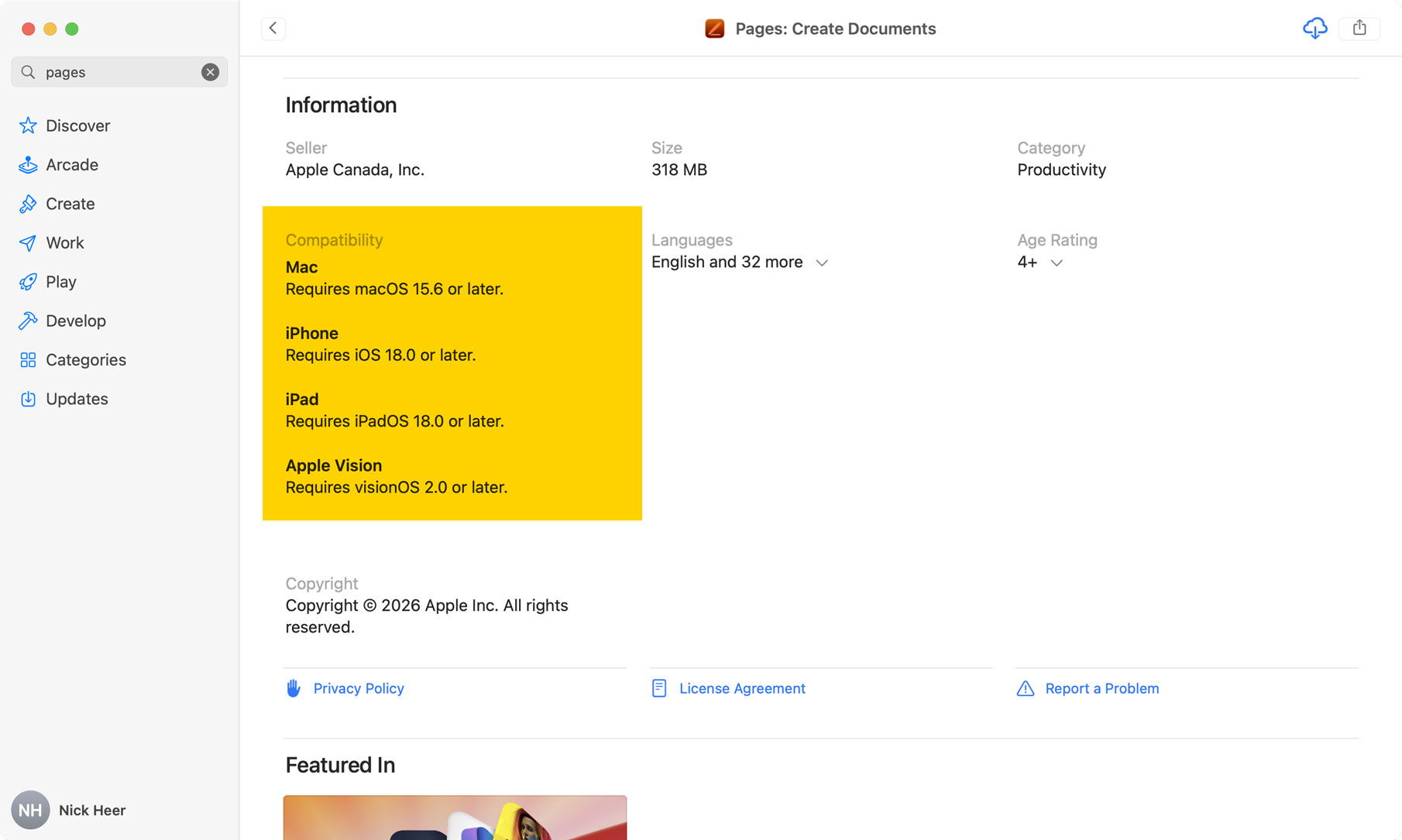
When I search “Pages” on my iMac running the latest supported version of MacOS, which is not the most recent, the results page only shows the newest iWork apps. The individual app page has a banner at the top reading “Requires macOS 15.6 or later”, but I do not know what this means. Is my iMac compatible? I cannot remember which MacOS version it is running. If I scroll to the app details, it sure looks like it is compatible. Apple says it “Works on this iMac“ and, if I click on that, it repeats the information about requiring MacOS 15.6. Yet, if I click the download button, it gives me an error and says I need to update because it is running Ventura, which is MacOS 13. But will I remember that? No, I will not.
To find the version of Pages that actually does work on my iMac, I have to dig around in my purchases — which cannot be searched — and find “Pages 14.5”. It seems like Apple is doing something funny on the back-end because I also have the new Pages with the cloud download icon beside it, which I apparently bought in June 2017.
Update (2026-04-16): John Gruber:
On the Mac, the old (classic?) version of Keynote has the bundle identifier
com.apple.iWork.Keynote. On iOS, it was always justcom.apple.Keynote, without theiWorkpart. To make the single-subscription bundle work across both platforms, Apple seemingly needed to unify the bundle IDs, and they unified them using the iOS versions, sans theiWorkpart.
Goodbye Keynote, Numbers, and Pages, and long live Keynote: Design Presentations, Numbers: Make Spreadsheets, and Pages: Create Documents
Update (2026-05-12): Dennis Sellers:
Apple has removed its old free productivity apps, leaving only the versions that are compatible with the new Creator Studio subscription, notes Macworld.
[…]
If you have previously downloaded Pages, Numbers, or Keynote on your Mac you will be able to find them in your Mac apps history (click your profile picture in the lower left) if you want to download them again, but you can expect they won’t be updated any longer.”
26 Comments RSS · Twitter · Mastodon
The sad thing about the way they've rolled out the Apple Creator Studio is that is pretty much confirms that Apple will never allow developers the ability to consolidate two separate App Store listings with separate bundle ids (e.g. a Mac Store entry and an iOS App Store entry of the same app) into a single app entry.
I've been dealing with this problem on my app for a long time, having released a Mac App Store version and then releasing an iOS App Store version as different App Store entries; before Apple allowed cross-platform apps to use a single listing.
Now the app is stuck in this situation whereby the only solution is to force migration to a new app – potentially losing the existing paid customers in the process, or keeping them seperate forever.
Keeping them separate has many flow-on issues too; e.g. it impacts Family Sharing, as noted in the section "Why are two subscriptions required to support both platforms?" on https://www.magiclasso.co/insights/family-sharing/
I've submitted feedback on this years ago to Apple with no response.
Maybe the negative feedback to how Apple Creator Studio handled the problem will be some encouragement for Apple to have a second look at resolving this?
Yup. “Technical debt” is one way to look at it.
As I learned from one project: Lots of US health insurers and old businesses have this problem — many still do nightly batch runs on emulated mainframes running COBOL to get things like contractual pricing and costs. If you’ve ever tried to look up the final price of a procedure, this is why it’s not available. Providers literally don’t know the costs and can’t find them in a useful time frame (making it hard for both doctors and patients to make decisions, likely leading to higher costs overall because the feedback loop is broken).
Migrating everything from the old legacy to new would involve either too much work or such huge refactoring that it will likely mess things up. Cost and risk = keep using old systems and build on top of them.
Apple’s system probably started in the iTunes Music store days, and while some significant new additions over the years since then: apps, subscriptions, payment tiers, Mac App Store, Family sharing, etc.… I’d say we should expect things on this front to continue to change very slowly. And yeah, even Apple suffers from the limits.
The ads are very bad - not just in the startup document/template picker, but also in e.g. the slide format panel (brush icon) of keynote.
Started with AppleWorks, went to Lotus 123, then Excel, Open Office, and finally Numbers. Rarely use Pages except when someone sends me a .doc file. And, while evolving in content, I only use a spreadsheet for a personal budget since 1985. As I see it, my choices are:
-- Continue with Numbers 14.5 until Apple says I can't, ignoring the occasional popup they introduced to nag me to upgrade.
-- Upgrade to 15.1, ignoring the in-app ads like I tend to do while watching television (it very similar when you are only working with a very mature spreadsheet) along with the other UI changes.
-- Pay Apple US$120 annually (yet another tax!) to hopefully get rid of most annoyances.
-- Be diligent about saving a CSV version of everything and hope plan to migrate to LibreOffice.
For now I think option #1 is for me, but I'll start getting ready to go to option #4. Thanks Apple!
Yesterday in the new Numbers, I dragged the selection around a few filled-in cells, all containing zeros, and then some empty cells to auto fill them. It worked as normal until one occasion, doing the same thing, when the newly-filled cells had a yellow background and a pop-up said something about how I could use [some jargon feature] to do this if I upgraded to Creator Studio.
I declined, and those cells were emptied of their zeros. I did it again and they were simply filled in as normal.
I'm becoming sadly accustomed to Apple's upselling of products and services but this felt like a new intrusive low.
@FreediverX... why use the word hate? That's nonsense. Hate is for someone who directly hurts you. Apple, Microsoft, etc., are clearly not "someone", and they didn't harm you in any way.
My earlier comment is the way to go... it's called "moving on" as needed. Life is too short to concern yourself with hating inanimate corporations! Now if you are any kind of... classic?... programmer or app developer and your current source of employment is threatened by AI? (I duck at those throwing rocks in my direction.)
I'm a lot closer to indifference. Growing up I was anti-Apple and pro-Microsoft. Then I flipped for a few years... at this point I mostly want Linux to get better so I can kick both of them to the curb.
I'm personally really close to being able to do that, but have a few hard blockers left.
These giant corporations are hiring people though. Wasting or time, downgrading our software and squeezing is for money. Removing apps that protect vulnerable groups, and protecting apps that generate noon consensual images of others.
It's a very good idea to get upset and to let people know.
Even better to build an exit and let others know about it.
But again, real harm is being done.
Libre Office has successfully replaced both MS Office and Apple’s office suite for me.
Happe camper.
Following on from my comment above about Numbers… I'm back using it again and I'm very confused: often when I want to fill the rest of a column based on some selected cells, the yellow grab handle at the bottom of the selection is large with a black + in it, and a pop-up about Magic Fill (I think that's the phrase). If I drag, the cells get filled (incorrectly) and I'm asked if I want to Reject or Accept the result. If I Accept then I have to subscribe to Creator Studio, or else the filled cells are erased again. If I Reject, they're erased.
But sometimes the yellow grab handle is small and yellow, with no +, no pop-up, and it just works as expected.
I can't figure out why or when either version occurs. For a while I couldn't get anything but the first, and now I can't get anything but the second. How on Earth is this helpful?
As a recovering accountant, I find that anything other than Excel feels very very substandard. Been trying to adapt to Google Sheets and need to try LibreOffice again, but numbers is kind of crazy while being really polished.
My limiting factor for Linux at this point is 3D modeling/CAD.
@gildarts that is a very familiar feeling. I would love for Libre to be a viable alternative but it's Calc suite is juist too far off.
Numbers has not ever been it for me, and the current state of things make me not want to lock in my data on a proprietary file format.
@Phil that's exactly the thing. It's not helpful and it's not supposed to be. It's supposed to be purposely annoying to get you to pay them to stop purposely annoying you.
@Dave and this is why people use words like hate Apple. I understand that seems to visceral a reaction to what seems like an abstract concept, but it's closer than it seems.
There are real people at these corporations consciously deciding to make their customers' lives worse in order to make their KPI just a little bit better.
It's a show of systemic contempt and it's extremely frustrating, as there is no recourse. Everyone says just use Linux but see the emulated mainframes comment above as just one of thousands of examples.
The computer industry is in a complete shambles and it's remarkable any of this works at all. The correct market reaction to all this would be to donate $120 a year to Libre Office instead. But even that doesn't actually get the job done that these applications are supposed to be performing.
I think that's really the key frustrating thing. It's become clear that the purpose of these applications is NOT to help you get something done. It's simply to turn you into another source of recurring revenue. They used to try to find some balance between those two, but it has shifted so far in the direction of manipulation and hostility that hate is a hard reaction not to feel.
I dunno. Possibly unpopular opinion here, but even though I hate subscriptions and the fact that Apple are grubbing for everything they can, shouldn't people be paying for iWork to incentivise its ongoing development if they like the apps? I've always found the apps pretty trashy, myself, and I think Apple's claims that they don't ship bloatware disingenuous so long as they've shipped iWork and iLife with Macs. And I don't see why Macs, in particular, should come bundled with "value add" or "lifestyle" apps, or that this somehow makes Macs viable in a way that other platforms supposedly are without similar software added, because Apple sells "nice" computers that are otherwise bereft or something.
It just doesn't make any sense. Perhaps someone here would like to enlighten? Or apologise? Take your pick …
@Sebby, These apps need to be seen in the context of their times, in particular what was happening in the computing industry and with consumers at the time. iLife was a big differentiator, and iWork was a big barrier-remover:
iLife was a big deal when it came out — during the iPod era — basically building in support for a lot of things that people wanted to do with computers: Manage photos, play music / put that music on your iPod, burn CDs, make videos.
iWeb was amazing. A WYSWYG web site builder unlike anything else at the time. I still miss it.
Doing these things prior to iLife either cost money or was janky, especially so on Windows machines. iLife, in comparison, was fairly integrated, free, and highlighted a lot of benefits that only Apple could provide in such a polished, easy-to-use fashion. Not only did these things make users happy, it had word-of-mouth both person to person but more importantly in the press, being that was how people used to get their information and make decisions.
iWork was a big deal when it came out — during the Microsoft vs Apple ‘wars’ — because being ‘free’ (though you had to buy a Mac go get it) it broke Microsoft’s grip on the productivity market (even though MS had an agreement (arranged by Jobs — worth researching more about that if you’d like to see existential high-stakes negotiations for Apple) to continue to make Office for Mac, as you all know, Apple doesn’t like relying on external companies). This was a significant savings and removed a significant mental and real barrier for home productivity on mac. One of the major features was the ability to import and export Microsoft Office file formats.
This was also before Google’s free Sheets, Docs, Drive got a foothold. Keynote was revolutionary in ease of use and polish. Still is. Pages was also really, really nice. I loved it when it still have palettes. Numbers I don’t use unless I have to (being an Excel and now Google sheets user) but again: free.
All these apps fully supported multimedia in ways that other apps didn’t and still don’t. Especially Keynote, iWeb, and Pages.
I don’t consider them ‘bloatware’. They were all included, but of course, and you can delete them, but you get a lifetime license to them as they came with your Mac (and later, iPhone/iPad).
Bloatware, I think of as crappy or unnecessary subscription-requiring items or more specifically: paid marketing from third parties, which Windows computer vendors and Android smartphone sellers were and still are notorious for. Demos, also.
(Notably on the bloatware tip, Apple didn’t allow demos in their App Store — they generally require(d?) that free apps provide at least something useful to users even if you never pay for the upgrade/unlock the app (‘reader’ apps not withstanding))
Most of the iLife stuff is not around anymore because the world has moved on, but I continue to use Pages regularly for quite advanced page layout things and self-publishing. Keynote is also quite nice for prototyping and has some Hypercard bones in there if you look. That these are available to all Apple users means a significant baseline for being able to collaborate and share documents without paying for anything extra.
Creator Studio… it is like iLife or iWork?
I don’t really have a strong opinion on it as I’m not the target audience with respect to the iWork parts… targeting people who need… templates? The iWork stuff right now feels like an add-on rather than the focus of the package right now. I also don’t particularly like the upselling going on in my apps but more importantly, there’s nothing there that I want yet.
But perhaps if AI gets better and Pages, etc. can be part of MCP-type stuff… being available on every Apple device could become an advantage here. AI-in-the-cloud costs money (also way higher emissions, and global warming), so I can understand why they’d at least want to pass those charges on vs putting those things into the free tier. I’d hope or prefer that anything AI that’s run locally is ‘free’ (though again, energy, etc.) and I think Apple would probably prefer that, too.
@Someone else:
I'm a stickler for hard facts. Your quote....
> iWork was a big deal when it came out — during the Microsoft vs Apple ‘wars’ — because being ‘free’ (though you had to buy a Mac go get it)
No. iWork came out in 2004, Numbers was added in 2007. But... the iWork suite was originally sold for US$79, and only bundled for free with a Mac purchase in October 2013.
While it depends on how you define this MSFT v AAPL war, it may have ended before iWork (or may not), but I can assure you that a free version (Mac or iPad) was first released CLEARLY after the war was ended.
That said, I like your comment. Particularly the hitorical context of iLife (I forgot about that) and your personal use of iWork components (or not). That last bit about local AI, not sure I agree. But it may get down to an either/or - do they sell it as a standalone app (like Numbers) or not (think part of the OS)?
"There are real people at these corporations consciously deciding to make their customers' lives worse in order to make their KPI just a little bit better."
The problem is the people who think setting KPIs is a good thing in the first place, not the people who do the thing you should 100% expect to happen, and game the numbers.
@Dave, yeah, I don’t recall buying iWork… maybe I pirated it :) but I definitely used the old/original version with the floating inspector palette (which didn’t exist on the iPad, so surely contributed to the change to a side panel for inspectors, along with probably other things to make it more cloud-friendly). It was a really nice re-envisioning of productivity software and was in a similar vein to the old Claris apps, which also all worked similarly, UI-wise across the suite of apps. Very Mac, and not Microsofty.
Looking at the other thread, I think people don’t realize that these apps are still going to be free and are very full-featured and mature now, and that only some optional things will be subscription. There are some things missing like a better mail merge (can’t do a sheet of labels), but it’s an amazing deal for free apps.
The Microsoft commitment to continue making office for Mac was around 1998. Commitment was for 5 years.
Without MS Office support, Apple was locked out of the business market, and shunned in the home, so about 5 years sounds right for Apple to gather resources and try to not only have a fallback should MS cancel office mac, but also quite nice for folks who just wanted to run a small business or write a paper.
Apple is fortunate the Microsoft found the Mac to be profitable and stuck around because even now, MS Office is still going strong as a standard business and school format, even as Google has taken up a lot of space.
Re: AI and subscriptions: I was reading elsewhere that the monthly AI token allotment (or whatever it’s called… I haven’t looked into its details) for Creative Suite is too easy to use up. I think that’s not only expensive but also kinda unsustainable because people are cheap and don’t want to think about paying money or discovering they need to pay more to finish a project.
I think AI is best when it can be done on the local machine because it can be done (relatively) cheaply and usually without usage limits (except your energy bill and the higher base hardware requirements). We might not be there yet but maybe someday, and hopefully, if those features prove to be reliable, Apple can do some of that in the free apps.
Apple does some amazing on-device “AI” stuff already - text to speech, OCR — but for LLM junk, Apple talks about having a foundation model on-device, but it’s teeny-tiny and I’ve yet to hear much about developers using it. (I personally would prefer a better deterministic Siri upgrade with a tiny bit of memory for context awareness. Also, I bet that recent Canadian graph database purchase is related to Apple’s AI efforts. I hope to see Apple do it better by doing it differently, but that’s just hope and annoyance at the current LLM stuff)
Re: 1997 Jobs getting Microsoft to invest in Apple and keep Office on Mac for 5 years: https://www.wired.com/2009/08/dayintech-0806/
@Someone else I never was a big iWork user, but I much preferred the initial interfaces with the palettes. Since the rewrite for iOS, it just doesn’t feel as good. The speed of Numbers remains horrendous.
@Someone Else Yeah, fair enough; I guess when you're the "underdog" you get special dispensation. I can accept that. Perhaps the apps just weren't for me, but it's still sad that people will be expected to subscribe to core functionality in much the same way they do on Windows via the not-quite-but-might-as-well-be-mandatory Office 365 subscription.
But at least macOS comes with a rich text editor, in TextEdit, that'll open Microsoft Word documents. So there's that.
@Sebby, Just to be clear: Pages, Numbers, and Keynote are still free and as I understand it, will continue to be free.
I don’t think folks will be missing much if they don’t subscribe to Creative Suite. Sounds like all the core functionality (i.e. everything that was there last month) will continue to be available… no existing functions newly paywalled.
So MacOS will continue to have two free amazing text editors (three, actually — Apple Notes is pretty nice, and also free, though heavy cloud users will need to pay for more cloud storage)
@Plume fair distinction. I suppose I also mean that to include those at the top who set the KPIs, and whose own “KPI” is simply stock price and “engagement.”
Pages has become genuinely unpleasant to use. Is there an alternative similar to 2011-era Pages or ClarisWorks 5-style word editor, just a simple tool for writing letters? All I really need are basic text formatting, rulers to set tabs, and the ability to freely position images and have text flow around them.
If TextEdit were better at handling images, I'd use it.
There used to Mariner and Nisus, but both are dead (and I never liked the newer Nisus versions).
It's kinda wild how Apple just sherlocked the word editor market and then peaced out of providing a pleasant, usable product.