Liquid Glass Disbelief
If someone had told me 12 months ago what was going to happen this past year, I wouldn’t have believed them. Skipping swiftly past all the political, economic and social turmoil, I come to the interface changes brought in macOS Tahoe with Liquid Glass. After three months of strong feedback during beta-testing, I was disappointed when Tahoe was released on 15 September to see how little had been addressed. When 26.1 followed on 3 November it had only regressed, and 26.2 has done nothing. Here I summarise my opinions on where Tahoe’s overhaul has gone wrong.
[…]
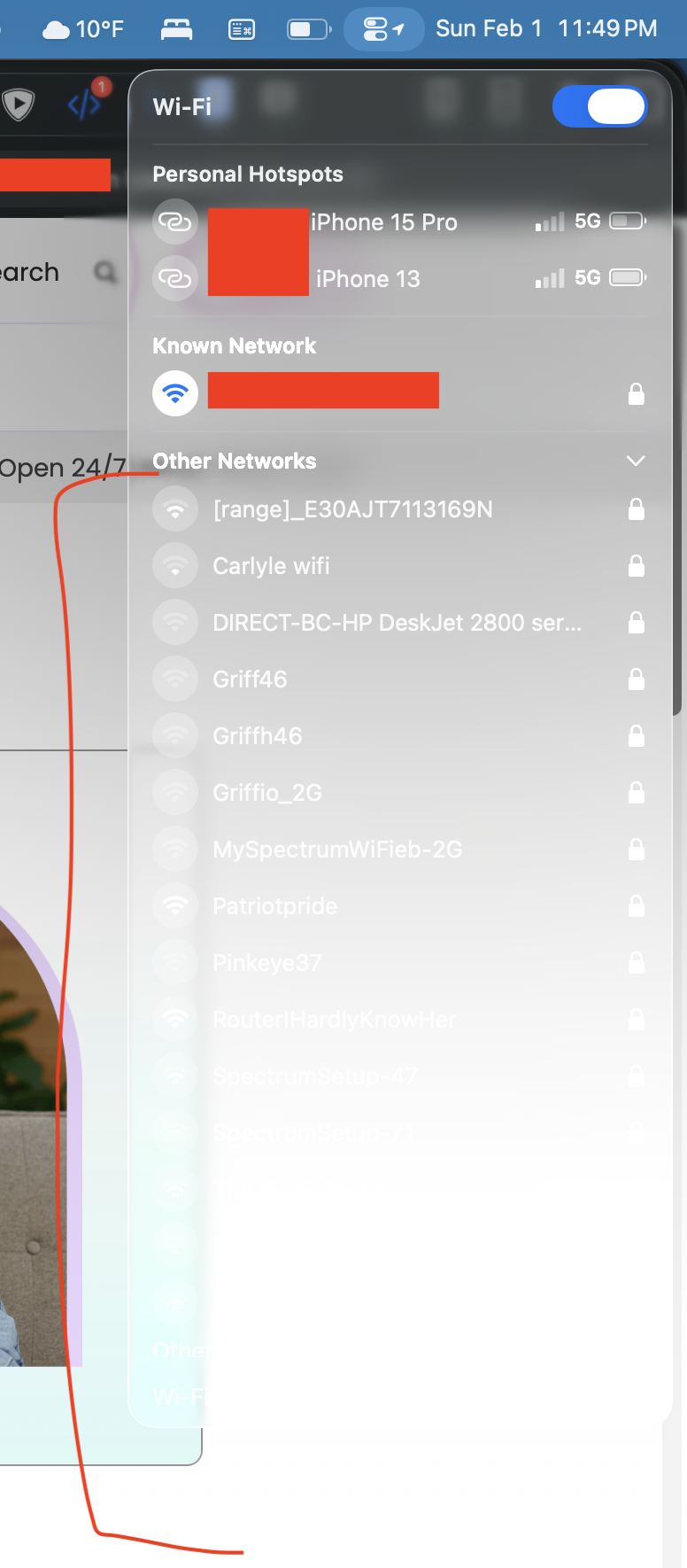
In real life, whiteouts are dangerous because they’re so disorienting. There’s no horizon, no features in the landscape, and no clues to navigation. We see and work best in visual environments that are rich in colour and tonal contrasts. Tahoe has continued a trend for Light Mode to be bleached-out white, and Dark Mode to be a moonless night. Seeing where controls, views and contents start and end is difficult, and leaves them suspended in the whiteout.
[…]
I’m sure that, in the right place and time, transparency effects of Liquid Glass can be visually pleasing. Not only is this the wrong time and place, but those with visual impairment can no longer remove or even reduce these effects, as the Reduce Transparency control in Accessibility settings no longer reduces transparency in any useful way. That was one of the regressions in 26.1 that hasn’t been addressed in 26.2.
I don’t mind how Liquid Glass looks at all. It’s just insane how buggy the system has become. Even Messages will bug out, like deleting my first word if I type too fast after opening a conversation or auto scrolling and not letting me scroll down until I exit and re-enter.
Unacceptable for the premium you pay for Apple software. Unacceptable for any software one is paying for. I hope they get their shit together and start fixing before they continue adding new stuff. 26.2 doesn’t inspire me that they’re on that trajectory.
Previously:
- Belated Liquid Glass on iPhone First Impressions
- macOS 26.2
- Alan and Aaron
- Alan Dye Leaving Apple for Meta
- Liquid Glass Toggle in appleOS 26.1 Beta
- Shipping Liquid Glass
- Tahoe Window Corners
- Tahoe’s Terrible Icons
- Liquid Glass: Content vs. Controls
Update (2025-12-30): Craig Grannell:
Sad to see that last pic of an older macOS and see how far things have fallen. (And Howard didn’t even mention the absurd “hovering” buttons.)
Oakley reviews several lingering problems with Liquid Glass in MacOS, but the above remains the most — and I use this word intentionally — glaring issue I have with it. It is a problem that becomes entirely clear as you scroll to the bottom of Oakley’s post and find a screenshot from — I think — Mac OS X Mavericks with evident precision and contrast.
What pushed me over the edge in deciding to chase at least some of it was installing the first beta of macOS Tahoe. It was clear that non-updated apps would immediately stand out, from the radius of the window corners to the look of standard controls, and I wanted to make sure my apps looked well-maintained. I decided on a major (dot-zero) release number to give me a bit more license to update the UI than normal, and dug in.
[…]
This, unfortunately, turned into a surprising time sink. There was a lot of churn, with each macOS beta changing at least something about how glass effects looked or behaved. Different control types applied glass effects inconsistently (and still do, in the released versions). When presented over a white background, glass layers become hard to spot without additional tweaking. This resulted in many hours of experimenting and iterating, far more than the size of these controls would imply. I’m pleased with the final result, but expect to keep revising it over time.
One thing Apple pushed for, which I did not adopt, was to extend blurred document content up under the toolbar. I tried, over many hours, repeating with each new beta, but it never worked out.
Update (2026-01-08): John Gruber (Mastodon):
It’s just remarkable how much better-looking MacOS was 10 years ago, compared to MacOS 26 Tahoe at its best. And it’s equally remarkable just how bad MacOS 26 Tahoe looks in many typical, non-contrived situations, where entire menus or the title of a window are rendered completely illegible.
For me, the first and worst sin of macOS Tahoe is that window backgrounds are 100% white in Light Aqua. Dark Aqua is 8.9% white, which is OK. Black still shows up against it.
Sequoia was and 90.6% and 14.7%, so you could draw white on a window background and see it.
As the Norwegians say, Liquid Glass is “not so bad” on iPhones and iPads, but on the Apple Watch and the Mac, it’s an abomination.
I understand sentiment of this article, but must note that the specifics of much of what’s mentioned here are the choice of third-party devs. You can’t just flip a switch and turn on Liquid Glass, especially in a traditional Mac app. Tying into what I said earlier this year: traditional Mac apps are not native to this design language — you need to redesign the apps too. That’s why adopting Liquid Glass is such an ordeal, and why many (including Apple) haven’t shipped
I don’t think it works well in the apps have have been redesigned, either.
This could be a case study on how design at Apple has gotten worse. Take iTunes/Music for Mac:
- From Catalina on, full-height sidebars started eating into valuable toolbar real estate.
- In Tahoe, not only to stupid big corner radii eats more into you usable area, they now allow the inspector sidebars to cut even more into toolbar space.
- The volume & scrub controls are now an extra click away.
Update (2026-01-15): Steve Troughton-Smith:
The parts of Liquid Glass that really suck on macOS are the parts that weren’t designed, left up to the various internal teams to figure out what to do on their own. That includes basically anything that AppKit does that Apple’s other platforms don’t. It’s not that the design language sucks (subjective), but there was clearly no guidance, thought or care given to a whole bunch of Mac-specific behaviors. As close as the platforms have got, macOS is still a special snowflake and suffers for it.
Also a big part of this, on all platforms, is the accessibility modes are all afterthoughts wrt design language, and are visually and mechanically broken on all platforms. Reduced transparency, reduced motion, et al — if you’re using these modes, the OS looks and feels so much worse. It amplifies the negative reaction to all the new stuff, because of course people predisposed to a more stripped-down experience, who might have turned that all on years ago, are being handed something way sub-par.
Update (2026-02-02): Norbert Heger:
Attention to detail…
Update (2026-02-03): Matt Gemmell:
I think the thing I hate most about the Liquid Glass redesign is those damned inset sidebars, leaving a weird strip of the window background visible down the left side (and above and below). It just looks broken. And the window chrome is within it!
Liquid Glass on the Mac is so bad because it’s like they didn’t test it at all (versus the iPhone that got iterated and is much better).
Update (2026-02-19): Mario Guzmán:
Look how bad the #LiquidGlass buttons look on the bottom-right for Installers. They’re hardly visible and what is most noticeable is their smudgy-looking shadow.
It’s sadly been a long time since there was a see-it-at-a-glance difference between the main window and other windows, but now I have all these Safari windows in every different color and it’s so jarring and frustrating and demoralizing to me. (I switched back to the default settings for this screenshot but there’s the same issue in tinted mode with Reduce Transparency turned on.)
I will never understand how the most important, and main set of [Music.app] controls was reduced to a very tiny area that isn’t very prominent and easily gets lost in muddied Liquid Glass.
This is a prime example of how to NOT design with users in mind.
At a glance, it’s hard to even find it in the second screenshot. In the first, it’s difficult to read its contents.
Not to mention the volume, scrubber, and time labels now take two steps to interact with them.
Apple Music keeps opening in its smallest window size possible, in the middle of my main display. It doesn’t persist its last window position or size. Also the damn Lyrics sidebar also always comes up open. This all started in Tahoe during the beta season over the summer.
Update (2026-03-19): Jeff Johnson:
This is the Finder sidebar on Tahoe with the Ventura volume selected.
I can barely see the selection highlight!
See also: Miserable-Guide8844.
20 Comments RSS · Twitter · Mastodon
Liquid Glass has not become less infuriating the more I use it. It seems like the kind of half-baked interface we would get from Linux or Windows. Nothing in the UI is better than iOS 18, and many, many things are substantially worse. I appreciate some of the new features, but not the design. Liquid Glass is a total failure. I can't even tell what's a UI bug and what's working as intended, because all of it just looks wrong.
Example: Today I turned on the "alarm" function in Reminders. At least I think I did because I guess that's what the "Urgent" toggle is for? I don't know why it asks me if I want to turn on Alarms for Reminders, but then it's not called "Alarm" in the UI? WTF. And with something else I was doing in a native app earlier today (can't remember which one), there was an on/off toggle, but instead of showing green when it's "on" it just showed the toggle completely filled with white when I toggled it to the "on" position. Again, who knows if this is a bug or the intended UI.
I hope Apple realizes what a disaster Liquid Glass is, and completely pivots away from it in iOS 27. Send it down the Apple memory hole and pretend like it never existed. Don't try to polish the turd.
It still worries me that Apple let this happen and apparently intended to continue encouraging it. And the only thing that might stop this mess is its designer having even less integrity than talent.
IF this gets turned around in the coming years it will only be out of sheer luck that the right person was able to get the job despite everything working against it.
> Not that I want to turn the clock back, but it would be really helpful if I could read clearly what’s on my display once again.
I do. Turn the clock back to 10.9. That's around when the macOS UI peaked, before the first major UI facelift that made everything worse. 10.10 wasn't nearly as bad as Big Sur or Tahoe, but it was a step in the wrong direction. And then it just got worse and worse.
It's hilarious that Meta hired Alan Dye at the point in time that his magnum opus is still being refined to a point of relative usability.
Two entities couldn't deserve one-another more.
I'm sure the timing of his departure was down to Dye realising he was a busted flush at Apple now that his fellow execs have to use the crap for which he was the main architect / designer.
The disregard for everyday usability let alone for people with special requirements is astounding.
I'm still not at all convinced that Alan Dye leaving Apple will lead to their UI being fixed, much less all of the bugs.
Jobs and the Old Guard would never let Liquid Ass happen to the Mac (or let macOS decay into Windows).
- No upper management stopped LA (clueless).
- Leadership let Bad Dye Job spit on Jobs's grave with his quote (hubris).
- None of the SWEs and designers who ought to know better could stop it (broken process).
- Excessive negative user beta feedback didn't stop it (arrogance).
- They're still promoting it (denial).
Apple's culture around software and the Mac experience is rotten. I don't think anyone who *gets* the Mac has much power. They seem to be crowded-out by an overwhelming number of retarded careerists and Leetcode hires.
I agree with @Bart; it's dumb luck if anything gets fixed.
"Liquid Glass has not become less infuriating the more I use it. It seems like the kind of half-baked interface we would get from Linux or Windows."
After 30 years using Apple hardware and services I have mostly transitioned to GNU/Linux. My M1 Mac Mini is powered off most of the time and I installed the Mint distribution with the Cinnamon desktop on my old 2012 Mac Mini that the M1 was meant to replace. That's been my daily driver along with a 2018 Lenovo Thinkpad purchased off EBay for $200.
Boot times on those computers, 13 years old and 7 years old respectively, are equal to or less than the M1 Mini that is still running Ventura. App launch times are usually less than they are with comparable apps on the M1 Mini. Bonus, the interface is not half baked. In fact, the default theme included with the Cinnamon desktop is much closer to older versions of macOS. Not only is it visually pleasing, it is actually functional with proper contrast, clearly marked UI elements and none of the confusion that plagues macOS these days. I don't have to work at understanding the interface, it's clear to me what's what.
I used Platinum with System 8 and 9. I used Aqua in the early 2000s and every version since. Mac users that snark about Linux seem a bit clueless. I know I was biased and assumed the worst when I first installed Mint back in February. I'd assumed it would be a less-than-Mac experience. It's an understatement to say I was pleasantly surprised. Not only is the default theme more usable and pleasant than the current mess that is macOS, I can actually customize it with any number of themes if I want a change.
I won't be buying another Mac. My M2 iPad Pro which still gets daily use will be my last iPad. Why pay extra for locked down hardware that comes with an increasingly enshitified interface I have to accept as it is delivered? No thanks.
With 10k employees wasted on Apple Car. With most revenues coming from iOS powered hardware and derivatives. With Silicon shining and Machine Learning failing at the Microsoft game. All of it powered by software mostly developed on macOS. Did they truly needed to waste resources, and wipe out public trust, on something that was not broken in the first place? The burning question.
@Denny agreed, I too have switched to Linux for most of my work-tasks and Gnome on Debian is a pleasure (not perfect, but still a relief from both W11 and OSX)
Now if only there was a truly viable MS Excel alternative, contrary to forums, none of the 'alternatives' could even stand in its shadow.
Tahoe is one of the worst bug-ridden releases from Apple in modern time. Then Liquid Glass to top it all. Usability? It's to the point I focus more on the UI and trying to see what's happening on the screen than getting work done. Sidebars for everyone! Ugly icons! Readabilty? Nah, screw that!
Now, i have used Macs since 1988. Gone from Classic Mac OS to Mac OS X Server 1.0 to Aqua Mac OS X and so on. Sure, there was a period with Aqua in the start that was quite rough.
Now, it feels they no longer give a darn. QA at Apple is now that one guy they keep in the cellar (they feed him with pizza, old bread and energy drinks and he has a fantasy friend named Fluffy).
It's not just me. Because I used to work in the business (Mac support etc) for a long time, everyone calls me or mail me for help with bugs etc. This is nothing new, but the amount of help request with Tahoe is like an avalanche.
I'll be trying out Omarchy soon (Arch + Hyprland + Apps distro) on a Framework Desktop or SFF. Super minimalistic, looks great. Under full control by the user. No ugly Liquid Ass Apple slop from Anal Dye. Other than that sticking to Sequoia and OS 18 on all Macs/phones/ipads.
Another idiotic thing: On modal iOS dialogs like "Allow paste?" why is the default blue-highlighted option "Don't Allow Paste" when 99.999% of the time, I want to "Allow Paste"??? This would be like if the default option in Mac OS was "Cancel" for everything.
Who are the morons steering this ship?
A related complaint, not specific to Apple OSes, why is the default when entering a password or a social security number to obscure it with dots, when again, 99.999% of the time that I enter this data, my screen is not visible to anyone else? Totally idiotic. Makes it difficult to verify that I entered the correct data, with zero benefit to obscuring it.
@Ben G, because the default protects pasteboard privacy, and keeps crypto wallet password stealers from gobbling up what’s on your pasteboard.
Similar with passwords. Helps prevent screen captures, if not keyloggers. If you type it wrong, the worst that can happen is you get an error.
If someone has hacked my computer such that they can capture a screenshot and transmit it to bad actors, I've got bigger problems than them being able to read a plaintext password in a browser form.
I've been testing Linux distros in hopes that I could move to a more reliable system and both I tried had interfaces that were both confusing *and* feature-poor to the point of absurdity.
I'll give Cinnamon a shot, but I'm disappointed to see it mostly seems to be aping Windows' bad UI decisions instead of using the things that actually work better. For example, a big deal for me is the menu bar at the top of the screen
Oops, I messed up my last comment.
I meant to say:
@Denny: I've been testing Linux distros in hopes that I could move to a more reliable system and both I tried had interfaces that were both confusing *and* feature-poor to the point of absurdity.
I'll give Cinnamon a shot, but I'm disappointed to see it mostly seems to be aping Windows' bad UI decisions instead of using the things that actually work better. For example, a big deal for me is the menu bar at the top of the screen
I am curious what Linux desktop environments macOS refugees have found to their liking. I can deal with both a mac and Windows UI paradigm. I think what I care about the most is it being visually clear, efficient without being obtuse, and at least some attempt at consistency.
Oh, and Windows had better have a larger than 1 pixel wide hit box for resizing! I've used a number of linux distros over the years where they dump you into an environment where that 1 pixel click area is the default. That's an instant failing grade from me. If they're so daft they can't get that one obvious thing right, then there's no doubt they will foolishly get a thousand other things similarly wrong.
"Windows had better have a larger than 1 pixel wide hit box for resizing"
It's about 10 pixels on both KDE and COSMIC. Just burn some modern distros onto a USB stick and boot from it to see if there is one you like; it takes no time at all.
@Bri
I'm using Mint with Cinnamon and Fedora 43 with GNOME whatever-its-version there. Both work, that's about it. Fedora was installed at version 41, weathered two system upgrades.
Granted, I'm not dependent on any Mac- or Win-specific software. If you absolutely *need* things like Excel, you're prolly out of options.
Since the `com.apple.SwiftUI.DisableSolarium` user default stopped working in macOS 26.2, I searched and found a way to programmatically disable Liquid Glass in my app using private APIs (must be called during app initialization):
https://github.com/F1248/Genius/blob/ee1ab16f/Genius/Extensions/AppKit/NSAppearance.swift
So far, this works almost perfectly, with no visual glitches.
Unlike the [`UIDesignRequiresCompatibility` Info.plist key](https://developer.apple.com/documentation/bundleresources/information-property-list/uidesignrequirescompatibility), which will likely be removed with Xcode 27, this method enables my app to adapt its interface based on a user setting.